
The idea
One activity, two screens, a back stack
Goal Tap a card to open its page, come back, and share the note.
A NavHost shows one screen at a time, chosen by a short text, its route. Opening a page pushes its route on a back stack; Back pops it. Both screens need the notes, so the list moves up into NotesApp: state goes down, events go up.
package com.yourname.notes
import android.os.Bundleimport android.util.Logimport androidx.activity.ComponentActivityimport androidx.activity.compose.setContentimport androidx.activity.enableEdgeToEdgeimport androidx.compose.animation.fadeInimport androidx.compose.animation.fadeOutimport androidx.compose.animation.scaleOutimport androidx.compose.animation.slideInHorizontallyimport androidx.compose.animation.slideOutHorizontallyimport androidx.compose.foundation.layout.WindowInsetsimport androidx.compose.foundation.layout.fillMaxSizeimport androidx.compose.foundation.layout.paddingimport androidx.compose.foundation.layout.safeDrawingimport androidx.compose.material3.Scaffoldimport androidx.compose.runtime.Composableimport androidx.compose.runtime.LaunchedEffectimport androidx.compose.runtime.getValueimport androidx.compose.runtime.mutableIntStateOfimport androidx.compose.runtime.rememberimport androidx.compose.runtime.setValueimport androidx.compose.runtime.toMutableStateListimport androidx.compose.ui.Modifierimport androidx.core.view.WindowCompatimport androidx.lifecycle.compose.dropUnlessResumedimport androidx.navigation.compose.NavHostimport androidx.navigation.compose.composableimport androidx.navigation.compose.rememberNavControllerimport com.yourname.notes.ui.theme.NotesTheme
class MainActivity : ComponentActivity() { override fun onCreate(savedInstanceState: Bundle?) { super.onCreate(savedInstanceState) Log.d("Lifecycle", "Main onCreate") enableEdgeToEdge() // Dark icons on the paper, even when the phone is in dark mode (Lab 1's windowLightStatusBar) val bars = WindowCompat.getInsetsController(window, window.decorView) bars.isAppearanceLightStatusBars = true bars.isAppearanceLightNavigationBars = true setContent { NotesTheme { Scaffold( modifier = Modifier.fillMaxSize(), // keep the screen out of the status bar, the gesture bar and the keyboard contentWindowInsets = WindowInsets.safeDrawing ) { innerPadding -> NotesApp(modifier = Modifier.padding(innerPadding)) } } } }}
// The whole app: the notes and the colour counter (shared by both screens), and the two screens@Composablefun NotesApp(modifier: Modifier = Modifier) { val notes = remember { SeedNotes.toMutableStateList() } var added by remember { mutableIntStateOf(3) } // the seeds used colours 0, 1, 2 val navController = rememberNavController()
NavHost( navController = navController, startDestination = "notes", modifier = modifier, // The page comes in from the right and Back takes it away, like Lab 1's second activity enterTransition = { slideInHorizontally { it / 10 } + fadeIn() }, exitTransition = { slideOutHorizontally { -it / 10 } + fadeOut() }, popEnterTransition = { slideInHorizontally { -it / 10 } + fadeIn() }, popExitTransition = { slideOutHorizontally { it / 10 } + fadeOut() }, // The back swipe from the edge: the page shrinks away over the list, like Lab 1 predictivePopEnterTransition = { slideInHorizontally { -it / 10 } }, predictivePopExitTransition = { scaleOut(targetScale = 0.9f) } ) { composable("notes") { NotesScreen( notes = notes, onAdd = { title, body -> notes.add(0, Note(title, body, added % 4)) added++ }, onDelete = { note -> notes.remove(note) }, onOpen = { index -> navController.navigate("note/$index") } ) } composable("note/{index}") { entry -> val index = entry.arguments?.getString("index")?.toInt() ?: 0 val note = notes.getOrNull(index) if (note != null) { // dropUnlessResumed: a second quick tap, while the page is already leaving, does nothing NotePage(note = note, onBack = dropUnlessResumed { navController.popBackStack() }) } else { // After a rotation the list starts again from the seeds: no note here any more, so go back LaunchedEffect(Unit) { navController.popBackStack() } } } }}- The notes live here now, above both screens. Each screen receives them.
- The controller remembers which route is shown, and the back stack under it.
- The NavHost starts on the route
"notes": the list. - The list’s screen. Its events come up as parameters:
onAdd,onDelete,onOpen. - A tap on the second card (index 1) pushes
"note/1"(you type it in step 7.4). {index}is a hole the route fills; line 88 reads it (?.and?:, Kotlin sheet, card 4), and the page takes that note from the same list.
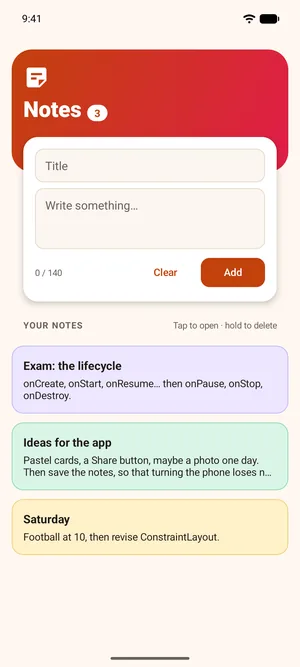 tap:
note/1
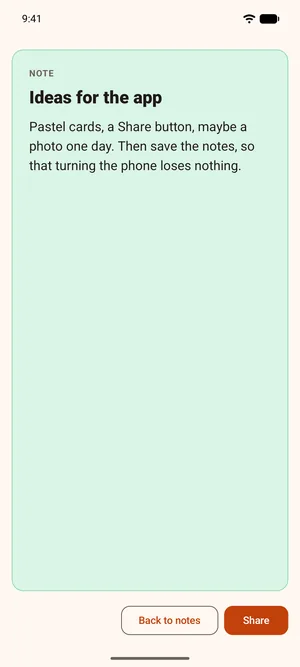
The back stack, after the tap
note/1on top: on screen. Back removes it.notesbelow: waits, then shows again.
Lab 1 Lab 1’s way: a second activity
Lab 1 declared a second activity in the manifest and sent it the note in an Intent, as three extras. Here: no new activity, nothing in the manifest, and the route carries only the position.
Lab 1 · MainActivity.java: an Intent and 3 extras
package com.yourname.notes;
import android.content.Intent;import android.os.Bundle;import android.text.Editable;import android.text.TextWatcher;import android.util.Log;import android.view.LayoutInflater;import android.view.View;import android.widget.Button;import android.widget.EditText;import android.widget.LinearLayout;import android.widget.TextView;import android.widget.Toast;
import androidx.appcompat.app.AppCompatActivity;
public class MainActivity extends AppCompatActivity {
private static final String TAG = "Lifecycle"; private static final int[] NOTE_BACKGROUNDS = { R.drawable.bg_note_butter, R.drawable.bg_note_mint, R.drawable.bg_note_lavender, R.drawable.bg_note_peach };
private TextView textCount; private TextView textEmpty; private LinearLayout notesContainer; private int notesAdded = 0;
private EditText editTitle; private EditText editBody; private TextView textError; private TextView textCounter;
private final TextWatcher formWatcher = new TextWatcher() { @Override public void beforeTextChanged(CharSequence s, int start, int count, int after) { }
@Override public void onTextChanged(CharSequence s, int start, int before, int count) { }
@Override public void afterTextChanged(Editable s) { updateForm(); } };
@Override protected void onCreate(Bundle savedInstanceState) { super.onCreate(savedInstanceState); setContentView(R.layout.activity_main); Log.d(TAG, "Main onCreate");
textCount = findViewById(R.id.textCount); textEmpty = findViewById(R.id.textEmpty); notesContainer = findViewById(R.id.notesContainer);
addNote(getString(R.string.seed_title_1), getString(R.string.seed_body_1)); addNote(getString(R.string.seed_title_2), getString(R.string.seed_body_2)); addNote(getString(R.string.seed_title_3), getString(R.string.seed_body_3)); updateCount();
editTitle = findViewById(R.id.editTitle); editBody = findViewById(R.id.editBody); textError = findViewById(R.id.textError); textCounter = findViewById(R.id.textCounter);
Button buttonAdd = findViewById(R.id.buttonAdd); buttonAdd.setOnClickListener(v -> addNoteFromComposer());
editTitle.addTextChangedListener(formWatcher); editBody.addTextChangedListener(formWatcher); }
private void updateCount() { int count = notesContainer.getChildCount(); textCount.setText(String.valueOf(count)); textEmpty.setVisibility(count == 0 ? View.VISIBLE : View.GONE); }
private void addNote(String title, String body) { View card = LayoutInflater.from(this).inflate(R.layout.item_note, notesContainer, false); TextView cardTitle = card.findViewById(R.id.textNoteTitle); TextView cardBody = card.findViewById(R.id.textNoteBody); cardTitle.setText(title); cardBody.setText(body); cardBody.setVisibility(body.isEmpty() ? View.GONE : View.VISIBLE); int background = NOTE_BACKGROUNDS[notesAdded % NOTE_BACKGROUNDS.length]; card.setBackgroundResource(background); notesAdded++;
card.setOnClickListener(v -> openNote(title, body, background)); card.setOnLongClickListener(v -> { notesContainer.removeView(card); updateCount(); Toast.makeText(this, R.string.note_deleted, Toast.LENGTH_SHORT).show(); return true; });
notesContainer.addView(card, 0); }
private void addNoteFromComposer() { String title = editTitle.getText().toString().trim(); String body = editBody.getText().toString().trim(); if (title.isEmpty()) { textError.setVisibility(View.VISIBLE); return; } textError.setVisibility(View.GONE); addNote(title, body); updateCount(); editTitle.setText(""); editBody.setText(""); Toast.makeText(this, R.string.note_added, Toast.LENGTH_SHORT).show(); }
private void updateForm() { int length = editBody.length(); textCounter.setText(getString(R.string.counter, length)); int colour = length >= 120 ? R.color.error : R.color.muted; textCounter.setTextColor(getColor(colour)); if (editTitle.length() > 0) { textError.setVisibility(View.GONE); } }
public void onClearClicked(View view) { editTitle.setText(""); editBody.setText(""); }
private void openNote(String title, String body, int background) { Intent intent = new Intent(this, NoteActivity.class); intent.putExtra(NoteActivity.EXTRA_TITLE, title); intent.putExtra(NoteActivity.EXTRA_BODY, body); intent.putExtra(NoteActivity.EXTRA_BACKGROUND, background); startActivity(intent); }
@Override protected void onStart() { super.onStart(); Log.d(TAG, "Main onStart"); }
@Override protected void onResume() { super.onResume(); Log.d(TAG, "Main onResume"); }
@Override protected void onPause() { super.onPause(); Log.d(TAG, "Main onPause"); }
@Override protected void onStop() { super.onStop(); Log.d(TAG, "Main onStop"); }
@Override protected void onRestart() { super.onRestart(); Log.d(TAG, "Main onRestart"); }
@Override protected void onDestroy() { super.onDestroy(); Log.d(TAG, "Main onDestroy"); }}Lab 1 · AndroidManifest.xml: one more activity
<?xml version="1.0" encoding="utf-8"?><manifest xmlns:android="http://schemas.android.com/apk/res/android" xmlns:tools="http://schemas.android.com/tools">
<application android:allowBackup="true" android:dataExtractionRules="@xml/data_extraction_rules" android:fullBackupContent="@xml/backup_rules" android:icon="@mipmap/ic_launcher" android:label="@string/app_name" android:roundIcon="@mipmap/ic_launcher_round" android:supportsRtl="true" android:theme="@style/Theme.Notes"> <activity android:name=".MainActivity" android:exported="true"> <intent-filter> <action android:name="android.intent.action.MAIN" /> <category android:name="android.intent.category.LAUNCHER" /> </intent-filter> </activity> <activity android:name=".NoteActivity" android:exported="false" /> </application>
</manifest>Go deeper Routes as text, typed routes, Navigation 3
Here a route is a plain string. The library also accepts type-safe routes, @Serializable classes; string routes are not deprecated. Navigation Compose 2.x now gets only critical fixes; Navigation 3, a back stack that is a plain list shown by NavDisplay, is the newer library.
Part 6 not finished, or a fresh project? Start here about 5 min
The project: your own from Part 6, or a fresh one: Part 0, steps 0.2 to 0.4 (about 10 minutes).
Your package name, for the code of this page:
Without JavaScript, the code says com.yourname.notes: replace yourname by the name you chose.
The logo: res › drawable › ic_notes.xml. Missing? Right-click res › drawable, then NewDrawable Resource File: type
ic_notes, click OK. If it opens in Design, click Code. Select all, then paste this file.<!-- ~ Copyright (C) 2026 The Android Open Source Project ~ ~ Licensed under the Apache License, Version 2.0 (the "License"); ~ you may not use this file except in compliance with the License. ~ You may obtain a copy of the License at ~ ~ http://www.apache.org/licenses/LICENSE-2.0 ~ ~ Unless required by applicable law or agreed to in writing, software ~ distributed under the License is distributed on an "AS IS" BASIS, ~ WITHOUT WARRANTIES OR CONDITIONS OF ANY KIND, either express or implied. ~ See the License for the specific language governing permissions and ~ limitations under the License. --><vector xmlns:android="http://schemas.android.com/apk/res/android" android:autoMirrored="true" android:height="24dp" android:tint="#FFFFFF" android:viewportHeight="24" android:viewportWidth="24" android:width="24dp"> <path android:fillColor="@android:color/white" android:pathData="M19,3H4.99C3.89,3 3,3.9 3,5l0.01,14c0,1.1 0.89,2 1.99,2h10l6,-6V5C21,3.9 20.1,3 19,3zM7,8h10v2H7V8zM12,14H7v-2h5V14zM14,19.5V14h5.5L14,19.5z"/> </vector>The window’s paper: in res › values › colors.xml, check the marked line; then in themes.xml, select all and paste the second file.
<?xml version="1.0" encoding="utf-8"?><resources> <color name="purple_200">#FFBB86FC</color> <color name="purple_500">#FF6200EE</color> <color name="purple_700">#FF3700B3</color> <color name="teal_200">#FF03DAC5</color> <color name="teal_700">#FF018786</color> <color name="black">#FF000000</color> <color name="white">#FFFFFFFF</color> <color name="paper">#FFF8F1</color></resources><?xml version="1.0" encoding="utf-8"?><resources>
<style name="Theme.Notes" parent="android:Theme.Material.Light.NoActionBar"> <!-- The window behind Compose, seen while the app starts: paper, as in Lab 1 --> <item name="android:windowBackground">@color/paper</item> </style></resources>Kotlin: open each file, select all, then paste it.
NotesScreen.ktmissing? Right-click kotlin+java › com.yourname.notes, the one without(test), then NewKotlin Class/File: typeNotesScreen, click File in the list, then press Enter.package com.yourname.notes
import android.os.Bundleimport android.util.Logimport androidx.activity.ComponentActivityimport androidx.activity.compose.setContentimport androidx.activity.enableEdgeToEdgeimport androidx.compose.foundation.layout.WindowInsetsimport androidx.compose.foundation.layout.fillMaxSizeimport androidx.compose.foundation.layout.paddingimport androidx.compose.foundation.layout.safeDrawingimport androidx.compose.material3.Scaffoldimport androidx.compose.ui.Modifierimport com.yourname.notes.ui.theme.NotesTheme
class MainActivity : ComponentActivity() { override fun onCreate(savedInstanceState: Bundle?) { super.onCreate(savedInstanceState) Log.d("Lifecycle", "Main onCreate") enableEdgeToEdge() setContent { NotesTheme { Scaffold( modifier = Modifier.fillMaxSize(), // keep the screen out of the status bar, the gesture bar and the keyboard contentWindowInsets = WindowInsets.safeDrawing ) { innerPadding -> NotesScreen(modifier = Modifier.padding(innerPadding)) } } } }}package com.yourname.notes
import android.widget.Toastimport androidx.compose.foundation.Imageimport androidx.compose.foundation.backgroundimport androidx.compose.foundation.borderimport androidx.compose.foundation.combinedClickableimport androidx.compose.foundation.layout.Boximport androidx.compose.foundation.layout.Columnimport androidx.compose.foundation.layout.PaddingValuesimport androidx.compose.foundation.layout.Rowimport androidx.compose.foundation.layout.fillMaxSizeimport androidx.compose.foundation.layout.fillMaxWidthimport androidx.compose.foundation.layout.heightimport androidx.compose.foundation.layout.paddingimport androidx.compose.foundation.layout.sizeimport androidx.compose.foundation.layout.widthimport androidx.compose.foundation.lazy.LazyColumnimport androidx.compose.foundation.lazy.itemsimport androidx.compose.foundation.shape.RoundedCornerShapeimport androidx.compose.foundation.text.BasicTextFieldimport androidx.compose.foundation.text.KeyboardOptionsimport androidx.compose.material3.Buttonimport androidx.compose.material3.MaterialThemeimport androidx.compose.material3.Textimport androidx.compose.material3.TextButtonimport androidx.compose.runtime.Composableimport androidx.compose.runtime.getValueimport androidx.compose.runtime.keyimport androidx.compose.runtime.mutableIntStateOfimport androidx.compose.runtime.mutableStateOfimport androidx.compose.runtime.rememberimport androidx.compose.runtime.saveable.rememberSaveableimport androidx.compose.runtime.setValueimport androidx.compose.runtime.toMutableStateListimport androidx.compose.ui.Alignmentimport androidx.compose.ui.Modifierimport androidx.compose.ui.draw.clipimport androidx.compose.ui.draw.shadowimport androidx.compose.ui.graphics.Brushimport androidx.compose.ui.graphics.SolidColorimport androidx.compose.ui.platform.LocalContextimport androidx.compose.ui.res.painterResourceimport androidx.compose.ui.text.font.FontWeightimport androidx.compose.ui.text.input.ImeActionimport androidx.compose.ui.text.input.KeyboardCapitalizationimport androidx.compose.ui.text.style.TextAlignimport androidx.compose.ui.text.style.TextOverflowimport androidx.compose.ui.tooling.preview.Previewimport androidx.compose.ui.unit.dpimport androidx.compose.ui.unit.emimport androidx.compose.ui.unit.spimport com.yourname.notes.ui.theme.Brandimport com.yourname.notes.ui.theme.CardWhiteimport com.yourname.notes.ui.theme.ErrorRedimport com.yourname.notes.ui.theme.Fieldimport com.yourname.notes.ui.theme.HeaderEndimport com.yourname.notes.ui.theme.Inkimport com.yourname.notes.ui.theme.Lineimport com.yourname.notes.ui.theme.Mutedimport com.yourname.notes.ui.theme.NoteButterimport com.yourname.notes.ui.theme.NoteButterLineimport com.yourname.notes.ui.theme.NoteLavenderimport com.yourname.notes.ui.theme.NoteLavenderLineimport com.yourname.notes.ui.theme.NoteMintimport com.yourname.notes.ui.theme.NoteMintLineimport com.yourname.notes.ui.theme.NotePeachimport com.yourname.notes.ui.theme.NotePeachLineimport com.yourname.notes.ui.theme.NotesThemeimport com.yourname.notes.ui.theme.OnBrand
// One note: what the screen draws a card fromdata class Note(val title: String, val body: String, val colour: Int)
// The four pastels, in creation order: butter, mint, lavender, peachval NoteFills = listOf(NoteButter, NoteMint, NoteLavender, NotePeach)val NoteLines = listOf(NoteButterLine, NoteMintLine, NoteLavenderLine, NotePeachLine)
// Lab 1's three seed notes, newest first (colours 2, 1, 0: lavender, mint, butter)val SeedNotes = listOf( Note("Exam: the lifecycle", "onCreate, onStart, onResume… then onPause, onStop, onDestroy.", 2), Note( "Ideas for the app", "Pastel cards, a Share button, maybe a photo one day. Then save the notes, so that turning the phone loses nothing.", 1 ), Note("Saturday", "Football at 10, then revise ConstraintLayout.", 0))
@Composablefun NotesScreen(modifier: Modifier = Modifier) { val context = LocalContext.current val notes = remember { SeedNotes.toMutableStateList() } var added by remember { mutableIntStateOf(3) } // the seeds used colours 0, 1, 2 var title by rememberSaveable { mutableStateOf("") } var body by rememberSaveable { mutableStateOf("") } var showError by remember { mutableStateOf(false) }
Column(modifier = modifier.fillMaxSize()) { Box { // The header: a gradient with round corners Column( modifier = Modifier .padding(16.dp) .fillMaxWidth() .height(168.dp) .clip(RoundedCornerShape(28.dp)) .background(Brush.linearGradient(listOf(Brand, HeaderEnd))) .padding(start = 16.dp, top = 20.dp) ) { Image( painter = painterResource(R.drawable.ic_notes), contentDescription = "Notes logo", modifier = Modifier.size(36.dp) ) Row(modifier = Modifier.padding(top = 4.dp)) { Text( text = "Notes", color = OnBrand, fontSize = 30.sp, fontWeight = FontWeight.Black, modifier = Modifier.alignByBaseline() ) Text( text = "${notes.size}", color = Brand, fontSize = 14.sp, fontWeight = FontWeight.Bold, modifier = Modifier .padding(start = 8.dp) .alignByBaseline() .background(CardWhite, RoundedCornerShape(12.dp)) .padding(horizontal = 10.dp, vertical = 2.dp) ) } }
// The composer: a white card that overlaps the header Column( modifier = Modifier .padding(start = 32.dp, top = 136.dp, end = 32.dp) .fillMaxWidth() .shadow(6.dp, RoundedCornerShape(20.dp)) .background(CardWhite) .padding(16.dp) ) { NotesField( value = title, onValueChange = { title = it if (it.isNotEmpty()) showError = false }, hint = "Title", singleLine = true ) NotesField( value = body, onValueChange = { body = it.take(140) }, // input stops at 140, as Lab 1's maxLength hint = "Write something…", minLines = 3, modifier = Modifier.padding(top = 8.dp) ) if (showError) { Text( text = "Give your note a title first.", color = ErrorRed, fontSize = 14.sp, modifier = Modifier.padding(top = 8.dp) ) } Row( modifier = Modifier.padding(top = 8.dp), verticalAlignment = Alignment.CenterVertically ) { Text( text = "${body.length} / 140", color = if (body.length >= 120) ErrorRed else Muted, fontSize = 12.sp, modifier = Modifier.weight(1f) ) TextButton( onClick = { title = "" body = "" }, modifier = Modifier.width(88.dp) ) { Text("Clear") } Button( onClick = { if (title.isBlank()) { showError = true } else { notes.add(0, Note(title.trim(), body.trim(), added % 4)) added++ title = "" body = "" showError = false Toast.makeText(context, "Note added", Toast.LENGTH_SHORT).show() } }, shape = RoundedCornerShape(12.dp), modifier = Modifier .padding(start = 4.dp) .width(88.dp) ) { Text("Add") } } } }
// The list's title, and its hint on the right Row(modifier = Modifier.padding(start = 32.dp, top = 24.dp, end = 32.dp)) { Text( text = "YOUR NOTES", color = Muted, fontSize = 12.sp, fontWeight = FontWeight.Bold, letterSpacing = 0.1.em, modifier = Modifier.alignByBaseline() ) Text( text = "Tap to open · hold to delete", color = Muted, fontSize = 12.sp, textAlign = TextAlign.End, modifier = Modifier .padding(start = 16.dp) .weight(1f) .alignByBaseline() ) }
if (notes.isEmpty()) { Text( text = "No notes yet.\nWrite your first one above.", color = Muted, fontSize = 16.sp, textAlign = TextAlign.Center, modifier = Modifier .align(Alignment.CenterHorizontally) .padding(top = 56.dp) ) }
// The cards, newest on top; only those that fit are drawn LazyColumn( modifier = Modifier .weight(1f) .padding(top = 8.dp), contentPadding = PaddingValues(start = 16.dp, end = 16.dp, bottom = 16.dp) ) { items(notes) { note -> key(note) { // this card belongs to this note: the card below does not inherit its pressed look NoteCard( note = note, onLongClick = { notes.remove(note) Toast.makeText(context, "Note deleted", Toast.LENGTH_SHORT).show() } ) } } } }}
// Lab 1's style NotesField, as a function: the same look for both text fields@Composablefun NotesField( value: String, onValueChange: (String) -> Unit, hint: String, modifier: Modifier = Modifier, singleLine: Boolean = false, minLines: Int = 1) { BasicTextField( value = value, onValueChange = onValueChange, modifier = modifier .fillMaxWidth() .background(Field, RoundedCornerShape(12.dp)) .border(1.dp, Line, RoundedCornerShape(12.dp)) .padding(horizontal = 14.dp, vertical = 12.dp), textStyle = MaterialTheme.typography.bodyLarge.copy(color = Ink), singleLine = singleLine, minLines = minLines, keyboardOptions = KeyboardOptions( capitalization = KeyboardCapitalization.Sentences, imeAction = if (singleLine) ImeAction.Next else ImeAction.Default ), cursorBrush = SolidColor(Brand), decorationBox = { innerTextField -> Box { if (value.isEmpty()) { Text(text = hint, color = Muted) } innerTextField() } } )}
// One card: hold it to delete it@Composablefun NoteCard(note: Note, onLongClick: () -> Unit) { Column( modifier = Modifier .padding(top = 12.dp) .fillMaxWidth() .clip(RoundedCornerShape(16.dp)) .background(NoteFills[note.colour]) .border(1.dp, NoteLines[note.colour], RoundedCornerShape(16.dp)) .combinedClickable(onClick = { }, onLongClick = onLongClick) .padding(16.dp) ) { Text( text = note.title, color = Ink, fontSize = 16.sp, fontWeight = FontWeight.Bold ) if (note.body.isNotEmpty()) { Text( text = note.body, color = Ink, fontSize = 14.sp, maxLines = 2, overflow = TextOverflow.Ellipsis, modifier = Modifier.padding(top = 4.dp) ) } }}
@Preview(showBackground = true)@Composablefun NoteCardPreview() { NotesTheme { NoteCard(note = SeedNotes[1], onLongClick = { }) }}
@Preview(showBackground = true)@Composablefun NotesScreenPreview() { NotesTheme { NotesScreen() }}package com.yourname.notes.ui.theme
import androidx.compose.ui.graphics.Color
// Lab 1's colors.xml, in Kotlin: the same names, the same hex valuesval Brand = Color(0xFFC2410C)val OnBrand = Color(0xFFFFFFFF)val HeaderEnd = Color(0xFFE11D48)val Paper = Color(0xFFFFF8F1)val CardWhite = Color(0xFFFFFFFF)val Field = Color(0xFFFBF6F0)val Line = Color(0xFFE7D9CB)val Ink = Color(0xFF1F1A17)val Muted = Color(0xFF6B6159)val ErrorRed = Color(0xFFB91C1C)
val NoteButter = Color(0xFFFFF1C9)val NoteButterLine = Color(0xFFF2D27A)val NoteMint = Color(0xFFD9F5E6)val NoteMintLine = Color(0xFF93D9B4)val NoteLavender = Color(0xFFECE6FF)val NoteLavenderLine = Color(0xFFC6B8FA)val NotePeach = Color(0xFFFFE1D6)val NotePeachLine = Color(0xFFF7B29A)package com.yourname.notes.ui.theme
import androidx.compose.material3.MaterialThemeimport androidx.compose.material3.lightColorSchemeimport androidx.compose.runtime.Composable
// Lab 1's themes.xml, in Kotlin: light only, and no dynamic colourprivate val NotesColors = lightColorScheme( primary = Brand, onPrimary = OnBrand, background = Paper, surface = Paper, onSurface = Ink, outline = Muted, error = ErrorRed)
@Composablefun NotesTheme(content: @Composable () -> Unit) { MaterialTheme( colorScheme = NotesColors, typography = Typography, content = content )}package com.yourname.notes.ui.theme
import androidx.compose.material3.Typographyimport androidx.compose.ui.text.PlatformTextStyleimport androidx.compose.ui.text.TextStyleimport androidx.compose.ui.text.font.FontFamilyimport androidx.compose.ui.text.font.FontWeightimport androidx.compose.ui.unit.sp
// Set of Material typography styles to start withval Typography = Typography( bodyLarge = TextStyle( fontFamily = FontFamily.Default, fontWeight = FontWeight.Normal, fontSize = 16.sp, // Only to match Lab 1's TextView spacing (a little space above and below the letters). // Compose's default is false: this is not a styling technique, just pixel parity with Lab 1. platformStyle = PlatformTextStyle(includeFontPadding = true) ) /* Other default text styles to override titleLarge = TextStyle( fontFamily = FontFamily.Default, fontWeight = FontWeight.Normal, fontSize = 22.sp, lineHeight = 28.sp, letterSpacing = 0.sp ), labelSmall = TextStyle( fontFamily = FontFamily.Default, fontWeight = FontWeight.Medium, fontSize = 11.sp, lineHeight = 16.sp, letterSpacing = 0.5.sp ) */)Restarting this part? After the files above, also delete
NotePage.kt(right-click it, Delete…, OK), and thenavigation-composeline of build.gradle.kts (Module :app), then click Sync Now.▶. You are ready when the phone shows three cards, and holding one deletes it.
Before you start
By the end you can
- show two screens in one activity with a
NavHost, and open one with a route; - move a list up so both screens share it: state down, events up;
- share a note with an implicit Intent, written in Kotlin.
- Gradle
- Kotlin
- Android Studio Split
- Emulator
Step 1 of 5
Add the Navigation library
Goal Add Navigation Compose to the project, with one Gradle line.
- Gradle build.gradle.kts (Module :app)
-
Paste The Navigation line, then a sync.
- In Project, open Gradle Scripts › build.gradle.kts (Module :app).
- In the panel below, click Copy 1 line.
- Click at the end of line 47,
implementation(, then press Enter.libs.androidx.lifecycle.runtime.ktx) - Press Ctrl+V: line 48 appears, underlined in yellow.
- Click Sync Now, in the bar at the top of the editor. Wait for the end of the sync, at the bottom of the window.
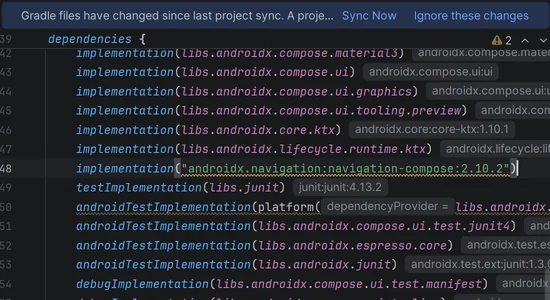
- Line 48 in yellow: a hint, not an error
- Sync Now
plugins { alias(libs.plugins.android.application) alias(libs.plugins.kotlin.compose)}
android { namespace = "com.yourname.notes" compileSdk { version = release(37) }
defaultConfig { applicationId = "com.yourname.notes" minSdk = 24 targetSdk = 37 versionCode = 1 versionName = "1.0"
testInstrumentationRunner = "androidx.test.runner.AndroidJUnitRunner" }
buildTypes { release { optimization { enable = true packageScope = setOf("androidx.**", "kotlin.**", "kotlinx.**") } } } compileOptions { sourceCompatibility = JavaVersion.VERSION_11 targetCompatibility = JavaVersion.VERSION_11 } buildFeatures { compose = true }}
dependencies { implementation(platform(libs.androidx.compose.bom)) implementation(libs.androidx.activity.compose) implementation(libs.androidx.compose.material3) implementation(libs.androidx.compose.ui) implementation(libs.androidx.compose.ui.graphics) implementation(libs.androidx.compose.ui.tooling.preview) implementation(libs.androidx.core.ktx) implementation(libs.androidx.lifecycle.runtime.ktx) implementation("androidx.navigation:navigation-compose:2.10.2") testImplementation(libs.junit) androidTestImplementation(platform(libs.androidx.compose.bom)) androidTestImplementation(libs.androidx.compose.ui.test.junit4) androidTestImplementation(libs.androidx.espresso.core) androidTestImplementation(libs.androidx.junit) debugImplementation(libs.androidx.compose.ui.test.manifest) debugImplementation(libs.androidx.compose.ui.tooling)}The yellow says Use version catalog instead: a hint, ignore it. Lab 1 added its library the same way.
Done The sync ends, with no red error.
Stuck? 2 symptoms
- No Sync Now bar It went away. Click FileSync Project with Gradle Files.
- The sync fails:
Failed to resolve: androidx.navigation:navigation-compose:2.10.2The PC is offline (this sync downloads the library from the internet), or the line has a typo. Check the Wi-Fi, paste the line again, then sync.
The panel above holds the file at the end of this step: click Whole file.
Step 2 of 5
Create the note page, a composable
Goal Create NotePage.kt, paste the page, and see it in the preview.
- Kotlin kotlin+java › com.yourname.notes › NotePage.kt
- Android Studio Split
-
Paste The file
NotePage.kt, the whole page.- In Project, right-click the plain kotlin+java › com.yourname.notes, without
(test)or(androidTest). - Choose NewKotlin Class/File.
- A small New Kotlin Class/File popup opens: type
NotePage, click File in the list, then press Enter. - The file opens: click Copy the file, on the panel below.
- Click in the editor, press Ctrl+A, then Ctrl+V.
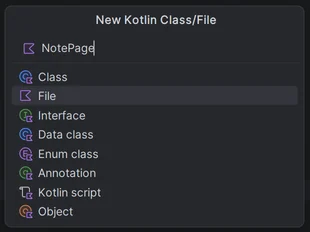
- The name,
NotePage - File, then Enter
package com.yourname.notes
import android.content.Intentimport androidx.compose.foundation.BorderStrokeimport androidx.compose.foundation.backgroundimport androidx.compose.foundation.borderimport androidx.compose.foundation.layout.Columnimport androidx.compose.foundation.layout.Rowimport androidx.compose.foundation.layout.fillMaxSizeimport androidx.compose.foundation.layout.fillMaxWidthimport androidx.compose.foundation.layout.paddingimport androidx.compose.foundation.layout.widthimport androidx.compose.foundation.shape.RoundedCornerShapeimport androidx.compose.material3.Buttonimport androidx.compose.material3.OutlinedButtonimport androidx.compose.material3.Textimport androidx.compose.runtime.Composableimport androidx.compose.ui.Alignmentimport androidx.compose.ui.Modifierimport androidx.compose.ui.draw.clipimport androidx.compose.ui.platform.LocalContextimport androidx.compose.ui.text.font.FontWeightimport androidx.compose.ui.tooling.preview.Previewimport androidx.compose.ui.unit.dpimport androidx.compose.ui.unit.emimport androidx.compose.ui.unit.spimport com.yourname.notes.ui.theme.Brandimport com.yourname.notes.ui.theme.Inkimport com.yourname.notes.ui.theme.Mutedimport com.yourname.notes.ui.theme.NotesThemeimport com.yourname.notes.ui.theme.Paper
// The note page: the whole note on a sheet of its colour, then Back to notes and Share@Composablefun NotePage(note: Note, onBack: () -> Unit, modifier: Modifier = Modifier) {    val context = LocalContext.current    // A paper page with round corners: during the back swipe it shrinks as one opaque card    Column(        modifier = modifier            .fillMaxSize()            .clip(RoundedCornerShape(28.dp))            .background(Paper)    ) {        Column(            modifier = Modifier                .weight(1f)                .padding(16.dp)                .fillMaxWidth()                .clip(RoundedCornerShape(16.dp))                .background(NoteFills[note.colour])                .border(1.dp, NoteLines[note.colour], RoundedCornerShape(16.dp))                .padding(24.dp)        ) {            Text(                text = "NOTE",                color = Muted,                fontSize = 12.sp,                fontWeight = FontWeight.Bold,                letterSpacing = 0.1.em            )            Text(                text = note.title,                color = Ink,                fontSize = 24.sp,                fontWeight = FontWeight.Black,                modifier = Modifier.padding(top = 8.dp)            )            Text(                text = note.body,                color = Ink,                fontSize = 18.sp,                lineHeight = 26.5.sp,   // Lab 1: 1.25 x the font's own line height                modifier = Modifier.padding(top = 12.dp)            )        }        Row(            modifier = Modifier                .align(Alignment.End)                .padding(end = 16.dp, bottom = 16.dp)        ) {            OutlinedButton(                onClick = onBack,                shape = RoundedCornerShape(12.dp),                border = BorderStroke(1.dp, Muted)            ) {                Text("Back to notes", color = Brand)            }            Button(                onClick = {                    val send = Intent(Intent.ACTION_SEND).apply {                        type = "text/plain"                        putExtra(Intent.EXTRA_TEXT, "${note.title}\n${note.body}")                    }                    context.startActivity(Intent.createChooser(send, null))                },                shape = RoundedCornerShape(12.dp),                modifier = Modifier                    .padding(start = 8.dp)                    .width(88.dp)            ) {                Text("Share")            }        }    }}
@Preview(showBackground = true)@Composablefun NotePagePreview() {    NotesTheme {        NotePage(note = SeedNotes[1], onBack = { })    }}
Line 35:
onBack: () -> Unit, a function the caller gives (sheet card 7): the page does not know where Back goes. Lines 41–42: paper with round corners, for the back swipe. Lines 89–94: Share, read in step 7.5. - In Project, right-click the plain kotlin+java › com.yourname.notes, without
-
The page, in the preview.
- Click Split, at the top right of the editor.
- If the banner says A successful build is needed before the preview can be displayed, click Build & Refresh.
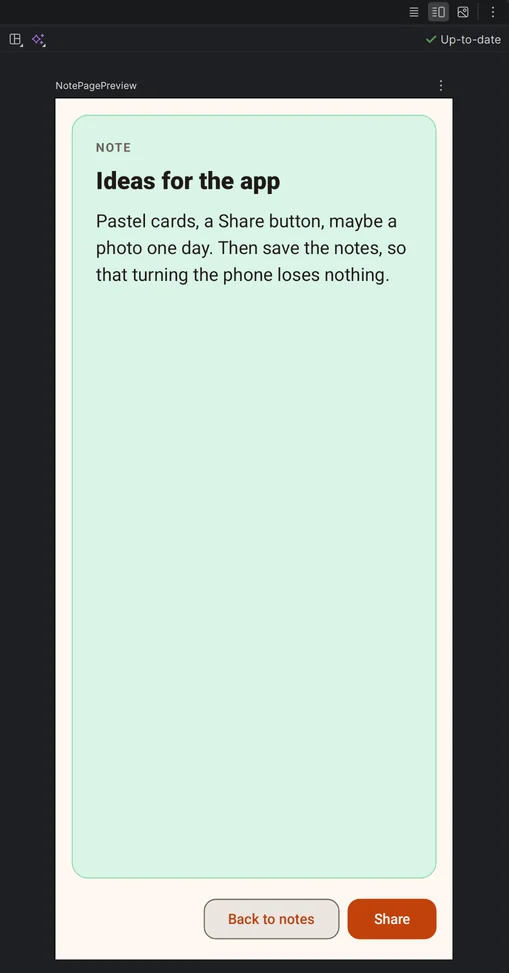
- Split
- The preview: the mint page of Ideas for the app
Done I see the mint page of Ideas for the app in the preview, and no red code.
Stuck? 3 symptoms
- The file holds
class NotePageYou picked Class, not File. No matter: select all, then paste the panel’s file over it. NoteFillsorNotestays redNotePage.ktis not in the plain package. Drag it onto the plain com.yourname.notes.- No preview beside the code Click Split, at the top right of the editor, then Build & Refresh.
The panel above holds the whole file: click Copy the file.
Step 3 of 5
Move the notes up, and declare the two screens
Goal Replace two files: the list moves up into NotesApp, which holds the NavHost.
- Kotlin NotesScreen.kt · MainActivity.kt
- Emulator
-
Paste
NotesScreen.kt: it receives the notes, and reports what happens.- Open kotlin+java › com.yourname.notes › NotesScreen.kt.
- Click Copy the file, on the panel below.
- Click in the editor, press Ctrl+A, then Ctrl+V.
MainActivity.ktturns red: action b fixes it.
package com.yourname.notes
import android.widget.Toastimport androidx.compose.foundation.Imageimport androidx.compose.foundation.backgroundimport androidx.compose.foundation.borderimport androidx.compose.foundation.combinedClickableimport androidx.compose.foundation.layout.Boximport androidx.compose.foundation.layout.Columnimport androidx.compose.foundation.layout.PaddingValuesimport androidx.compose.foundation.layout.Rowimport androidx.compose.foundation.layout.fillMaxSizeimport androidx.compose.foundation.layout.fillMaxWidthimport androidx.compose.foundation.layout.heightimport androidx.compose.foundation.layout.paddingimport androidx.compose.foundation.layout.sizeimport androidx.compose.foundation.layout.widthimport androidx.compose.foundation.lazy.LazyColumnimport androidx.compose.foundation.lazy.itemsIndexedimport androidx.compose.foundation.shape.RoundedCornerShapeimport androidx.compose.foundation.text.BasicTextFieldimport androidx.compose.foundation.text.KeyboardOptionsimport androidx.compose.material3.Buttonimport androidx.compose.material3.MaterialThemeimport androidx.compose.material3.Textimport androidx.compose.material3.TextButtonimport androidx.compose.runtime.Composableimport androidx.compose.runtime.getValueimport androidx.compose.runtime.keyimport androidx.compose.runtime.mutableStateOfimport androidx.compose.runtime.rememberimport androidx.compose.runtime.saveable.rememberSaveableimport androidx.compose.runtime.setValueimport androidx.compose.ui.Alignmentimport androidx.compose.ui.Modifierimport androidx.compose.ui.draw.clipimport androidx.compose.ui.draw.shadowimport androidx.compose.ui.graphics.Brushimport androidx.compose.ui.graphics.SolidColorimport androidx.compose.ui.platform.LocalContextimport androidx.compose.ui.res.painterResourceimport androidx.compose.ui.text.font.FontWeightimport androidx.compose.ui.text.input.ImeActionimport androidx.compose.ui.text.input.KeyboardCapitalizationimport androidx.compose.ui.text.style.TextAlignimport androidx.compose.ui.text.style.TextOverflowimport androidx.compose.ui.tooling.preview.Previewimport androidx.compose.ui.unit.dpimport androidx.compose.ui.unit.emimport androidx.compose.ui.unit.spimport androidx.lifecycle.compose.dropUnlessResumedimport com.yourname.notes.ui.theme.Brandimport com.yourname.notes.ui.theme.CardWhiteimport com.yourname.notes.ui.theme.ErrorRedimport com.yourname.notes.ui.theme.Fieldimport com.yourname.notes.ui.theme.HeaderEndimport com.yourname.notes.ui.theme.Inkimport com.yourname.notes.ui.theme.Lineimport com.yourname.notes.ui.theme.Mutedimport com.yourname.notes.ui.theme.NoteButterimport com.yourname.notes.ui.theme.NoteButterLineimport com.yourname.notes.ui.theme.NoteLavenderimport com.yourname.notes.ui.theme.NoteLavenderLineimport com.yourname.notes.ui.theme.NoteMintimport com.yourname.notes.ui.theme.NoteMintLineimport com.yourname.notes.ui.theme.NotePeachimport com.yourname.notes.ui.theme.NotePeachLineimport com.yourname.notes.ui.theme.NotesThemeimport com.yourname.notes.ui.theme.OnBrand
// One note: what the screen draws a card fromdata class Note(val title: String, val body: String, val colour: Int)
// The four pastels, in creation order: butter, mint, lavender, peachval NoteFills = listOf(NoteButter, NoteMint, NoteLavender, NotePeach)val NoteLines = listOf(NoteButterLine, NoteMintLine, NoteLavenderLine, NotePeachLine)
// Lab 1's three seed notes, newest first (colours 2, 1, 0: lavender, mint, butter)val SeedNotes = listOf( Note("Exam: the lifecycle", "onCreate, onStart, onResume… then onPause, onStop, onDestroy.", 2), Note( "Ideas for the app", "Pastel cards, a Share button, maybe a photo one day. Then save the notes, so that turning the phone loses nothing.", 1 ), Note("Saturday", "Football at 10, then revise ConstraintLayout.", 0))
@Composablefun NotesScreen( notes: List<Note>, // the screen reads the notes... onAdd: (String, String) -> Unit, // ...and tells its caller what happened onDelete: (Note) -> Unit, onOpen: (Int) -> Unit, modifier: Modifier = Modifier) { val context = LocalContext.current var title by rememberSaveable { mutableStateOf("") } var body by rememberSaveable { mutableStateOf("") } var showError by remember { mutableStateOf(false) }
Column(modifier = modifier.fillMaxSize()) { Box { // The header: a gradient with round corners Column( modifier = Modifier .padding(16.dp) .fillMaxWidth() .height(168.dp) .clip(RoundedCornerShape(28.dp)) .background(Brush.linearGradient(listOf(Brand, HeaderEnd))) .padding(start = 16.dp, top = 20.dp) ) { Image( painter = painterResource(R.drawable.ic_notes), contentDescription = "Notes logo", modifier = Modifier.size(36.dp) ) Row(modifier = Modifier.padding(top = 4.dp)) { Text( text = "Notes", color = OnBrand, fontSize = 30.sp, fontWeight = FontWeight.Black, modifier = Modifier.alignByBaseline() ) Text( text = "${notes.size}", color = Brand, fontSize = 14.sp, fontWeight = FontWeight.Bold, modifier = Modifier .padding(start = 8.dp) .alignByBaseline() .background(CardWhite, RoundedCornerShape(12.dp)) .padding(horizontal = 10.dp, vertical = 2.dp) ) } }
// The composer: a white card that overlaps the header Column( modifier = Modifier .padding(start = 32.dp, top = 136.dp, end = 32.dp) .fillMaxWidth() .shadow(6.dp, RoundedCornerShape(20.dp)) .background(CardWhite) .padding(16.dp) ) { NotesField( value = title, onValueChange = { title = it if (it.isNotEmpty()) showError = false }, hint = "Title", singleLine = true ) NotesField( value = body, onValueChange = { body = it.take(140) }, // input stops at 140, as Lab 1's maxLength hint = "Write something…", minLines = 3, modifier = Modifier.padding(top = 8.dp) ) if (showError) { Text( text = "Give your note a title first.", color = ErrorRed, fontSize = 14.sp, modifier = Modifier.padding(top = 8.dp) ) } Row( modifier = Modifier.padding(top = 8.dp), verticalAlignment = Alignment.CenterVertically ) { Text( text = "${body.length} / 140", color = if (body.length >= 120) ErrorRed else Muted, fontSize = 12.sp, modifier = Modifier.weight(1f) ) TextButton( onClick = { title = "" body = "" }, modifier = Modifier.width(88.dp) ) { Text("Clear") } Button( onClick = { if (title.isBlank()) { showError = true } else { onAdd(title.trim(), body.trim()) title = "" body = "" showError = false Toast.makeText(context, "Note added", Toast.LENGTH_SHORT).show() } }, shape = RoundedCornerShape(12.dp), modifier = Modifier .padding(start = 4.dp) .width(88.dp) ) { Text("Add") } } } }
// The list's title, and its hint on the right Row(modifier = Modifier.padding(start = 32.dp, top = 24.dp, end = 32.dp)) { Text( text = "YOUR NOTES", color = Muted, fontSize = 12.sp, fontWeight = FontWeight.Bold, letterSpacing = 0.1.em, modifier = Modifier.alignByBaseline() ) Text( text = "Tap to open · hold to delete", color = Muted, fontSize = 12.sp, textAlign = TextAlign.End, modifier = Modifier .padding(start = 16.dp) .weight(1f) .alignByBaseline() ) }
if (notes.isEmpty()) { Text( text = "No notes yet.\nWrite your first one above.", color = Muted, fontSize = 16.sp, textAlign = TextAlign.Center, modifier = Modifier .align(Alignment.CenterHorizontally) .padding(top = 56.dp) ) }
// The cards, newest on top; only those that fit are drawn LazyColumn( modifier = Modifier .weight(1f) .padding(top = 8.dp), contentPadding = PaddingValues(start = 16.dp, end = 16.dp, bottom = 16.dp) ) { itemsIndexed(notes) { index, note -> key(note) { // this card belongs to this note: the card below does not inherit its pressed look NoteCard( note = note, onClick = dropUnlessResumed { onOpen(index) }, // a second quick tap opens nothing more onLongClick = { onDelete(note) Toast.makeText(context, "Note deleted", Toast.LENGTH_SHORT).show() } ) } } } }}
// Lab 1's style NotesField, as a function: the same look for both text fields@Composablefun NotesField( value: String, onValueChange: (String) -> Unit, hint: String, modifier: Modifier = Modifier, singleLine: Boolean = false, minLines: Int = 1) { BasicTextField( value = value, onValueChange = onValueChange, modifier = modifier .fillMaxWidth() .background(Field, RoundedCornerShape(12.dp)) .border(1.dp, Line, RoundedCornerShape(12.dp)) .padding(horizontal = 14.dp, vertical = 12.dp), textStyle = MaterialTheme.typography.bodyLarge.copy(color = Ink), singleLine = singleLine, minLines = minLines, keyboardOptions = KeyboardOptions( capitalization = KeyboardCapitalization.Sentences, imeAction = if (singleLine) ImeAction.Next else ImeAction.Default ), cursorBrush = SolidColor(Brand), decorationBox = { innerTextField -> Box { if (value.isEmpty()) { Text(text = hint, color = Muted) } innerTextField() } } )}
// One card: tap to open, hold to delete@Composablefun NoteCard(note: Note, onClick: () -> Unit, onLongClick: () -> Unit) { Column( modifier = Modifier .padding(top = 12.dp) .fillMaxWidth() .clip(RoundedCornerShape(16.dp)) .background(NoteFills[note.colour]) .border(1.dp, NoteLines[note.colour], RoundedCornerShape(16.dp)) .combinedClickable(onClick = onClick, onLongClick = onLongClick) .padding(16.dp) ) { Text( text = note.title, color = Ink, fontSize = 16.sp, fontWeight = FontWeight.Bold ) if (note.body.isNotEmpty()) { Text( text = note.body, color = Ink, fontSize = 14.sp, maxLines = 2, overflow = TextOverflow.Ellipsis, modifier = Modifier.padding(top = 4.dp) ) } }}
@Preview(showBackground = true)@Composablefun NoteCardPreview() { NotesTheme { NoteCard(note = SeedNotes[1], onClick = { }, onLongClick = { }) }}
@Preview(showBackground = true)@Composablefun NotesScreenPreview() { NotesTheme { NotesScreen( notes = SeedNotes, onAdd = { _, _ -> }, onDelete = { }, onOpen = { } ) }}Lines 91–95: the list and three events arrive as parameters. Line 257:
itemsIndexedalso gives each card its position, which line 261 sends up. -
Paste
MainActivity.kt, withNotesAppand its NavHost.- Open MainActivity.kt.
- Click Copy the file, on the panel below.
- Click in the editor, press Ctrl+A, then Ctrl+V: the red goes.
package com.yourname.notes
import android.os.Bundleimport android.util.Logimport androidx.activity.ComponentActivityimport androidx.activity.compose.setContentimport androidx.activity.enableEdgeToEdgeimport androidx.compose.animation.fadeInimport androidx.compose.animation.fadeOutimport androidx.compose.animation.scaleOutimport androidx.compose.animation.slideInHorizontallyimport androidx.compose.animation.slideOutHorizontallyimport androidx.compose.foundation.layout.WindowInsetsimport androidx.compose.foundation.layout.fillMaxSizeimport androidx.compose.foundation.layout.paddingimport androidx.compose.foundation.layout.safeDrawingimport androidx.compose.material3.Scaffoldimport androidx.compose.runtime.Composableimport androidx.compose.runtime.LaunchedEffectimport androidx.compose.runtime.getValueimport androidx.compose.runtime.mutableIntStateOfimport androidx.compose.runtime.rememberimport androidx.compose.runtime.setValueimport androidx.compose.runtime.toMutableStateListimport androidx.compose.ui.Modifierimport androidx.core.view.WindowCompatimport androidx.lifecycle.compose.dropUnlessResumedimport androidx.navigation.compose.NavHostimport androidx.navigation.compose.composableimport androidx.navigation.compose.rememberNavControllerimport com.yourname.notes.ui.theme.NotesTheme
class MainActivity : ComponentActivity() { override fun onCreate(savedInstanceState: Bundle?) { super.onCreate(savedInstanceState) Log.d("Lifecycle", "Main onCreate") enableEdgeToEdge() // Dark icons on the paper, even when the phone is in dark mode (Lab 1's windowLightStatusBar) val bars = WindowCompat.getInsetsController(window, window.decorView) bars.isAppearanceLightStatusBars = true bars.isAppearanceLightNavigationBars = true setContent { NotesTheme { Scaffold( modifier = Modifier.fillMaxSize(), // keep the screen out of the status bar, the gesture bar and the keyboard contentWindowInsets = WindowInsets.safeDrawing ) { innerPadding -> NotesApp(modifier = Modifier.padding(innerPadding)) } } } }}
// The whole app: the notes and the colour counter (shared by both screens), and the two screens@Composablefun NotesApp(modifier: Modifier = Modifier) { val notes = remember { SeedNotes.toMutableStateList() } var added by remember { mutableIntStateOf(3) } // the seeds used colours 0, 1, 2 val navController = rememberNavController()
NavHost( navController = navController, startDestination = "notes", modifier = modifier, // The page comes in from the right and Back takes it away, like Lab 1's second activity enterTransition = { slideInHorizontally { it / 10 } + fadeIn() }, exitTransition = { slideOutHorizontally { -it / 10 } + fadeOut() }, popEnterTransition = { slideInHorizontally { -it / 10 } + fadeIn() }, popExitTransition = { slideOutHorizontally { it / 10 } + fadeOut() }, // The back swipe from the edge: the page shrinks away over the list, like Lab 1 predictivePopEnterTransition = { slideInHorizontally { -it / 10 } }, predictivePopExitTransition = { scaleOut(targetScale = 0.9f) } ) { composable("notes") { NotesScreen( notes = notes, onAdd = { title, body -> notes.add(0, Note(title, body, added % 4)) added++ }, onDelete = { note -> notes.remove(note) }, onOpen = { } ) } composable("note/{index}") { entry -> val index = entry.arguments?.getString("index")?.toInt() ?: 0 val note = notes.getOrNull(index) if (note != null) { // dropUnlessResumed: a second quick tap, while the page is already leaving, does nothing NotePage(note = note, onBack = dropUnlessResumed { navController.popBackStack() }) } else { // After a rotation the list starts again from the seeds: no note here any more, so go back LaunchedEffect(Unit) { navController.popBackStack() } } } }}The marked lines are the idea at the top of this page. Line 84,
onOpen = { }, does nothing yet: step 7.4 fills it. YourLog.dline stays (line 36).The other lines Same look as Lab 1, and safety
package com.yourname.notes
import android.os.Bundleimport android.util.Logimport androidx.activity.ComponentActivityimport androidx.activity.compose.setContentimport androidx.activity.enableEdgeToEdgeimport androidx.compose.animation.fadeInimport androidx.compose.animation.fadeOutimport androidx.compose.animation.scaleOutimport androidx.compose.animation.slideInHorizontallyimport androidx.compose.animation.slideOutHorizontallyimport androidx.compose.foundation.layout.WindowInsetsimport androidx.compose.foundation.layout.fillMaxSizeimport androidx.compose.foundation.layout.paddingimport androidx.compose.foundation.layout.safeDrawingimport androidx.compose.material3.Scaffoldimport androidx.compose.runtime.Composableimport androidx.compose.runtime.LaunchedEffectimport androidx.compose.runtime.getValueimport androidx.compose.runtime.mutableIntStateOfimport androidx.compose.runtime.rememberimport androidx.compose.runtime.setValueimport androidx.compose.runtime.toMutableStateListimport androidx.compose.ui.Modifierimport androidx.core.view.WindowCompatimport androidx.lifecycle.compose.dropUnlessResumedimport androidx.navigation.compose.NavHostimport androidx.navigation.compose.composableimport androidx.navigation.compose.rememberNavControllerimport com.yourname.notes.ui.theme.NotesTheme
class MainActivity : ComponentActivity() { override fun onCreate(savedInstanceState: Bundle?) { super.onCreate(savedInstanceState) Log.d("Lifecycle", "Main onCreate") enableEdgeToEdge() // Dark icons on the paper, even when the phone is in dark mode (Lab 1's windowLightStatusBar) val bars = WindowCompat.getInsetsController(window, window.decorView) bars.isAppearanceLightStatusBars = true bars.isAppearanceLightNavigationBars = true setContent { NotesTheme { Scaffold( modifier = Modifier.fillMaxSize(), // keep the screen out of the status bar, the gesture bar and the keyboard contentWindowInsets = WindowInsets.safeDrawing ) { innerPadding -> NotesApp(modifier = Modifier.padding(innerPadding)) } } } }}
// The whole app: the notes and the colour counter (shared by both screens), and the two screens@Composablefun NotesApp(modifier: Modifier = Modifier) { val notes = remember { SeedNotes.toMutableStateList() } var added by remember { mutableIntStateOf(3) } // the seeds used colours 0, 1, 2 val navController = rememberNavController()
NavHost( navController = navController, startDestination = "notes", modifier = modifier, // The page comes in from the right and Back takes it away, like Lab 1's second activity enterTransition = { slideInHorizontally { it / 10 } + fadeIn() }, exitTransition = { slideOutHorizontally { -it / 10 } + fadeOut() }, popEnterTransition = { slideInHorizontally { -it / 10 } + fadeIn() }, popExitTransition = { slideOutHorizontally { it / 10 } + fadeOut() }, // The back swipe from the edge: the page shrinks away over the list, like Lab 1 predictivePopEnterTransition = { slideInHorizontally { -it / 10 } }, predictivePopExitTransition = { scaleOut(targetScale = 0.9f) } ) { composable("notes") { NotesScreen( notes = notes, onAdd = { title, body -> notes.add(0, Note(title, body, added % 4)) added++ }, onDelete = { note -> notes.remove(note) }, onOpen = { } ) } composable("note/{index}") { entry -> val index = entry.arguments?.getString("index")?.toInt() ?: 0 val note = notes.getOrNull(index) if (note != null) { // dropUnlessResumed: a second quick tap, while the page is already leaving, does nothing NotePage(note = note, onBack = dropUnlessResumed { navController.popBackStack() }) } else { // After a rotation the list starts again from the seeds: no note here any more, so go back LaunchedEffect(Unit) { navController.popBackStack() } } } }}- Dark icons in the status and gesture bars, even when the phone is in dark mode (Lab 1’s
windowLightStatusBar). - The page slides in from the right, like Lab 1’s activity;
+plays a slide and a fade together. - The back swipe from the edge: the page shrinks away over the list, as in Lab 1.
dropUnlessResumed: a second quick tap on Back does nothing. The card has the same,NotesScreen.ktline 261.- After a turn of the phone the note may be gone: go back to the list.
-
The app, on the phone.
- Click ▶ Run 'app' (↻ Rerun if the app is running).
- On the phone, tap a card: nothing opens yet.
You should see The same app as in Part 6. Add, Clear and hold to delete still work: only where the list lives changed.
Done I see the three cards, as in Part 6, and no red code.
Stuck? 3 symptoms
No value passed for parameter 'notes'.MainActivity.ktis still Part 6’s. Do action b.Unresolved reference 'navigation'.on the imports The Gradle line is missing or not synced. Do step 7.1 again, then Sync Now.Unresolved reference 'NotePage'.NotePage.ktis missing. Do step 7.2.
The two panels above hold the files at the end of this step: click Copy the file.
Step 4 of 5
Open a note with its route, then come back
Goal Make a tap on a card open its page, then come back three ways.
- Kotlin kotlin+java › com.yourname.notes › MainActivity.kt
- Emulator Running Devices
-
Type The route to open, in
onOpen.- In MainActivity.kt, find line 84,
onOpen = { }. - Click right after its
{, then press Space. - Completion lists open as you type: keep typing.
- Type
index -> navController.navigate("note/$index"). The closing"and)are already there: type over them.
package com.yourname.notes
import android.os.Bundleimport android.util.Logimport androidx.activity.ComponentActivityimport androidx.activity.compose.setContentimport androidx.activity.enableEdgeToEdgeimport androidx.compose.animation.fadeInimport androidx.compose.animation.fadeOutimport androidx.compose.animation.scaleOutimport androidx.compose.animation.slideInHorizontallyimport androidx.compose.animation.slideOutHorizontallyimport androidx.compose.foundation.layout.WindowInsetsimport androidx.compose.foundation.layout.fillMaxSizeimport androidx.compose.foundation.layout.paddingimport androidx.compose.foundation.layout.safeDrawingimport androidx.compose.material3.Scaffoldimport androidx.compose.runtime.Composableimport androidx.compose.runtime.LaunchedEffectimport androidx.compose.runtime.getValueimport androidx.compose.runtime.mutableIntStateOfimport androidx.compose.runtime.rememberimport androidx.compose.runtime.setValueimport androidx.compose.runtime.toMutableStateListimport androidx.compose.ui.Modifierimport androidx.core.view.WindowCompatimport androidx.lifecycle.compose.dropUnlessResumedimport androidx.navigation.compose.NavHostimport androidx.navigation.compose.composableimport androidx.navigation.compose.rememberNavControllerimport com.yourname.notes.ui.theme.NotesTheme
class MainActivity : ComponentActivity() {    override fun onCreate(savedInstanceState: Bundle?) {        super.onCreate(savedInstanceState)        Log.d("Lifecycle", "Main onCreate")        enableEdgeToEdge()        // Dark icons on the paper, even when the phone is in dark mode (Lab 1's windowLightStatusBar)        val bars = WindowCompat.getInsetsController(window, window.decorView)        bars.isAppearanceLightStatusBars = true        bars.isAppearanceLightNavigationBars = true        setContent {            NotesTheme {                Scaffold(                    modifier = Modifier.fillMaxSize(),                    // keep the screen out of the status bar, the gesture bar and the keyboard                    contentWindowInsets = WindowInsets.safeDrawing                ) { innerPadding ->                    NotesApp(modifier = Modifier.padding(innerPadding))                }            }        }    }}
// The whole app: the notes and the colour counter (shared by both screens), and the two screens@Composablefun NotesApp(modifier: Modifier = Modifier) {    val notes = remember { SeedNotes.toMutableStateList() }    var added by remember { mutableIntStateOf(3) }   // the seeds used colours 0, 1, 2    val navController = rememberNavController()
NavHost( navController = navController, startDestination = "notes", modifier = modifier, // The page comes in from the right and Back takes it away, like Lab 1's second activity enterTransition = { slideInHorizontally { it / 10 } + fadeIn() }, exitTransition = { slideOutHorizontally { -it / 10 } + fadeOut() }, popEnterTransition = { slideInHorizontally { -it / 10 } + fadeIn() }, popExitTransition = { slideOutHorizontally { it / 10 } + fadeOut() }, // The back swipe from the edge: the page shrinks away over the list, like Lab 1 predictivePopEnterTransition = { slideInHorizontally { -it / 10 } }, predictivePopExitTransition = { scaleOut(targetScale = 0.9f) } ) { composable("notes") { NotesScreen( notes = notes, onAdd = { title, body -> notes.add(0, Note(title, body, added % 4)) added++ }, onDelete = { note -> notes.remove(note) }, onOpen = { index -> navController.navigate("note/$index") } ) } composable("note/{index}") { entry -> val index = entry.arguments?.getString("index")?.toInt() ?: 0 val note = notes.getOrNull(index) if (note != null) { // dropUnlessResumed: a second quick tap, while the page is already leaving, does nothing NotePage(note = note, onBack = dropUnlessResumed { navController.popBackStack() }) } else { // After a rotation the list starts again from the seeds: no note here any more, so go back LaunchedEffect(Unit) { navController.popBackStack() } } } }}index ->names the lambda’s parameter (card 7);$indexputs it in the route (card 1). The second card opensnote/1. - In MainActivity.kt, find line 84,
-
The page, then back three ways.
- Click ▶ Run 'app' (↻ Rerun if the app is running).
- On the phone, tap Ideas for the app: its page slides in. Tap Back to notes.
- Tap the card again, then click Back in the Running Devices toolbar.
- Tap the card again. With the mouse, drag slowly from the very left edge of the phone’s screen to its middle, then release.
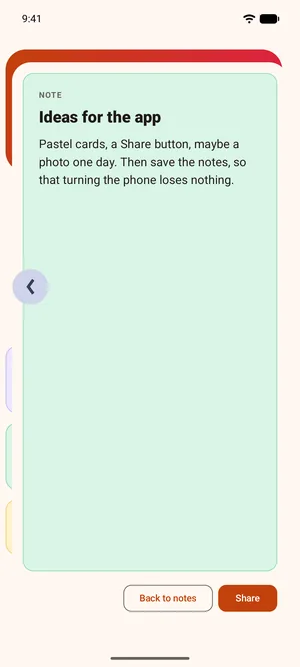
Lab 2, mid-swipe 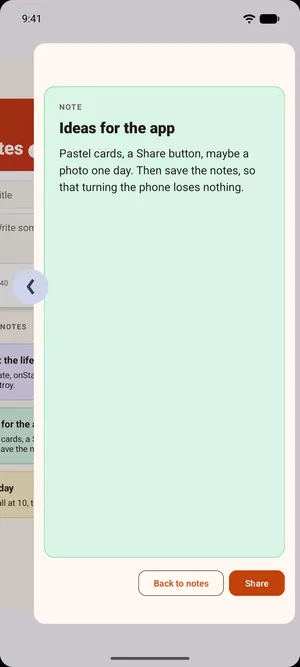
Lab 1, the same swipe
Why navigate() pushes the route on the back stack, and the NavHost shows the top one. Back pops it. Still one activity: Logcat shows no new Main onCreate.
You should see The page, mint like its card, its text whole. Each way back brings the list.
Done I see the note page, and the list comes back three ways.
Stuck? 3 symptoms · the file
- A tap on a card does nothing Line 84 still reads
onOpen = { }, or the app was not run again. Type the line, then ▶. Unresolved reference 'index'.Theindex ->part is missing at the start of the braces.- The app closes when you tap a card Your route differs from
note/{index}, line 87: a letter, ans. Compare line 84 with the panel.
Behind? The files at the end of this step
package com.yourname.notes
import android.os.Bundleimport android.util.Logimport androidx.activity.ComponentActivityimport androidx.activity.compose.setContentimport androidx.activity.enableEdgeToEdgeimport androidx.compose.animation.fadeInimport androidx.compose.animation.fadeOutimport androidx.compose.animation.scaleOutimport androidx.compose.animation.slideInHorizontallyimport androidx.compose.animation.slideOutHorizontallyimport androidx.compose.foundation.layout.WindowInsetsimport androidx.compose.foundation.layout.fillMaxSizeimport androidx.compose.foundation.layout.paddingimport androidx.compose.foundation.layout.safeDrawingimport androidx.compose.material3.Scaffoldimport androidx.compose.runtime.Composableimport androidx.compose.runtime.LaunchedEffectimport androidx.compose.runtime.getValueimport androidx.compose.runtime.mutableIntStateOfimport androidx.compose.runtime.rememberimport androidx.compose.runtime.setValueimport androidx.compose.runtime.toMutableStateListimport androidx.compose.ui.Modifierimport androidx.core.view.WindowCompatimport androidx.lifecycle.compose.dropUnlessResumedimport androidx.navigation.compose.NavHostimport androidx.navigation.compose.composableimport androidx.navigation.compose.rememberNavControllerimport com.yourname.notes.ui.theme.NotesTheme
class MainActivity : ComponentActivity() { override fun onCreate(savedInstanceState: Bundle?) { super.onCreate(savedInstanceState) Log.d("Lifecycle", "Main onCreate") enableEdgeToEdge() // Dark icons on the paper, even when the phone is in dark mode (Lab 1's windowLightStatusBar) val bars = WindowCompat.getInsetsController(window, window.decorView) bars.isAppearanceLightStatusBars = true bars.isAppearanceLightNavigationBars = true setContent { NotesTheme { Scaffold( modifier = Modifier.fillMaxSize(), // keep the screen out of the status bar, the gesture bar and the keyboard contentWindowInsets = WindowInsets.safeDrawing ) { innerPadding -> NotesApp(modifier = Modifier.padding(innerPadding)) } } } }}
// The whole app: the notes and the colour counter (shared by both screens), and the two screens@Composablefun NotesApp(modifier: Modifier = Modifier) { val notes = remember { SeedNotes.toMutableStateList() } var added by remember { mutableIntStateOf(3) } // the seeds used colours 0, 1, 2 val navController = rememberNavController()
NavHost( navController = navController, startDestination = "notes", modifier = modifier, // The page comes in from the right and Back takes it away, like Lab 1's second activity enterTransition = { slideInHorizontally { it / 10 } + fadeIn() }, exitTransition = { slideOutHorizontally { -it / 10 } + fadeOut() }, popEnterTransition = { slideInHorizontally { -it / 10 } + fadeIn() }, popExitTransition = { slideOutHorizontally { it / 10 } + fadeOut() }, // The back swipe from the edge: the page shrinks away over the list, like Lab 1 predictivePopEnterTransition = { slideInHorizontally { -it / 10 } }, predictivePopExitTransition = { scaleOut(targetScale = 0.9f) } ) { composable("notes") { NotesScreen( notes = notes, onAdd = { title, body -> notes.add(0, Note(title, body, added % 4)) added++ }, onDelete = { note -> notes.remove(note) }, onOpen = { index -> navController.navigate("note/$index") } ) } composable("note/{index}") { entry -> val index = entry.arguments?.getString("index")?.toInt() ?: 0 val note = notes.getOrNull(index) if (note != null) { // dropUnlessResumed: a second quick tap, while the page is already leaving, does nothing NotePage(note = note, onBack = dropUnlessResumed { navController.popBackStack() }) } else { // After a rotation the list starts again from the seeds: no note here any more, so go back LaunchedEffect(Unit) { navController.popBackStack() } } } }}For the teacher Turn the phone on a note page
Open a note you added, then turn the phone. The activity is created again and the list starts again from the seeds: the route’s position now points at another note, or past the end, and the app goes back to the list (line 95). Lab 1 kept the note in its extras. Keeping the notes is the next milestone of the course.
Step 5 of 5
Share the note: an implicit Intent, in Kotlin
Goal Read how Share hands the note to Android, then tap it.
- Kotlin kotlin+java › com.yourname.notes › NotePage.kt
- Emulator
-
Share, in
NotePage.kt.- Open NotePage.kt and find the
Buttonof line 88.
package com.yourname.notes
import android.content.Intentimport androidx.compose.foundation.BorderStrokeimport androidx.compose.foundation.backgroundimport androidx.compose.foundation.borderimport androidx.compose.foundation.layout.Columnimport androidx.compose.foundation.layout.Rowimport androidx.compose.foundation.layout.fillMaxSizeimport androidx.compose.foundation.layout.fillMaxWidthimport androidx.compose.foundation.layout.paddingimport androidx.compose.foundation.layout.widthimport androidx.compose.foundation.shape.RoundedCornerShapeimport androidx.compose.material3.Buttonimport androidx.compose.material3.OutlinedButtonimport androidx.compose.material3.Textimport androidx.compose.runtime.Composableimport androidx.compose.ui.Alignmentimport androidx.compose.ui.Modifierimport androidx.compose.ui.draw.clipimport androidx.compose.ui.platform.LocalContextimport androidx.compose.ui.text.font.FontWeightimport androidx.compose.ui.tooling.preview.Previewimport androidx.compose.ui.unit.dpimport androidx.compose.ui.unit.emimport androidx.compose.ui.unit.spimport com.yourname.notes.ui.theme.Brandimport com.yourname.notes.ui.theme.Inkimport com.yourname.notes.ui.theme.Mutedimport com.yourname.notes.ui.theme.NotesThemeimport com.yourname.notes.ui.theme.Paper
// The note page: the whole note on a sheet of its colour, then Back to notes and Share@Composablefun NotePage(note: Note, onBack: () -> Unit, modifier: Modifier = Modifier) { val context = LocalContext.current // A paper page with round corners: during the back swipe it shrinks as one opaque card Column( modifier = modifier .fillMaxSize() .clip(RoundedCornerShape(28.dp)) .background(Paper) ) { Column( modifier = Modifier .weight(1f) .padding(16.dp) .fillMaxWidth() .clip(RoundedCornerShape(16.dp)) .background(NoteFills[note.colour]) .border(1.dp, NoteLines[note.colour], RoundedCornerShape(16.dp)) .padding(24.dp) ) { Text( text = "NOTE", color = Muted, fontSize = 12.sp, fontWeight = FontWeight.Bold, letterSpacing = 0.1.em ) Text( text = note.title, color = Ink, fontSize = 24.sp, fontWeight = FontWeight.Black, modifier = Modifier.padding(top = 8.dp) ) Text( text = note.body, color = Ink, fontSize = 18.sp, lineHeight = 26.5.sp, // Lab 1: 1.25 x the font's own line height modifier = Modifier.padding(top = 12.dp) ) } Row( modifier = Modifier .align(Alignment.End) .padding(end = 16.dp, bottom = 16.dp) ) { OutlinedButton( onClick = onBack, shape = RoundedCornerShape(12.dp), border = BorderStroke(1.dp, Muted) ) { Text("Back to notes", color = Brand) } Button( onClick = { val send = Intent(Intent.ACTION_SEND).apply { type = "text/plain" putExtra(Intent.EXTRA_TEXT, "${note.title}\n${note.body}") } context.startActivity(Intent.createChooser(send, null)) }, shape = RoundedCornerShape(12.dp), modifier = Modifier .padding(start = 8.dp) .width(88.dp) ) { Text("Share") } } }}
@Preview(showBackground = true)@Composablefun NotePagePreview() { NotesTheme { NotePage(note = SeedNotes[1], onBack = { }) }}context: the activity this page lives in, as in Part 5’s Toasts. In Lab 1 it wasthis.- The Intent names an action,
ACTION_SEND, not a screen.apply { }sets it up and returns it (card 10). type = …calls Java’ssetType(): Kotlin reads setters as properties.createChooserasks Android for the share sheet.
Lab 1 The same Share in Lab 1’s Java
package com.yourname.notes;
import android.content.Intent;import android.os.Bundle;import android.util.Log;import android.widget.TextView;
import androidx.appcompat.app.AppCompatActivity;
public class NoteActivity extends AppCompatActivity {
public static final String EXTRA_TITLE = "com.yourname.notes.EXTRA_TITLE"; public static final String EXTRA_BODY = "com.yourname.notes.EXTRA_BODY"; public static final String EXTRA_BACKGROUND = "com.yourname.notes.EXTRA_BACKGROUND"; private static final String TAG = "Lifecycle";
@Override protected void onCreate(Bundle savedInstanceState) { super.onCreate(savedInstanceState); setContentView(R.layout.activity_note); Log.d(TAG, "Note onCreate");
String title = getIntent().getStringExtra(EXTRA_TITLE); String body = getIntent().getStringExtra(EXTRA_BODY); int background = getIntent().getIntExtra(EXTRA_BACKGROUND, R.drawable.bg_note_butter);
TextView textTitle = findViewById(R.id.textTitle); TextView textBody = findViewById(R.id.textBody); textTitle.setText(title); textBody.setText(body); findViewById(R.id.noteSheet).setBackgroundResource(background);
findViewById(R.id.buttonBack).setOnClickListener(v -> finish()); findViewById(R.id.buttonShare).setOnClickListener(v -> share(title, body)); }
private void share(String title, String body) { Intent send = new Intent(Intent.ACTION_SEND); send.setType("text/plain"); send.putExtra(Intent.EXTRA_TEXT, title + "\n" + body); startActivity(Intent.createChooser(send, null)); }
@Override protected void onDestroy() { super.onDestroy(); Log.d(TAG, "Note onDestroy"); }} - Open NotePage.kt and find the
-
The share sheet, on the phone.
- On the phone, tap a card: its page opens.
- Tap Share.
Why An implicit Intent names an action, and Android finds the apps that accept it. navigate() stays inside your app.
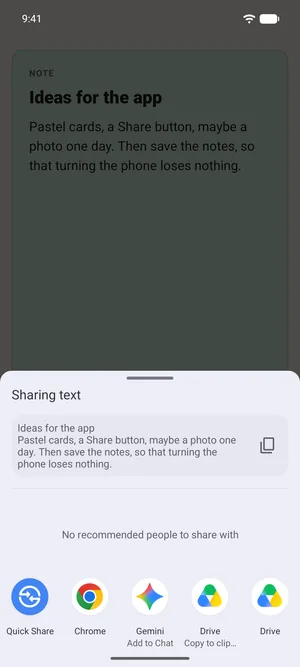
You should see A sheet, “Sharing text”, showing your note.
Done I see my note’s text in the sheet.
Stuck? 2 symptoms
- The sheet looks different from the picture Each phone lists its own apps. What matters is your note’s text at the top.
- Share does nothing
NotePage.ktdiffers from step 7.2’s panel. Paste that file again.
No file changes in this step: step 7.2 holds NotePage.kt.
End of the part
Recap
The activity stayed: the NavHost swapped two composable screens. navigate("note/1") pushed a route on the back stack, and Back popped it. The list lives in NotesApp, above both screens. Share still leaves the app through an implicit Intent.
- show two screens in one activity with a
NavHost, and open one with a route; - move a list up so both screens share it: state down, events up;
- share a note with an implicit Intent, written in Kotlin.
End of Lab 2
The same app, described: what you can do now
Lab 1 built the screen: XML, then Java changed the views. Lab 2 describes it: a function says what the screen looks like for the current data, and Compose draws it again when the data changes.
| Lab 1 · XML and Java | Lab 2 · Compose | |
|---|---|---|
| A screen | activity_main.xml and setContentView | a @Composable function in setContent |
| Placing | ConstraintLayout and its constraints | Column, Row, Box and a Modifier |
| Colours and shapes | colors.xml, themes.xml, drawables | Color.kt, NotesTheme, links of a Modifier |
| The cards | inflate and addView, card by card | LazyColumn and itemsIndexed(notes) |
| A change on screen | setText(), setVisibility() | change a state: Compose draws again |
| A tap | setOnClickListener | onClick = { … }, a parameter |
| A second screen | an activity, an Intent with 3 extras, a manifest line | a NavHost and a route, nothing in the manifest |
| Share | an implicit Intent | the same Intent, in Kotlin |
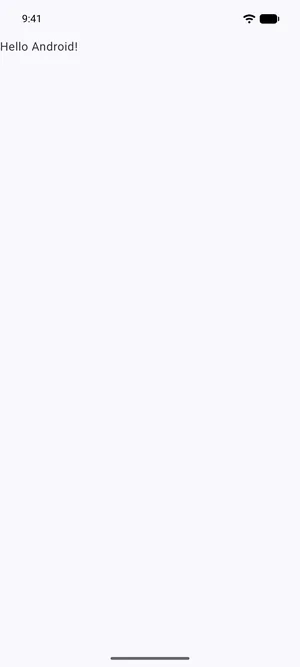 Part 030 min, home
Before class: read Kotlin, create the project
I can read Kotlin beside Java, and create and run the Compose project.
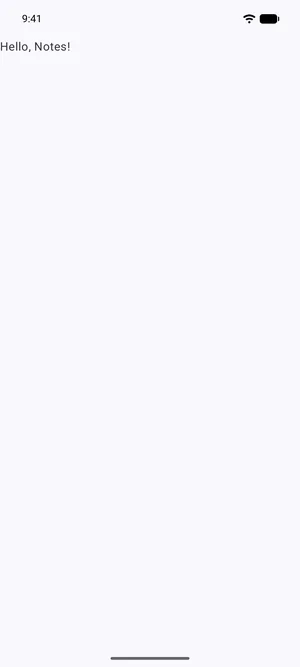 Part 113 min
I can find the screen in a function, and preview it without the phone.
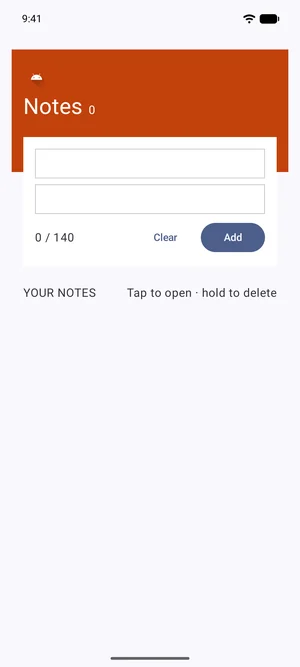 Part 232 min
Place the pieces: Column, Row, Box
I can place the screen’s pieces with three containers and the
Modifier.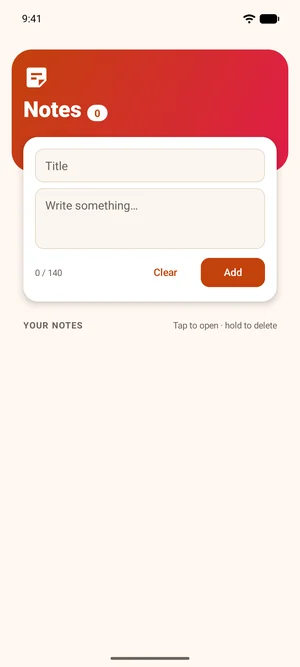 Part 328 min
Make it beautiful: the theme and the Modifier
I can give the app Lab 1’s colours with a theme, and paint a box link by link.
- Part 418 min
I can draw a list of cards from a list of notes.
- Part 542 min
The screen answers: state and events
I can make the screen react to typing, taps and long presses.
- Part 615 min
The activity’s life, and what Compose keeps
I can tell a recomposition from a recreation, and keep typed text across a rotation.
- Part 727 min
A second screen: Navigation Compose
I can open a second screen in the same activity, and share a note.
In class now: the quick check, six questions. Next lab: Lab 3 · Cross-platform with React Native and Expo, the same app again, with one code for Android and iPhone.