
Part 5 not finished, or a fresh project? Start here about 4 min
The project: your own from Part 5, or a fresh one: Part 0, steps 0.2 to 0.4 (about 10 minutes).
Your package name, for the code of this page:
Without JavaScript, the code says com.yourname.notes: replace yourname by the name you chose.
The logo: res › drawable › ic_notes.xml. Missing? Right-click res › drawable, then NewDrawable Resource File: type
ic_notes, then press Enter. It opens in Design: click Code, select all, then paste this file. Already there? Skip it.<!-- ~ Copyright (C) 2026 The Android Open Source Project ~ ~ Licensed under the Apache License, Version 2.0 (the "License"); ~ you may not use this file except in compliance with the License. ~ You may obtain a copy of the License at ~ ~ http://www.apache.org/licenses/LICENSE-2.0 ~ ~ Unless required by applicable law or agreed to in writing, software ~ distributed under the License is distributed on an "AS IS" BASIS, ~ WITHOUT WARRANTIES OR CONDITIONS OF ANY KIND, either express or implied. ~ See the License for the specific language governing permissions and ~ limitations under the License. --><vector xmlns:android="http://schemas.android.com/apk/res/android" android:autoMirrored="true" android:height="24dp" android:tint="#FFFFFF" android:viewportHeight="24" android:viewportWidth="24" android:width="24dp"> <path android:fillColor="@android:color/white" android:pathData="M19,3H4.99C3.89,3 3,3.9 3,5l0.01,14c0,1.1 0.89,2 1.99,2h10l6,-6V5C21,3.9 20.1,3 19,3zM7,8h10v2H7V8zM12,14H7v-2h5V14zM14,19.5V14h5.5L14,19.5z"/> </vector>The window’s paper: in res › values › colors.xml, check the
paperline; missing? Click Copy 1 line, click at the end of line 9, press Enter, then Ctrl+V. Then open res › values › themes.xml, select all, and paste the second file.<?xml version="1.0" encoding="utf-8"?><resources> <color name="purple_200">#FFBB86FC</color> <color name="purple_500">#FF6200EE</color> <color name="purple_700">#FF3700B3</color> <color name="teal_200">#FF03DAC5</color> <color name="teal_700">#FF018786</color> <color name="black">#FF000000</color> <color name="white">#FFFFFFFF</color> <color name="paper">#FFF8F1</color></resources><?xml version="1.0" encoding="utf-8"?><resources>
<style name="Theme.Notes" parent="android:Theme.Material.Light.NoActionBar"> <!-- The window behind Compose, seen while the app starts: paper, as in Lab 1 --> <item name="android:windowBackground">@color/paper</item> </style></resources>The theme: in kotlin+java › com.yourname.notes › ui.theme, open each file, select all, then paste it:
Color.kt,Theme.kt,Type.kt.package com.yourname.notes.ui.theme
import androidx.compose.ui.graphics.Color
// Lab 1's colors.xml, in Kotlin: the same names, the same hex valuesval Brand = Color(0xFFC2410C)val OnBrand = Color(0xFFFFFFFF)val HeaderEnd = Color(0xFFE11D48)val Paper = Color(0xFFFFF8F1)val CardWhite = Color(0xFFFFFFFF)val Field = Color(0xFFFBF6F0)val Line = Color(0xFFE7D9CB)val Ink = Color(0xFF1F1A17)val Muted = Color(0xFF6B6159)val ErrorRed = Color(0xFFB91C1C)
val NoteButter = Color(0xFFFFF1C9)val NoteButterLine = Color(0xFFF2D27A)val NoteMint = Color(0xFFD9F5E6)val NoteMintLine = Color(0xFF93D9B4)val NoteLavender = Color(0xFFECE6FF)val NoteLavenderLine = Color(0xFFC6B8FA)val NotePeach = Color(0xFFFFE1D6)val NotePeachLine = Color(0xFFF7B29A)package com.yourname.notes.ui.theme
import androidx.compose.material3.MaterialThemeimport androidx.compose.material3.lightColorSchemeimport androidx.compose.runtime.Composable
// Lab 1's themes.xml, in Kotlin: light only, and no dynamic colourprivate val NotesColors = lightColorScheme( primary = Brand, onPrimary = OnBrand, background = Paper, surface = Paper, onSurface = Ink, outline = Muted, error = ErrorRed)
@Composablefun NotesTheme(content: @Composable () -> Unit) { MaterialTheme( colorScheme = NotesColors, typography = Typography, content = content )}package com.yourname.notes.ui.theme
import androidx.compose.material3.Typographyimport androidx.compose.ui.text.PlatformTextStyleimport androidx.compose.ui.text.TextStyleimport androidx.compose.ui.text.font.FontFamilyimport androidx.compose.ui.text.font.FontWeightimport androidx.compose.ui.unit.sp
// Set of Material typography styles to start withval Typography = Typography( bodyLarge = TextStyle( fontFamily = FontFamily.Default, fontWeight = FontWeight.Normal, fontSize = 16.sp, // Only to match Lab 1's TextView spacing (a little space above and below the letters). // Compose's default is false: this is not a styling technique, just pixel parity with Lab 1. platformStyle = PlatformTextStyle(includeFontPadding = true) ) /* Other default text styles to override titleLarge = TextStyle( fontFamily = FontFamily.Default, fontWeight = FontWeight.Normal, fontSize = 22.sp, lineHeight = 28.sp, letterSpacing = 0.sp ), labelSmall = TextStyle( fontFamily = FontFamily.Default, fontWeight = FontWeight.Medium, fontSize = 11.sp, lineHeight = 16.sp, letterSpacing = 0.5.sp ) */)NotesScreen.kt: open it, select all, then paste this file. Missing? First right-click kotlin+java › com.yourname.notes, the one without
(test), then NewKotlin Class/File: typeNotesScreen, click File in the list, then press Enter.package com.yourname.notes
import android.widget.Toastimport androidx.compose.foundation.Imageimport androidx.compose.foundation.backgroundimport androidx.compose.foundation.borderimport androidx.compose.foundation.combinedClickableimport androidx.compose.foundation.layout.Boximport androidx.compose.foundation.layout.Columnimport androidx.compose.foundation.layout.PaddingValuesimport androidx.compose.foundation.layout.Rowimport androidx.compose.foundation.layout.fillMaxSizeimport androidx.compose.foundation.layout.fillMaxWidthimport androidx.compose.foundation.layout.heightimport androidx.compose.foundation.layout.paddingimport androidx.compose.foundation.layout.sizeimport androidx.compose.foundation.layout.widthimport androidx.compose.foundation.lazy.LazyColumnimport androidx.compose.foundation.lazy.itemsimport androidx.compose.foundation.shape.RoundedCornerShapeimport androidx.compose.foundation.text.BasicTextFieldimport androidx.compose.foundation.text.KeyboardOptionsimport androidx.compose.material3.Buttonimport androidx.compose.material3.MaterialThemeimport androidx.compose.material3.Textimport androidx.compose.material3.TextButtonimport androidx.compose.runtime.Composableimport androidx.compose.runtime.getValueimport androidx.compose.runtime.keyimport androidx.compose.runtime.mutableIntStateOfimport androidx.compose.runtime.mutableStateOfimport androidx.compose.runtime.rememberimport androidx.compose.runtime.setValueimport androidx.compose.runtime.toMutableStateListimport androidx.compose.ui.Alignmentimport androidx.compose.ui.Modifierimport androidx.compose.ui.draw.clipimport androidx.compose.ui.draw.shadowimport androidx.compose.ui.graphics.Brushimport androidx.compose.ui.graphics.SolidColorimport androidx.compose.ui.platform.LocalContextimport androidx.compose.ui.res.painterResourceimport androidx.compose.ui.text.font.FontWeightimport androidx.compose.ui.text.input.ImeActionimport androidx.compose.ui.text.input.KeyboardCapitalizationimport androidx.compose.ui.text.style.TextAlignimport androidx.compose.ui.text.style.TextOverflowimport androidx.compose.ui.tooling.preview.Previewimport androidx.compose.ui.unit.dpimport androidx.compose.ui.unit.emimport androidx.compose.ui.unit.spimport com.yourname.notes.ui.theme.Brandimport com.yourname.notes.ui.theme.CardWhiteimport com.yourname.notes.ui.theme.ErrorRedimport com.yourname.notes.ui.theme.Fieldimport com.yourname.notes.ui.theme.HeaderEndimport com.yourname.notes.ui.theme.Inkimport com.yourname.notes.ui.theme.Lineimport com.yourname.notes.ui.theme.Mutedimport com.yourname.notes.ui.theme.NoteButterimport com.yourname.notes.ui.theme.NoteButterLineimport com.yourname.notes.ui.theme.NoteLavenderimport com.yourname.notes.ui.theme.NoteLavenderLineimport com.yourname.notes.ui.theme.NoteMintimport com.yourname.notes.ui.theme.NoteMintLineimport com.yourname.notes.ui.theme.NotePeachimport com.yourname.notes.ui.theme.NotePeachLineimport com.yourname.notes.ui.theme.NotesThemeimport com.yourname.notes.ui.theme.OnBrand
// One note: what the screen draws a card fromdata class Note(val title: String, val body: String, val colour: Int)
// The four pastels, in creation order: butter, mint, lavender, peachval NoteFills = listOf(NoteButter, NoteMint, NoteLavender, NotePeach)val NoteLines = listOf(NoteButterLine, NoteMintLine, NoteLavenderLine, NotePeachLine)
// Lab 1's three seed notes, newest first (colours 2, 1, 0: lavender, mint, butter)val SeedNotes = listOf( Note("Exam: the lifecycle", "onCreate, onStart, onResume… then onPause, onStop, onDestroy.", 2), Note( "Ideas for the app", "Pastel cards, a Share button, maybe a photo one day. Then save the notes, so that turning the phone loses nothing.", 1 ), Note("Saturday", "Football at 10, then revise ConstraintLayout.", 0))
@Composablefun NotesScreen(modifier: Modifier = Modifier) { val context = LocalContext.current val notes = remember { SeedNotes.toMutableStateList() } var added by remember { mutableIntStateOf(3) } // the seeds used colours 0, 1, 2 var title by remember { mutableStateOf("") } var body by remember { mutableStateOf("") } var showError by remember { mutableStateOf(false) }
Column(modifier = modifier.fillMaxSize()) { Box { // The header: a gradient with round corners Column( modifier = Modifier .padding(16.dp) .fillMaxWidth() .height(168.dp) .clip(RoundedCornerShape(28.dp)) .background(Brush.linearGradient(listOf(Brand, HeaderEnd))) .padding(start = 16.dp, top = 20.dp) ) { Image( painter = painterResource(R.drawable.ic_notes), contentDescription = "Notes logo", modifier = Modifier.size(36.dp) ) Row(modifier = Modifier.padding(top = 4.dp)) { Text( text = "Notes", color = OnBrand, fontSize = 30.sp, fontWeight = FontWeight.Black, modifier = Modifier.alignByBaseline() ) Text( text = "${notes.size}", color = Brand, fontSize = 14.sp, fontWeight = FontWeight.Bold, modifier = Modifier .padding(start = 8.dp) .alignByBaseline() .background(CardWhite, RoundedCornerShape(12.dp)) .padding(horizontal = 10.dp, vertical = 2.dp) ) } }
// The composer: a white card that overlaps the header Column( modifier = Modifier .padding(start = 32.dp, top = 136.dp, end = 32.dp) .fillMaxWidth() .shadow(6.dp, RoundedCornerShape(20.dp)) .background(CardWhite) .padding(16.dp) ) { NotesField( value = title, onValueChange = { title = it if (it.isNotEmpty()) showError = false }, hint = "Title", singleLine = true ) NotesField( value = body, onValueChange = { body = it.take(140) }, // input stops at 140, as Lab 1's maxLength hint = "Write something…", minLines = 3, modifier = Modifier.padding(top = 8.dp) ) if (showError) { Text( text = "Give your note a title first.", color = ErrorRed, fontSize = 14.sp, modifier = Modifier.padding(top = 8.dp) ) } Row( modifier = Modifier.padding(top = 8.dp), verticalAlignment = Alignment.CenterVertically ) { Text( text = "${body.length} / 140", color = if (body.length >= 120) ErrorRed else Muted, fontSize = 12.sp, modifier = Modifier.weight(1f) ) TextButton( onClick = { title = "" body = "" }, modifier = Modifier.width(88.dp) ) { Text("Clear") } Button( onClick = { if (title.isBlank()) { showError = true } else { notes.add(0, Note(title.trim(), body.trim(), added % 4)) added++ title = "" body = "" showError = false Toast.makeText(context, "Note added", Toast.LENGTH_SHORT).show() } }, shape = RoundedCornerShape(12.dp), modifier = Modifier .padding(start = 4.dp) .width(88.dp) ) { Text("Add") } } } }
// The list's title, and its hint on the right Row(modifier = Modifier.padding(start = 32.dp, top = 24.dp, end = 32.dp)) { Text( text = "YOUR NOTES", color = Muted, fontSize = 12.sp, fontWeight = FontWeight.Bold, letterSpacing = 0.1.em, modifier = Modifier.alignByBaseline() ) Text( text = "Tap to open · hold to delete", color = Muted, fontSize = 12.sp, textAlign = TextAlign.End, modifier = Modifier .padding(start = 16.dp) .weight(1f) .alignByBaseline() ) }
if (notes.isEmpty()) { Text( text = "No notes yet.\nWrite your first one above.", color = Muted, fontSize = 16.sp, textAlign = TextAlign.Center, modifier = Modifier .align(Alignment.CenterHorizontally) .padding(top = 56.dp) ) }
// The cards, newest on top; only those that fit are drawn LazyColumn( modifier = Modifier .weight(1f) .padding(top = 8.dp), contentPadding = PaddingValues(start = 16.dp, end = 16.dp, bottom = 16.dp) ) { items(notes) { note -> key(note) { // this card belongs to this note: the card below does not inherit its pressed look NoteCard( note = note, onLongClick = { notes.remove(note) Toast.makeText(context, "Note deleted", Toast.LENGTH_SHORT).show() } ) } } } }}
// Lab 1's style NotesField, as a function: the same look for both text fields@Composablefun NotesField( value: String, onValueChange: (String) -> Unit, hint: String, modifier: Modifier = Modifier, singleLine: Boolean = false, minLines: Int = 1) { BasicTextField( value = value, onValueChange = onValueChange, modifier = modifier .fillMaxWidth() .background(Field, RoundedCornerShape(12.dp)) .border(1.dp, Line, RoundedCornerShape(12.dp)) .padding(horizontal = 14.dp, vertical = 12.dp), textStyle = MaterialTheme.typography.bodyLarge.copy(color = Ink), singleLine = singleLine, minLines = minLines, keyboardOptions = KeyboardOptions( capitalization = KeyboardCapitalization.Sentences, imeAction = if (singleLine) ImeAction.Next else ImeAction.Default ), cursorBrush = SolidColor(Brand), decorationBox = { innerTextField -> Box { if (value.isEmpty()) { Text(text = hint, color = Muted) } innerTextField() } } )}
// One card: hold it to delete it@Composablefun NoteCard(note: Note, onLongClick: () -> Unit) { Column( modifier = Modifier .padding(top = 12.dp) .fillMaxWidth() .clip(RoundedCornerShape(16.dp)) .background(NoteFills[note.colour]) .border(1.dp, NoteLines[note.colour], RoundedCornerShape(16.dp)) .combinedClickable(onClick = { }, onLongClick = onLongClick) .padding(16.dp) ) { Text( text = note.title, color = Ink, fontSize = 16.sp, fontWeight = FontWeight.Bold ) if (note.body.isNotEmpty()) { Text( text = note.body, color = Ink, fontSize = 14.sp, maxLines = 2, overflow = TextOverflow.Ellipsis, modifier = Modifier.padding(top = 4.dp) ) } }}
@Preview(showBackground = true)@Composablefun NoteCardPreview() { NotesTheme { NoteCard(note = SeedNotes[1], onLongClick = { }) }}
@Preview(showBackground = true)@Composablefun NotesScreenPreview() { NotesTheme { NotesScreen() }}MainActivity.kt: open it, select all, then paste this file.
package com.yourname.notes
import android.os.Bundleimport androidx.activity.ComponentActivityimport androidx.activity.compose.setContentimport androidx.activity.enableEdgeToEdgeimport androidx.compose.foundation.layout.WindowInsetsimport androidx.compose.foundation.layout.fillMaxSizeimport androidx.compose.foundation.layout.paddingimport androidx.compose.foundation.layout.safeDrawingimport androidx.compose.material3.Scaffoldimport androidx.compose.ui.Modifierimport com.yourname.notes.ui.theme.NotesTheme
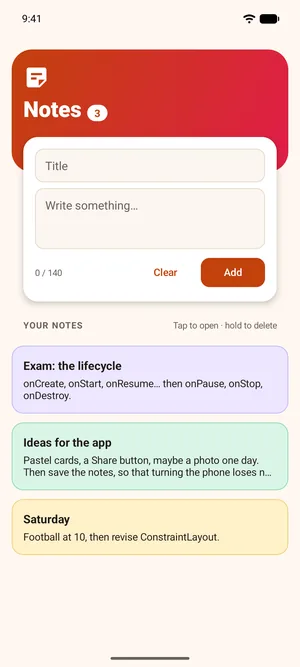
class MainActivity : ComponentActivity() { override fun onCreate(savedInstanceState: Bundle?) { super.onCreate(savedInstanceState) enableEdgeToEdge() setContent { NotesTheme { Scaffold( modifier = Modifier.fillMaxSize(), // keep the screen out of the status bar, the gesture bar and the keyboard contentWindowInsets = WindowInsets.safeDrawing ) { innerPadding -> NotesScreen(modifier = Modifier.padding(innerPadding)) } } } }}▶. You are ready when the phone shows the three seed notes and 3 in the pill.
Before you start
By the end you can
- tell a recomposition (the function called again) from a recreation (a new activity);
- show both in Logcat with a
Log.dline; - keep a typed value through a rotation with
rememberSaveable.
- Kotlin MainActivity.kt · NotesScreen.kt
- Logcat
- Emulator
Step 1 of 4
Write a line when the activity is created
Goal Make your activity write “Main onCreate” to Logcat, then show only your lines.
- Kotlin kotlin+java › com.yourname.notes › MainActivity.kt
- Logcat package:mine tag:Lifecycle
-
Paste The import, at the top of the file.
- In the Project window, open kotlin+java › com.yourname.notes › MainActivity (the tree hides the
.ktof a file that holds one class). - On the panel below, find After line 3, then click Copy 1 line.
- In
MainActivity.kt, click at the end of line 3,import android.os.Bundle, press Enter, then Ctrl+V.
package com.yourname.notes
import android.os.Bundleimport android.util.Logimport androidx.activity.ComponentActivityimport androidx.activity.compose.setContentimport androidx.activity.enableEdgeToEdgeimport androidx.compose.foundation.layout.WindowInsetsimport androidx.compose.foundation.layout.fillMaxSizeimport androidx.compose.foundation.layout.paddingimport androidx.compose.foundation.layout.safeDrawingimport androidx.compose.material3.Scaffoldimport androidx.compose.ui.Modifierimport com.yourname.notes.ui.theme.NotesTheme
class MainActivity : ComponentActivity() { override fun onCreate(savedInstanceState: Bundle?) { super.onCreate(savedInstanceState) enableEdgeToEdge() setContent { NotesTheme { Scaffold( modifier = Modifier.fillMaxSize(), // keep the screen out of the status bar, the gesture bar and the keyboard contentWindowInsets = WindowInsets.safeDrawing ) { innerPadding -> NotesScreen(modifier = Modifier.padding(innerPadding)) } } } }} - In the Project window, open kotlin+java › com.yourname.notes › MainActivity (the tree hides the
-
Type One line for Logcat, in
onCreate.- Click at the end of line 18,
super.onCreate(savedInstanceState), then press Enter. - Type line 19:
Log.d("Lifecycle", "Main onCreate"). No;at the end: Kotlin does without.
package com.yourname.notes
import android.os.Bundleimport android.util.Logimport androidx.activity.ComponentActivityimport androidx.activity.compose.setContentimport androidx.activity.enableEdgeToEdgeimport androidx.compose.foundation.layout.WindowInsetsimport androidx.compose.foundation.layout.fillMaxSizeimport androidx.compose.foundation.layout.paddingimport androidx.compose.foundation.layout.safeDrawingimport androidx.compose.material3.Scaffoldimport androidx.compose.ui.Modifierimport com.yourname.notes.ui.theme.NotesTheme
class MainActivity : ComponentActivity() { override fun onCreate(savedInstanceState: Bundle?) { super.onCreate(savedInstanceState) Log.d("Lifecycle", "Main onCreate") enableEdgeToEdge() setContent { NotesTheme { Scaffold( modifier = Modifier.fillMaxSize(), // keep the screen out of the status bar, the gesture bar and the keyboard contentWindowInsets = WindowInsets.safeDrawing ) { innerPadding -> NotesScreen(modifier = Modifier.padding(innerPadding)) } } } }}The same tag and message as Lab 1, Part 5: the same Logcat filter shows them.
- Click at the end of line 18,
-
The app runs, and Logcat shows only your lines.
- Click ▶ Run 'app' in the toolbar (↻ Rerun if the app already runs).
- Open ViewTool WindowsLogcat: Logcat opens at the bottom of the window.
- If the query field holds only
package:mine, click right after it, then type a space andtag:Lifecycle.

- The query field:
package:mine tag:Lifecycle. - The process number:
7837here; yours differs. - Your message:
Main onCreate.
Done I see one line, “Main onCreate”.
Stuck? 2 symptoms · the file
Logis red The import is missing. Do action a again, or clickLog, press Alt+Enter, then choose the import ofandroid.util.Log.- No line appears Check the query,
package:mine tag:Lifecycle, and the device menu at its left: Pixel 7 (emulator-5554) Android 17, API 37.0.
Behind? The files at the end of this step
package com.yourname.notes
import android.os.Bundleimport android.util.Logimport androidx.activity.ComponentActivityimport androidx.activity.compose.setContentimport androidx.activity.enableEdgeToEdgeimport androidx.compose.foundation.layout.WindowInsetsimport androidx.compose.foundation.layout.fillMaxSizeimport androidx.compose.foundation.layout.paddingimport androidx.compose.foundation.layout.safeDrawingimport androidx.compose.material3.Scaffoldimport androidx.compose.ui.Modifierimport com.yourname.notes.ui.theme.NotesTheme
class MainActivity : ComponentActivity() { override fun onCreate(savedInstanceState: Bundle?) { super.onCreate(savedInstanceState) Log.d("Lifecycle", "Main onCreate") enableEdgeToEdge() setContent { NotesTheme { Scaffold( modifier = Modifier.fillMaxSize(), // keep the screen out of the status bar, the gesture bar and the keyboard contentWindowInsets = WindowInsets.safeDrawing ) { innerPadding -> NotesScreen(modifier = Modifier.padding(innerPadding)) } } } }}Step 2 of 4
Write a line each time NotesScreen draws
Goal See Compose call NotesScreen again at each letter, while the activity stays the same.
- Kotlin kotlin+java › com.yourname.notes › NotesScreen.kt
- Logcat package:mine tag:Lifecycle
- Emulator Running Devices
-
Paste The import, at the top of
NotesScreen.kt.- Open kotlin+java › com.yourname.notes › NotesScreen.kt.
- On the panel below, find After line 2, then click Copy 1 line.
- Click in the empty line 2, press Enter, then Ctrl+V.
package com.yourname.notes
import android.util.Logimport android.widget.Toastimport androidx.compose.foundation.Imageimport androidx.compose.foundation.backgroundimport androidx.compose.foundation.borderimport androidx.compose.foundation.combinedClickableimport androidx.compose.foundation.layout.Boximport androidx.compose.foundation.layout.Columnimport androidx.compose.foundation.layout.PaddingValuesimport androidx.compose.foundation.layout.Rowimport androidx.compose.foundation.layout.fillMaxSizeimport androidx.compose.foundation.layout.fillMaxWidthimport androidx.compose.foundation.layout.heightimport androidx.compose.foundation.layout.paddingimport androidx.compose.foundation.layout.sizeimport androidx.compose.foundation.layout.widthimport androidx.compose.foundation.lazy.LazyColumnimport androidx.compose.foundation.lazy.itemsimport androidx.compose.foundation.shape.RoundedCornerShapeimport androidx.compose.foundation.text.BasicTextFieldimport androidx.compose.foundation.text.KeyboardOptionsimport androidx.compose.material3.Buttonimport androidx.compose.material3.MaterialThemeimport androidx.compose.material3.Textimport androidx.compose.material3.TextButtonimport androidx.compose.runtime.Composableimport androidx.compose.runtime.getValueimport androidx.compose.runtime.keyimport androidx.compose.runtime.mutableIntStateOfimport androidx.compose.runtime.mutableStateOfimport androidx.compose.runtime.rememberimport androidx.compose.runtime.setValueimport androidx.compose.runtime.toMutableStateListimport androidx.compose.ui.Alignmentimport androidx.compose.ui.Modifierimport androidx.compose.ui.draw.clipimport androidx.compose.ui.draw.shadowimport androidx.compose.ui.graphics.Brushimport androidx.compose.ui.graphics.SolidColorimport androidx.compose.ui.platform.LocalContextimport androidx.compose.ui.res.painterResourceimport androidx.compose.ui.text.font.FontWeightimport androidx.compose.ui.text.input.ImeActionimport androidx.compose.ui.text.input.KeyboardCapitalizationimport androidx.compose.ui.text.style.TextAlignimport androidx.compose.ui.text.style.TextOverflowimport androidx.compose.ui.tooling.preview.Previewimport androidx.compose.ui.unit.dpimport androidx.compose.ui.unit.emimport androidx.compose.ui.unit.spimport com.yourname.notes.ui.theme.Brandimport com.yourname.notes.ui.theme.CardWhiteimport com.yourname.notes.ui.theme.ErrorRedimport com.yourname.notes.ui.theme.Fieldimport com.yourname.notes.ui.theme.HeaderEndimport com.yourname.notes.ui.theme.Inkimport com.yourname.notes.ui.theme.Lineimport com.yourname.notes.ui.theme.Mutedimport com.yourname.notes.ui.theme.NoteButterimport com.yourname.notes.ui.theme.NoteButterLineimport com.yourname.notes.ui.theme.NoteLavenderimport com.yourname.notes.ui.theme.NoteLavenderLineimport com.yourname.notes.ui.theme.NoteMintimport com.yourname.notes.ui.theme.NoteMintLineimport com.yourname.notes.ui.theme.NotePeachimport com.yourname.notes.ui.theme.NotePeachLineimport com.yourname.notes.ui.theme.NotesThemeimport com.yourname.notes.ui.theme.OnBrand
// One note: what the screen draws a card fromdata class Note(val title: String, val body: String, val colour: Int)
// The four pastels, in creation order: butter, mint, lavender, peachval NoteFills = listOf(NoteButter, NoteMint, NoteLavender, NotePeach)val NoteLines = listOf(NoteButterLine, NoteMintLine, NoteLavenderLine, NotePeachLine)
// Lab 1's three seed notes, newest first (colours 2, 1, 0: lavender, mint, butter)val SeedNotes = listOf( Note("Exam: the lifecycle", "onCreate, onStart, onResume… then onPause, onStop, onDestroy.", 2), Note( "Ideas for the app", "Pastel cards, a Share button, maybe a photo one day. Then save the notes, so that turning the phone loses nothing.", 1 ), Note("Saturday", "Football at 10, then revise ConstraintLayout.", 0))
@Composablefun NotesScreen(modifier: Modifier = Modifier) { val context = LocalContext.current val notes = remember { SeedNotes.toMutableStateList() } var added by remember { mutableIntStateOf(3) } // the seeds used colours 0, 1, 2 var title by remember { mutableStateOf("") } var body by remember { mutableStateOf("") } var showError by remember { mutableStateOf(false) }
Column(modifier = modifier.fillMaxSize()) { Box { // The header: a gradient with round corners Column( modifier = Modifier .padding(16.dp) .fillMaxWidth() .height(168.dp) .clip(RoundedCornerShape(28.dp)) .background(Brush.linearGradient(listOf(Brand, HeaderEnd))) .padding(start = 16.dp, top = 20.dp) ) { Image( painter = painterResource(R.drawable.ic_notes), contentDescription = "Notes logo", modifier = Modifier.size(36.dp) ) Row(modifier = Modifier.padding(top = 4.dp)) { Text( text = "Notes", color = OnBrand, fontSize = 30.sp, fontWeight = FontWeight.Black, modifier = Modifier.alignByBaseline() ) Text( text = "${notes.size}", color = Brand, fontSize = 14.sp, fontWeight = FontWeight.Bold, modifier = Modifier .padding(start = 8.dp) .alignByBaseline() .background(CardWhite, RoundedCornerShape(12.dp)) .padding(horizontal = 10.dp, vertical = 2.dp) ) } }
// The composer: a white card that overlaps the header Column( modifier = Modifier .padding(start = 32.dp, top = 136.dp, end = 32.dp) .fillMaxWidth() .shadow(6.dp, RoundedCornerShape(20.dp)) .background(CardWhite) .padding(16.dp) ) { NotesField( value = title, onValueChange = { title = it if (it.isNotEmpty()) showError = false }, hint = "Title", singleLine = true ) NotesField( value = body, onValueChange = { body = it.take(140) }, // input stops at 140, as Lab 1's maxLength hint = "Write something…", minLines = 3, modifier = Modifier.padding(top = 8.dp) ) if (showError) { Text( text = "Give your note a title first.", color = ErrorRed, fontSize = 14.sp, modifier = Modifier.padding(top = 8.dp) ) } Row( modifier = Modifier.padding(top = 8.dp), verticalAlignment = Alignment.CenterVertically ) { Text( text = "${body.length} / 140", color = if (body.length >= 120) ErrorRed else Muted, fontSize = 12.sp, modifier = Modifier.weight(1f) ) TextButton( onClick = { title = "" body = "" }, modifier = Modifier.width(88.dp) ) { Text("Clear") } Button( onClick = { if (title.isBlank()) { showError = true } else { notes.add(0, Note(title.trim(), body.trim(), added % 4)) added++ title = "" body = "" showError = false Toast.makeText(context, "Note added", Toast.LENGTH_SHORT).show() } }, shape = RoundedCornerShape(12.dp), modifier = Modifier .padding(start = 4.dp) .width(88.dp) ) { Text("Add") } } } }
// The list's title, and its hint on the right Row(modifier = Modifier.padding(start = 32.dp, top = 24.dp, end = 32.dp)) { Text( text = "YOUR NOTES", color = Muted, fontSize = 12.sp, fontWeight = FontWeight.Bold, letterSpacing = 0.1.em, modifier = Modifier.alignByBaseline() ) Text( text = "Tap to open · hold to delete", color = Muted, fontSize = 12.sp, textAlign = TextAlign.End, modifier = Modifier .padding(start = 16.dp) .weight(1f) .alignByBaseline() ) }
if (notes.isEmpty()) { Text( text = "No notes yet.\nWrite your first one above.", color = Muted, fontSize = 16.sp, textAlign = TextAlign.Center, modifier = Modifier .align(Alignment.CenterHorizontally) .padding(top = 56.dp) ) }
// The cards, newest on top; only those that fit are drawn LazyColumn( modifier = Modifier .weight(1f) .padding(top = 8.dp), contentPadding = PaddingValues(start = 16.dp, end = 16.dp, bottom = 16.dp) ) { items(notes) { note -> key(note) { // this card belongs to this note: the card below does not inherit its pressed look NoteCard( note = note, onLongClick = { notes.remove(note) Toast.makeText(context, "Note deleted", Toast.LENGTH_SHORT).show() } ) } } } }}
// Lab 1's style NotesField, as a function: the same look for both text fields@Composablefun NotesField( value: String, onValueChange: (String) -> Unit, hint: String, modifier: Modifier = Modifier, singleLine: Boolean = false, minLines: Int = 1) { BasicTextField( value = value, onValueChange = onValueChange, modifier = modifier .fillMaxWidth() .background(Field, RoundedCornerShape(12.dp)) .border(1.dp, Line, RoundedCornerShape(12.dp)) .padding(horizontal = 14.dp, vertical = 12.dp), textStyle = MaterialTheme.typography.bodyLarge.copy(color = Ink), singleLine = singleLine, minLines = minLines, keyboardOptions = KeyboardOptions( capitalization = KeyboardCapitalization.Sentences, imeAction = if (singleLine) ImeAction.Next else ImeAction.Default ), cursorBrush = SolidColor(Brand), decorationBox = { innerTextField -> Box { if (value.isEmpty()) { Text(text = hint, color = Muted) } innerTextField() } } )}
// One card: hold it to delete it@Composablefun NoteCard(note: Note, onLongClick: () -> Unit) { Column( modifier = Modifier .padding(top = 12.dp) .fillMaxWidth() .clip(RoundedCornerShape(16.dp)) .background(NoteFills[note.colour]) .border(1.dp, NoteLines[note.colour], RoundedCornerShape(16.dp)) .combinedClickable(onClick = { }, onLongClick = onLongClick) .padding(16.dp) ) { Text( text = note.title, color = Ink, fontSize = 16.sp, fontWeight = FontWeight.Bold ) if (note.body.isNotEmpty()) { Text( text = note.body, color = Ink, fontSize = 14.sp, maxLines = 2, overflow = TextOverflow.Ellipsis, modifier = Modifier.padding(top = 4.dp) ) } }}
@Preview(showBackground = true)@Composablefun NoteCardPreview() { NotesTheme { NoteCard(note = SeedNotes[1], onLongClick = { }) }}
@Preview(showBackground = true)@Composablefun NotesScreenPreview() { NotesTheme { NotesScreen() }} -
Type One line, the first of
NotesScreen.- Click at the end of line 91,
fun NotesScreen(modifier: Modifier = Modifier) {, then press Enter. - Type line 92:
Log.d("Lifecycle", "NotesScreen draws")
package com.yourname.notes
import android.util.Logimport android.widget.Toastimport androidx.compose.foundation.Imageimport androidx.compose.foundation.backgroundimport androidx.compose.foundation.borderimport androidx.compose.foundation.combinedClickableimport androidx.compose.foundation.layout.Boximport androidx.compose.foundation.layout.Columnimport androidx.compose.foundation.layout.PaddingValuesimport androidx.compose.foundation.layout.Rowimport androidx.compose.foundation.layout.fillMaxSizeimport androidx.compose.foundation.layout.fillMaxWidthimport androidx.compose.foundation.layout.heightimport androidx.compose.foundation.layout.paddingimport androidx.compose.foundation.layout.sizeimport androidx.compose.foundation.layout.widthimport androidx.compose.foundation.lazy.LazyColumnimport androidx.compose.foundation.lazy.itemsimport androidx.compose.foundation.shape.RoundedCornerShapeimport androidx.compose.foundation.text.BasicTextFieldimport androidx.compose.foundation.text.KeyboardOptionsimport androidx.compose.material3.Buttonimport androidx.compose.material3.MaterialThemeimport androidx.compose.material3.Textimport androidx.compose.material3.TextButtonimport androidx.compose.runtime.Composableimport androidx.compose.runtime.getValueimport androidx.compose.runtime.keyimport androidx.compose.runtime.mutableIntStateOfimport androidx.compose.runtime.mutableStateOfimport androidx.compose.runtime.rememberimport androidx.compose.runtime.setValueimport androidx.compose.runtime.toMutableStateListimport androidx.compose.ui.Alignmentimport androidx.compose.ui.Modifierimport androidx.compose.ui.draw.clipimport androidx.compose.ui.draw.shadowimport androidx.compose.ui.graphics.Brushimport androidx.compose.ui.graphics.SolidColorimport androidx.compose.ui.platform.LocalContextimport androidx.compose.ui.res.painterResourceimport androidx.compose.ui.text.font.FontWeightimport androidx.compose.ui.text.input.ImeActionimport androidx.compose.ui.text.input.KeyboardCapitalizationimport androidx.compose.ui.text.style.TextAlignimport androidx.compose.ui.text.style.TextOverflowimport androidx.compose.ui.tooling.preview.Previewimport androidx.compose.ui.unit.dpimport androidx.compose.ui.unit.emimport androidx.compose.ui.unit.spimport com.yourname.notes.ui.theme.Brandimport com.yourname.notes.ui.theme.CardWhiteimport com.yourname.notes.ui.theme.ErrorRedimport com.yourname.notes.ui.theme.Fieldimport com.yourname.notes.ui.theme.HeaderEndimport com.yourname.notes.ui.theme.Inkimport com.yourname.notes.ui.theme.Lineimport com.yourname.notes.ui.theme.Mutedimport com.yourname.notes.ui.theme.NoteButterimport com.yourname.notes.ui.theme.NoteButterLineimport com.yourname.notes.ui.theme.NoteLavenderimport com.yourname.notes.ui.theme.NoteLavenderLineimport com.yourname.notes.ui.theme.NoteMintimport com.yourname.notes.ui.theme.NoteMintLineimport com.yourname.notes.ui.theme.NotePeachimport com.yourname.notes.ui.theme.NotePeachLineimport com.yourname.notes.ui.theme.NotesThemeimport com.yourname.notes.ui.theme.OnBrand
// One note: what the screen draws a card fromdata class Note(val title: String, val body: String, val colour: Int)
// The four pastels, in creation order: butter, mint, lavender, peachval NoteFills = listOf(NoteButter, NoteMint, NoteLavender, NotePeach)val NoteLines = listOf(NoteButterLine, NoteMintLine, NoteLavenderLine, NotePeachLine)
// Lab 1's three seed notes, newest first (colours 2, 1, 0: lavender, mint, butter)val SeedNotes = listOf(    Note("Exam: the lifecycle", "onCreate, onStart, onResume… then onPause, onStop, onDestroy.", 2),    Note(        "Ideas for the app",        "Pastel cards, a Share button, maybe a photo one day. Then save the notes, so that turning the phone loses nothing.",        1    ),    Note("Saturday", "Football at 10, then revise ConstraintLayout.", 0))
@Composablefun NotesScreen(modifier: Modifier = Modifier) {    Log.d("Lifecycle", "NotesScreen draws")    val context = LocalContext.current    val notes = remember { SeedNotes.toMutableStateList() }    var added by remember { mutableIntStateOf(3) }   // the seeds used colours 0, 1, 2    var title by remember { mutableStateOf("") }    var body by remember { mutableStateOf("") }    var showError by remember { mutableStateOf(false) }
    Column(modifier = modifier.fillMaxSize()) {        Box {            // The header: a gradient with round corners            Column(                modifier = Modifier                    .padding(16.dp)                    .fillMaxWidth()                    .height(168.dp)                    .clip(RoundedCornerShape(28.dp))                    .background(Brush.linearGradient(listOf(Brand, HeaderEnd)))                    .padding(start = 16.dp, top = 20.dp)            ) {                Image(                    painter = painterResource(R.drawable.ic_notes),                    contentDescription = "Notes logo",                    modifier = Modifier.size(36.dp)                )                Row(modifier = Modifier.padding(top = 4.dp)) {                    Text(                        text = "Notes",                        color = OnBrand,                        fontSize = 30.sp,                        fontWeight = FontWeight.Black,                        modifier = Modifier.alignByBaseline()                    )                    Text(                        text = "${notes.size}",                        color = Brand,                        fontSize = 14.sp,                        fontWeight = FontWeight.Bold,                        modifier = Modifier                            .padding(start = 8.dp)                            .alignByBaseline()                            .background(CardWhite, RoundedCornerShape(12.dp))                            .padding(horizontal = 10.dp, vertical = 2.dp)                    )                }            }
            // The composer: a white card that overlaps the header            Column(                modifier = Modifier                    .padding(start = 32.dp, top = 136.dp, end = 32.dp)                    .fillMaxWidth()                    .shadow(6.dp, RoundedCornerShape(20.dp))                    .background(CardWhite)                    .padding(16.dp)            ) {                NotesField(                    value = title,                    onValueChange = {                        title = it                        if (it.isNotEmpty()) showError = false                    },                    hint = "Title",                    singleLine = true                )                NotesField(                    value = body,                    onValueChange = { body = it.take(140) },   // input stops at 140, as Lab 1's maxLength                    hint = "Write something…",                    minLines = 3,                    modifier = Modifier.padding(top = 8.dp)                )                if (showError) {                    Text(                        text = "Give your note a title first.",                        color = ErrorRed,                        fontSize = 14.sp,                        modifier = Modifier.padding(top = 8.dp)                    )                }                Row(                    modifier = Modifier.padding(top = 8.dp),                    verticalAlignment = Alignment.CenterVertically                ) {                    Text(                        text = "${body.length} / 140",                        color = if (body.length >= 120) ErrorRed else Muted,                        fontSize = 12.sp,                        modifier = Modifier.weight(1f)                    )                    TextButton(                        onClick = {                            title = ""                            body = ""                        },                        modifier = Modifier.width(88.dp)                    ) {                        Text("Clear")                    }                    Button(                        onClick = {                            if (title.isBlank()) {                                showError = true                            } else {                                notes.add(0, Note(title.trim(), body.trim(), added % 4))                                added++                                title = ""                                body = ""                                showError = false                                Toast.makeText(context, "Note added", Toast.LENGTH_SHORT).show()                            }                        },                        shape = RoundedCornerShape(12.dp),                        modifier = Modifier                            .padding(start = 4.dp)                            .width(88.dp)                    ) {                        Text("Add")                    }                }            }        }
        // The list's title, and its hint on the right        Row(modifier = Modifier.padding(start = 32.dp, top = 24.dp, end = 32.dp)) {            Text(                text = "YOUR NOTES",                color = Muted,                fontSize = 12.sp,                fontWeight = FontWeight.Bold,                letterSpacing = 0.1.em,                modifier = Modifier.alignByBaseline()            )            Text(                text = "Tap to open · hold to delete",                color = Muted,                fontSize = 12.sp,                textAlign = TextAlign.End,                modifier = Modifier                    .padding(start = 16.dp)                    .weight(1f)                    .alignByBaseline()            )        }
        if (notes.isEmpty()) {            Text(                text = "No notes yet.\nWrite your first one above.",                color = Muted,                fontSize = 16.sp,                textAlign = TextAlign.Center,                modifier = Modifier                    .align(Alignment.CenterHorizontally)                    .padding(top = 56.dp)            )        }
        // The cards, newest on top; only those that fit are drawn        LazyColumn(            modifier = Modifier                .weight(1f)                .padding(top = 8.dp),            contentPadding = PaddingValues(start = 16.dp, end = 16.dp, bottom = 16.dp)        ) {            items(notes) { note ->                key(note) {   // this card belongs to this note: the card below does not inherit its pressed look                    NoteCard(                        note = note,                        onLongClick = {                            notes.remove(note)                            Toast.makeText(context, "Note deleted", Toast.LENGTH_SHORT).show()                        }                    )                }            }        }    }}
// Lab 1's style NotesField, as a function: the same look for both text fields@Composablefun NotesField(    value: String,    onValueChange: (String) -> Unit,    hint: String,    modifier: Modifier = Modifier,    singleLine: Boolean = false,    minLines: Int = 1) {    BasicTextField(        value = value,        onValueChange = onValueChange,        modifier = modifier            .fillMaxWidth()            .background(Field, RoundedCornerShape(12.dp))            .border(1.dp, Line, RoundedCornerShape(12.dp))            .padding(horizontal = 14.dp, vertical = 12.dp),        textStyle = MaterialTheme.typography.bodyLarge.copy(color = Ink),        singleLine = singleLine,        minLines = minLines,        keyboardOptions = KeyboardOptions(            capitalization = KeyboardCapitalization.Sentences,            imeAction = if (singleLine) ImeAction.Next else ImeAction.Default        ),        cursorBrush = SolidColor(Brand),        decorationBox = { innerTextField ->            Box {                if (value.isEmpty()) {                    Text(text = hint, color = Muted)                }                innerTextField()            }        }    )}
// One card: hold it to delete it@Composablefun NoteCard(note: Note, onLongClick: () -> Unit) {    Column(        modifier = Modifier            .padding(top = 12.dp)            .fillMaxWidth()            .clip(RoundedCornerShape(16.dp))            .background(NoteFills[note.colour])            .border(1.dp, NoteLines[note.colour], RoundedCornerShape(16.dp))            .combinedClickable(onClick = { }, onLongClick = onLongClick)            .padding(16.dp)    ) {        Text(            text = note.title,            color = Ink,            fontSize = 16.sp,            fontWeight = FontWeight.Bold        )        if (note.body.isNotEmpty()) {            Text(                text = note.body,                color = Ink,                fontSize = 14.sp,                maxLines = 2,                overflow = TextOverflow.Ellipsis,                modifier = Modifier.padding(top = 4.dp)            )        }    }}
@Preview(showBackground = true)@Composablefun NoteCardPreview() {    NotesTheme {        NoteCard(note = SeedNotes[1], onLongClick = { })    }}
@Preview(showBackground = true)@Composablefun NotesScreenPreview() { NotesTheme { NotesScreen() }} - Click at the end of line 91,
-
The app again, then a word typed.
- Click ↻ Rerun in the toolbar.
- In Logcat, click the trash icon at the top of its left column: Clear Logcat.
- On the phone, tap Title, then type
Groceries. Do not tap Add yet.
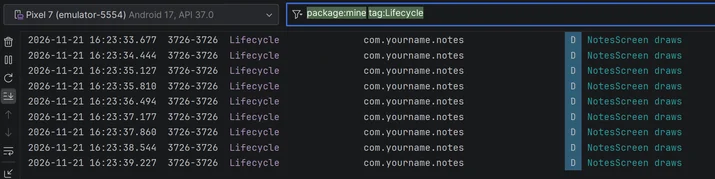
- One
NotesScreen drawsline per letter ofGroceries. - The same process number on every line: the same app, the same activity.
Why A letter changes title, a state NotesScreen reads: Compose calls the function again. A recomposition, not a new activity: no Main onCreate.
Done I see one “NotesScreen draws” line per letter, and no new “Main onCreate”.
Stuck? 3 symptoms · the file
Logis red The import is missing in this file too. Do action a again.- Fewer lines than letters Two letters that reach the phone in the same frame give one call; a paste gives one line. Clear Logcat, then type the word again, one letter at a time.
- No “NotesScreen draws” line The phone still runs the old code: click ↻ Rerun, then type again.
Behind? The files at the end of this step
package com.yourname.notes
import android.util.Logimport android.widget.Toastimport androidx.compose.foundation.Imageimport androidx.compose.foundation.backgroundimport androidx.compose.foundation.borderimport androidx.compose.foundation.combinedClickableimport androidx.compose.foundation.layout.Boximport androidx.compose.foundation.layout.Columnimport androidx.compose.foundation.layout.PaddingValuesimport androidx.compose.foundation.layout.Rowimport androidx.compose.foundation.layout.fillMaxSizeimport androidx.compose.foundation.layout.fillMaxWidthimport androidx.compose.foundation.layout.heightimport androidx.compose.foundation.layout.paddingimport androidx.compose.foundation.layout.sizeimport androidx.compose.foundation.layout.widthimport androidx.compose.foundation.lazy.LazyColumnimport androidx.compose.foundation.lazy.itemsimport androidx.compose.foundation.shape.RoundedCornerShapeimport androidx.compose.foundation.text.BasicTextFieldimport androidx.compose.foundation.text.KeyboardOptionsimport androidx.compose.material3.Buttonimport androidx.compose.material3.MaterialThemeimport androidx.compose.material3.Textimport androidx.compose.material3.TextButtonimport androidx.compose.runtime.Composableimport androidx.compose.runtime.getValueimport androidx.compose.runtime.keyimport androidx.compose.runtime.mutableIntStateOfimport androidx.compose.runtime.mutableStateOfimport androidx.compose.runtime.rememberimport androidx.compose.runtime.setValueimport androidx.compose.runtime.toMutableStateListimport androidx.compose.ui.Alignmentimport androidx.compose.ui.Modifierimport androidx.compose.ui.draw.clipimport androidx.compose.ui.draw.shadowimport androidx.compose.ui.graphics.Brushimport androidx.compose.ui.graphics.SolidColorimport androidx.compose.ui.platform.LocalContextimport androidx.compose.ui.res.painterResourceimport androidx.compose.ui.text.font.FontWeightimport androidx.compose.ui.text.input.ImeActionimport androidx.compose.ui.text.input.KeyboardCapitalizationimport androidx.compose.ui.text.style.TextAlignimport androidx.compose.ui.text.style.TextOverflowimport androidx.compose.ui.tooling.preview.Previewimport androidx.compose.ui.unit.dpimport androidx.compose.ui.unit.emimport androidx.compose.ui.unit.spimport com.yourname.notes.ui.theme.Brandimport com.yourname.notes.ui.theme.CardWhiteimport com.yourname.notes.ui.theme.ErrorRedimport com.yourname.notes.ui.theme.Fieldimport com.yourname.notes.ui.theme.HeaderEndimport com.yourname.notes.ui.theme.Inkimport com.yourname.notes.ui.theme.Lineimport com.yourname.notes.ui.theme.Mutedimport com.yourname.notes.ui.theme.NoteButterimport com.yourname.notes.ui.theme.NoteButterLineimport com.yourname.notes.ui.theme.NoteLavenderimport com.yourname.notes.ui.theme.NoteLavenderLineimport com.yourname.notes.ui.theme.NoteMintimport com.yourname.notes.ui.theme.NoteMintLineimport com.yourname.notes.ui.theme.NotePeachimport com.yourname.notes.ui.theme.NotePeachLineimport com.yourname.notes.ui.theme.NotesThemeimport com.yourname.notes.ui.theme.OnBrand
// One note: what the screen draws a card fromdata class Note(val title: String, val body: String, val colour: Int)
// The four pastels, in creation order: butter, mint, lavender, peachval NoteFills = listOf(NoteButter, NoteMint, NoteLavender, NotePeach)val NoteLines = listOf(NoteButterLine, NoteMintLine, NoteLavenderLine, NotePeachLine)
// Lab 1's three seed notes, newest first (colours 2, 1, 0: lavender, mint, butter)val SeedNotes = listOf( Note("Exam: the lifecycle", "onCreate, onStart, onResume… then onPause, onStop, onDestroy.", 2), Note( "Ideas for the app", "Pastel cards, a Share button, maybe a photo one day. Then save the notes, so that turning the phone loses nothing.", 1 ), Note("Saturday", "Football at 10, then revise ConstraintLayout.", 0))
@Composablefun NotesScreen(modifier: Modifier = Modifier) { Log.d("Lifecycle", "NotesScreen draws") val context = LocalContext.current val notes = remember { SeedNotes.toMutableStateList() } var added by remember { mutableIntStateOf(3) } // the seeds used colours 0, 1, 2 var title by remember { mutableStateOf("") } var body by remember { mutableStateOf("") } var showError by remember { mutableStateOf(false) }
Column(modifier = modifier.fillMaxSize()) { Box { // The header: a gradient with round corners Column( modifier = Modifier .padding(16.dp) .fillMaxWidth() .height(168.dp) .clip(RoundedCornerShape(28.dp)) .background(Brush.linearGradient(listOf(Brand, HeaderEnd))) .padding(start = 16.dp, top = 20.dp) ) { Image( painter = painterResource(R.drawable.ic_notes), contentDescription = "Notes logo", modifier = Modifier.size(36.dp) ) Row(modifier = Modifier.padding(top = 4.dp)) { Text( text = "Notes", color = OnBrand, fontSize = 30.sp, fontWeight = FontWeight.Black, modifier = Modifier.alignByBaseline() ) Text( text = "${notes.size}", color = Brand, fontSize = 14.sp, fontWeight = FontWeight.Bold, modifier = Modifier .padding(start = 8.dp) .alignByBaseline() .background(CardWhite, RoundedCornerShape(12.dp)) .padding(horizontal = 10.dp, vertical = 2.dp) ) } }
// The composer: a white card that overlaps the header Column( modifier = Modifier .padding(start = 32.dp, top = 136.dp, end = 32.dp) .fillMaxWidth() .shadow(6.dp, RoundedCornerShape(20.dp)) .background(CardWhite) .padding(16.dp) ) { NotesField( value = title, onValueChange = { title = it if (it.isNotEmpty()) showError = false }, hint = "Title", singleLine = true ) NotesField( value = body, onValueChange = { body = it.take(140) }, // input stops at 140, as Lab 1's maxLength hint = "Write something…", minLines = 3, modifier = Modifier.padding(top = 8.dp) ) if (showError) { Text( text = "Give your note a title first.", color = ErrorRed, fontSize = 14.sp, modifier = Modifier.padding(top = 8.dp) ) } Row( modifier = Modifier.padding(top = 8.dp), verticalAlignment = Alignment.CenterVertically ) { Text( text = "${body.length} / 140", color = if (body.length >= 120) ErrorRed else Muted, fontSize = 12.sp, modifier = Modifier.weight(1f) ) TextButton( onClick = { title = "" body = "" }, modifier = Modifier.width(88.dp) ) { Text("Clear") } Button( onClick = { if (title.isBlank()) { showError = true } else { notes.add(0, Note(title.trim(), body.trim(), added % 4)) added++ title = "" body = "" showError = false Toast.makeText(context, "Note added", Toast.LENGTH_SHORT).show() } }, shape = RoundedCornerShape(12.dp), modifier = Modifier .padding(start = 4.dp) .width(88.dp) ) { Text("Add") } } } }
// The list's title, and its hint on the right Row(modifier = Modifier.padding(start = 32.dp, top = 24.dp, end = 32.dp)) { Text( text = "YOUR NOTES", color = Muted, fontSize = 12.sp, fontWeight = FontWeight.Bold, letterSpacing = 0.1.em, modifier = Modifier.alignByBaseline() ) Text( text = "Tap to open · hold to delete", color = Muted, fontSize = 12.sp, textAlign = TextAlign.End, modifier = Modifier .padding(start = 16.dp) .weight(1f) .alignByBaseline() ) }
if (notes.isEmpty()) { Text( text = "No notes yet.\nWrite your first one above.", color = Muted, fontSize = 16.sp, textAlign = TextAlign.Center, modifier = Modifier .align(Alignment.CenterHorizontally) .padding(top = 56.dp) ) }
// The cards, newest on top; only those that fit are drawn LazyColumn( modifier = Modifier .weight(1f) .padding(top = 8.dp), contentPadding = PaddingValues(start = 16.dp, end = 16.dp, bottom = 16.dp) ) { items(notes) { note -> key(note) { // this card belongs to this note: the card below does not inherit its pressed look NoteCard( note = note, onLongClick = { notes.remove(note) Toast.makeText(context, "Note deleted", Toast.LENGTH_SHORT).show() } ) } } } }}
// Lab 1's style NotesField, as a function: the same look for both text fields@Composablefun NotesField( value: String, onValueChange: (String) -> Unit, hint: String, modifier: Modifier = Modifier, singleLine: Boolean = false, minLines: Int = 1) { BasicTextField( value = value, onValueChange = onValueChange, modifier = modifier .fillMaxWidth() .background(Field, RoundedCornerShape(12.dp)) .border(1.dp, Line, RoundedCornerShape(12.dp)) .padding(horizontal = 14.dp, vertical = 12.dp), textStyle = MaterialTheme.typography.bodyLarge.copy(color = Ink), singleLine = singleLine, minLines = minLines, keyboardOptions = KeyboardOptions( capitalization = KeyboardCapitalization.Sentences, imeAction = if (singleLine) ImeAction.Next else ImeAction.Default ), cursorBrush = SolidColor(Brand), decorationBox = { innerTextField -> Box { if (value.isEmpty()) { Text(text = hint, color = Muted) } innerTextField() } } )}
// One card: hold it to delete it@Composablefun NoteCard(note: Note, onLongClick: () -> Unit) { Column( modifier = Modifier .padding(top = 12.dp) .fillMaxWidth() .clip(RoundedCornerShape(16.dp)) .background(NoteFills[note.colour]) .border(1.dp, NoteLines[note.colour], RoundedCornerShape(16.dp)) .combinedClickable(onClick = { }, onLongClick = onLongClick) .padding(16.dp) ) { Text( text = note.title, color = Ink, fontSize = 16.sp, fontWeight = FontWeight.Bold ) if (note.body.isNotEmpty()) { Text( text = note.body, color = Ink, fontSize = 14.sp, maxLines = 2, overflow = TextOverflow.Ellipsis, modifier = Modifier.padding(top = 4.dp) ) } }}
@Preview(showBackground = true)@Composablefun NoteCardPreview() { NotesTheme { NoteCard(note = SeedNotes[1], onLongClick = { }) }}
@Preview(showBackground = true)@Composablefun NotesScreenPreview() { NotesTheme { NotesScreen() }}Step 3 of 4
Turn the phone: predict what stays
Goal Predict what a rotation keeps, then check on the phone and in Logcat.
- Emulator Running Devices
- Logcat package:mine tag:Lifecycle
Predict first
You will type Half in Title, then turn the phone and back. What will Title show?
See the answer
Empty. The rotation creates a new activity, so remember starts again from "". The seeds come back, as in Lab 1.
-
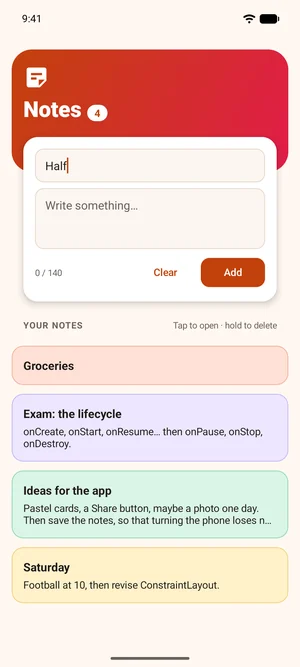
Groceries added, and a title half typed.
- On the phone, tap Add:
Groceriesjoins the list, and the pill says 4. - Tap Title, then type
Half, without tapping Add. - Close the keyboard with its down arrow, at the bottom left of the phone.
- On the phone, tap Add:
-
The phone turned, then upright again.
- In Logcat, click the trash icon: Clear Logcat.
- In Running Devices, click Rotate Left: the phone turns on its side.
- Click Rotate Right: the phone stands upright again.

Main onCreateagain, once per turn: a new activity object each time.NotesScreen draws: the function’s first call for that new activity.
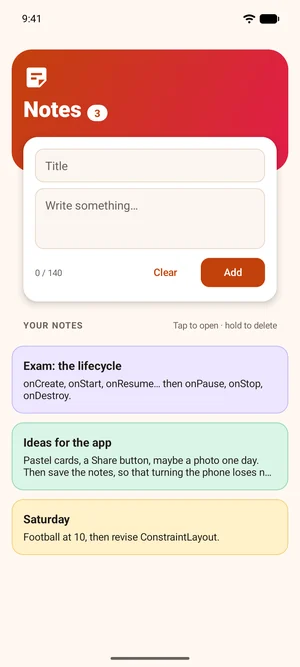
You should see Two new Main onCreate lines in Logcat, one per turn. On the phone: the 3 seeds, pill 3, and Title empty.
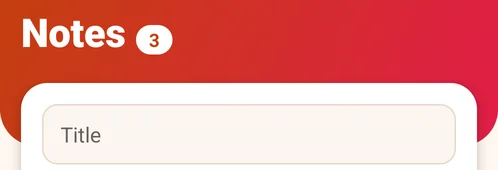
Why Turning recreated the activity: a new object, then a first call of NotesScreen. Everything remember held started again.
Done I see two new “Main onCreate” lines, the 3 seeds, pill 3, and Title empty.
Stuck? 1 symptom
- The screen does not turn Auto-rotate is off. Drag down twice from the top of the phone’s screen, then tap the rotation tile (two arrows around a phone) so it turns blue.
No file changes in this step: step 6.2 holds the files.
Step 4 of 4
Keep the title with rememberSaveable
Goal Make Title and the text survive a rotation, as Lab 1’s fields did.
- Kotlin kotlin+java › com.yourname.notes › NotesScreen.kt
- Emulator Running Devices
-
Step 6.2’s two lines, gone.
- In
NotesScreen.kt, click in line 92,Log.d("Lifecycle", "NotesScreen draws"). - Press Ctrl+Y: the line goes.
- Click in line 3,
import android.util.Log, then press Ctrl+Y.
- In
-
Paste The import of
rememberSaveable.- On the panel below, find After line 32, then click Copy 1 line.
- Click at the end of line 32,
import androidx.compose.runtime.remember, press Enter, then Ctrl+V.
package com.yourname.notes
import android.widget.Toastimport androidx.compose.foundation.Imageimport androidx.compose.foundation.backgroundimport androidx.compose.foundation.borderimport androidx.compose.foundation.combinedClickableimport androidx.compose.foundation.layout.Boximport androidx.compose.foundation.layout.Columnimport androidx.compose.foundation.layout.PaddingValuesimport androidx.compose.foundation.layout.Rowimport androidx.compose.foundation.layout.fillMaxSizeimport androidx.compose.foundation.layout.fillMaxWidthimport androidx.compose.foundation.layout.heightimport androidx.compose.foundation.layout.paddingimport androidx.compose.foundation.layout.sizeimport androidx.compose.foundation.layout.widthimport androidx.compose.foundation.lazy.LazyColumnimport androidx.compose.foundation.lazy.itemsimport androidx.compose.foundation.shape.RoundedCornerShapeimport androidx.compose.foundation.text.BasicTextFieldimport androidx.compose.foundation.text.KeyboardOptionsimport androidx.compose.material3.Buttonimport androidx.compose.material3.MaterialThemeimport androidx.compose.material3.Textimport androidx.compose.material3.TextButtonimport androidx.compose.runtime.Composableimport androidx.compose.runtime.getValueimport androidx.compose.runtime.keyimport androidx.compose.runtime.mutableIntStateOfimport androidx.compose.runtime.mutableStateOfimport androidx.compose.runtime.rememberimport androidx.compose.runtime.saveable.rememberSaveableimport androidx.compose.runtime.setValueimport androidx.compose.runtime.toMutableStateListimport androidx.compose.ui.Alignmentimport androidx.compose.ui.Modifierimport androidx.compose.ui.draw.clipimport androidx.compose.ui.draw.shadowimport androidx.compose.ui.graphics.Brushimport androidx.compose.ui.graphics.SolidColorimport androidx.compose.ui.platform.LocalContextimport androidx.compose.ui.res.painterResourceimport androidx.compose.ui.text.font.FontWeightimport androidx.compose.ui.text.input.ImeActionimport androidx.compose.ui.text.input.KeyboardCapitalizationimport androidx.compose.ui.text.style.TextAlignimport androidx.compose.ui.text.style.TextOverflowimport androidx.compose.ui.tooling.preview.Previewimport androidx.compose.ui.unit.dpimport androidx.compose.ui.unit.emimport androidx.compose.ui.unit.spimport com.yourname.notes.ui.theme.Brandimport com.yourname.notes.ui.theme.CardWhiteimport com.yourname.notes.ui.theme.ErrorRedimport com.yourname.notes.ui.theme.Fieldimport com.yourname.notes.ui.theme.HeaderEndimport com.yourname.notes.ui.theme.Inkimport com.yourname.notes.ui.theme.Lineimport com.yourname.notes.ui.theme.Mutedimport com.yourname.notes.ui.theme.NoteButterimport com.yourname.notes.ui.theme.NoteButterLineimport com.yourname.notes.ui.theme.NoteLavenderimport com.yourname.notes.ui.theme.NoteLavenderLineimport com.yourname.notes.ui.theme.NoteMintimport com.yourname.notes.ui.theme.NoteMintLineimport com.yourname.notes.ui.theme.NotePeachimport com.yourname.notes.ui.theme.NotePeachLineimport com.yourname.notes.ui.theme.NotesThemeimport com.yourname.notes.ui.theme.OnBrand
// One note: what the screen draws a card fromdata class Note(val title: String, val body: String, val colour: Int)
// The four pastels, in creation order: butter, mint, lavender, peachval NoteFills = listOf(NoteButter, NoteMint, NoteLavender, NotePeach)val NoteLines = listOf(NoteButterLine, NoteMintLine, NoteLavenderLine, NotePeachLine)
// Lab 1's three seed notes, newest first (colours 2, 1, 0: lavender, mint, butter)val SeedNotes = listOf( Note("Exam: the lifecycle", "onCreate, onStart, onResume… then onPause, onStop, onDestroy.", 2), Note( "Ideas for the app", "Pastel cards, a Share button, maybe a photo one day. Then save the notes, so that turning the phone loses nothing.", 1 ), Note("Saturday", "Football at 10, then revise ConstraintLayout.", 0))
@Composablefun NotesScreen(modifier: Modifier = Modifier) { val context = LocalContext.current val notes = remember { SeedNotes.toMutableStateList() } var added by remember { mutableIntStateOf(3) } // the seeds used colours 0, 1, 2 var title by remember { mutableStateOf("") } var body by remember { mutableStateOf("") } var showError by remember { mutableStateOf(false) }
Column(modifier = modifier.fillMaxSize()) { Box { // The header: a gradient with round corners Column( modifier = Modifier .padding(16.dp) .fillMaxWidth() .height(168.dp) .clip(RoundedCornerShape(28.dp)) .background(Brush.linearGradient(listOf(Brand, HeaderEnd))) .padding(start = 16.dp, top = 20.dp) ) { Image( painter = painterResource(R.drawable.ic_notes), contentDescription = "Notes logo", modifier = Modifier.size(36.dp) ) Row(modifier = Modifier.padding(top = 4.dp)) { Text( text = "Notes", color = OnBrand, fontSize = 30.sp, fontWeight = FontWeight.Black, modifier = Modifier.alignByBaseline() ) Text( text = "${notes.size}", color = Brand, fontSize = 14.sp, fontWeight = FontWeight.Bold, modifier = Modifier .padding(start = 8.dp) .alignByBaseline() .background(CardWhite, RoundedCornerShape(12.dp)) .padding(horizontal = 10.dp, vertical = 2.dp) ) } }
// The composer: a white card that overlaps the header Column( modifier = Modifier .padding(start = 32.dp, top = 136.dp, end = 32.dp) .fillMaxWidth() .shadow(6.dp, RoundedCornerShape(20.dp)) .background(CardWhite) .padding(16.dp) ) { NotesField( value = title, onValueChange = { title = it if (it.isNotEmpty()) showError = false }, hint = "Title", singleLine = true ) NotesField( value = body, onValueChange = { body = it.take(140) }, // input stops at 140, as Lab 1's maxLength hint = "Write something…", minLines = 3, modifier = Modifier.padding(top = 8.dp) ) if (showError) { Text( text = "Give your note a title first.", color = ErrorRed, fontSize = 14.sp, modifier = Modifier.padding(top = 8.dp) ) } Row( modifier = Modifier.padding(top = 8.dp), verticalAlignment = Alignment.CenterVertically ) { Text( text = "${body.length} / 140", color = if (body.length >= 120) ErrorRed else Muted, fontSize = 12.sp, modifier = Modifier.weight(1f) ) TextButton( onClick = { title = "" body = "" }, modifier = Modifier.width(88.dp) ) { Text("Clear") } Button( onClick = { if (title.isBlank()) { showError = true } else { notes.add(0, Note(title.trim(), body.trim(), added % 4)) added++ title = "" body = "" showError = false Toast.makeText(context, "Note added", Toast.LENGTH_SHORT).show() } }, shape = RoundedCornerShape(12.dp), modifier = Modifier .padding(start = 4.dp) .width(88.dp) ) { Text("Add") } } } }
// The list's title, and its hint on the right Row(modifier = Modifier.padding(start = 32.dp, top = 24.dp, end = 32.dp)) { Text( text = "YOUR NOTES", color = Muted, fontSize = 12.sp, fontWeight = FontWeight.Bold, letterSpacing = 0.1.em, modifier = Modifier.alignByBaseline() ) Text( text = "Tap to open · hold to delete", color = Muted, fontSize = 12.sp, textAlign = TextAlign.End, modifier = Modifier .padding(start = 16.dp) .weight(1f) .alignByBaseline() ) }
if (notes.isEmpty()) { Text( text = "No notes yet.\nWrite your first one above.", color = Muted, fontSize = 16.sp, textAlign = TextAlign.Center, modifier = Modifier .align(Alignment.CenterHorizontally) .padding(top = 56.dp) ) }
// The cards, newest on top; only those that fit are drawn LazyColumn( modifier = Modifier .weight(1f) .padding(top = 8.dp), contentPadding = PaddingValues(start = 16.dp, end = 16.dp, bottom = 16.dp) ) { items(notes) { note -> key(note) { // this card belongs to this note: the card below does not inherit its pressed look NoteCard( note = note, onLongClick = { notes.remove(note) Toast.makeText(context, "Note deleted", Toast.LENGTH_SHORT).show() } ) } } } }}
// Lab 1's style NotesField, as a function: the same look for both text fields@Composablefun NotesField( value: String, onValueChange: (String) -> Unit, hint: String, modifier: Modifier = Modifier, singleLine: Boolean = false, minLines: Int = 1) { BasicTextField( value = value, onValueChange = onValueChange, modifier = modifier .fillMaxWidth() .background(Field, RoundedCornerShape(12.dp)) .border(1.dp, Line, RoundedCornerShape(12.dp)) .padding(horizontal = 14.dp, vertical = 12.dp), textStyle = MaterialTheme.typography.bodyLarge.copy(color = Ink), singleLine = singleLine, minLines = minLines, keyboardOptions = KeyboardOptions( capitalization = KeyboardCapitalization.Sentences, imeAction = if (singleLine) ImeAction.Next else ImeAction.Default ), cursorBrush = SolidColor(Brand), decorationBox = { innerTextField -> Box { if (value.isEmpty()) { Text(text = hint, color = Muted) } innerTextField() } } )}
// One card: hold it to delete it@Composablefun NoteCard(note: Note, onLongClick: () -> Unit) { Column( modifier = Modifier .padding(top = 12.dp) .fillMaxWidth() .clip(RoundedCornerShape(16.dp)) .background(NoteFills[note.colour]) .border(1.dp, NoteLines[note.colour], RoundedCornerShape(16.dp)) .combinedClickable(onClick = { }, onLongClick = onLongClick) .padding(16.dp) ) { Text( text = note.title, color = Ink, fontSize = 16.sp, fontWeight = FontWeight.Bold ) if (note.body.isNotEmpty()) { Text( text = note.body, color = Ink, fontSize = 14.sp, maxLines = 2, overflow = TextOverflow.Ellipsis, modifier = Modifier.padding(top = 4.dp) ) } }}
@Preview(showBackground = true)@Composablefun NoteCardPreview() { NotesTheme { NoteCard(note = SeedNotes[1], onLongClick = { }) }}
@Preview(showBackground = true)@Composablefun NotesScreenPreview() { NotesTheme { NotesScreen() }} -
Type
rememberbecomesrememberSaveable, twice.- In line 95,
var title by remember …, double-clickremember, then typerememberSaveable. - Do the same in line 96,
var body by remember …. - If a list of suggestions opens, press Esc.
package com.yourname.notes
import android.widget.Toastimport androidx.compose.foundation.Imageimport androidx.compose.foundation.backgroundimport androidx.compose.foundation.borderimport androidx.compose.foundation.combinedClickableimport androidx.compose.foundation.layout.Boximport androidx.compose.foundation.layout.Columnimport androidx.compose.foundation.layout.PaddingValuesimport androidx.compose.foundation.layout.Rowimport androidx.compose.foundation.layout.fillMaxSizeimport androidx.compose.foundation.layout.fillMaxWidthimport androidx.compose.foundation.layout.heightimport androidx.compose.foundation.layout.paddingimport androidx.compose.foundation.layout.sizeimport androidx.compose.foundation.layout.widthimport androidx.compose.foundation.lazy.LazyColumnimport androidx.compose.foundation.lazy.itemsimport androidx.compose.foundation.shape.RoundedCornerShapeimport androidx.compose.foundation.text.BasicTextFieldimport androidx.compose.foundation.text.KeyboardOptionsimport androidx.compose.material3.Buttonimport androidx.compose.material3.MaterialThemeimport androidx.compose.material3.Textimport androidx.compose.material3.TextButtonimport androidx.compose.runtime.Composableimport androidx.compose.runtime.getValueimport androidx.compose.runtime.keyimport androidx.compose.runtime.mutableIntStateOfimport androidx.compose.runtime.mutableStateOfimport androidx.compose.runtime.rememberimport androidx.compose.runtime.saveable.rememberSaveableimport androidx.compose.runtime.setValueimport androidx.compose.runtime.toMutableStateListimport androidx.compose.ui.Alignmentimport androidx.compose.ui.Modifierimport androidx.compose.ui.draw.clipimport androidx.compose.ui.draw.shadowimport androidx.compose.ui.graphics.Brushimport androidx.compose.ui.graphics.SolidColorimport androidx.compose.ui.platform.LocalContextimport androidx.compose.ui.res.painterResourceimport androidx.compose.ui.text.font.FontWeightimport androidx.compose.ui.text.input.ImeActionimport androidx.compose.ui.text.input.KeyboardCapitalizationimport androidx.compose.ui.text.style.TextAlignimport androidx.compose.ui.text.style.TextOverflowimport androidx.compose.ui.tooling.preview.Previewimport androidx.compose.ui.unit.dpimport androidx.compose.ui.unit.emimport androidx.compose.ui.unit.spimport com.yourname.notes.ui.theme.Brandimport com.yourname.notes.ui.theme.CardWhiteimport com.yourname.notes.ui.theme.ErrorRedimport com.yourname.notes.ui.theme.Fieldimport com.yourname.notes.ui.theme.HeaderEndimport com.yourname.notes.ui.theme.Inkimport com.yourname.notes.ui.theme.Lineimport com.yourname.notes.ui.theme.Mutedimport com.yourname.notes.ui.theme.NoteButterimport com.yourname.notes.ui.theme.NoteButterLineimport com.yourname.notes.ui.theme.NoteLavenderimport com.yourname.notes.ui.theme.NoteLavenderLineimport com.yourname.notes.ui.theme.NoteMintimport com.yourname.notes.ui.theme.NoteMintLineimport com.yourname.notes.ui.theme.NotePeachimport com.yourname.notes.ui.theme.NotePeachLineimport com.yourname.notes.ui.theme.NotesThemeimport com.yourname.notes.ui.theme.OnBrand
// One note: what the screen draws a card fromdata class Note(val title: String, val body: String, val colour: Int)
// The four pastels, in creation order: butter, mint, lavender, peachval NoteFills = listOf(NoteButter, NoteMint, NoteLavender, NotePeach)val NoteLines = listOf(NoteButterLine, NoteMintLine, NoteLavenderLine, NotePeachLine)
// Lab 1's three seed notes, newest first (colours 2, 1, 0: lavender, mint, butter)val SeedNotes = listOf(    Note("Exam: the lifecycle", "onCreate, onStart, onResume… then onPause, onStop, onDestroy.", 2),    Note(        "Ideas for the app",        "Pastel cards, a Share button, maybe a photo one day. Then save the notes, so that turning the phone loses nothing.",        1    ),    Note("Saturday", "Football at 10, then revise ConstraintLayout.", 0))
@Composablefun NotesScreen(modifier: Modifier = Modifier) {    val context = LocalContext.current    val notes = remember { SeedNotes.toMutableStateList() }    var added by remember { mutableIntStateOf(3) }   // the seeds used colours 0, 1, 2    var title by rememberSaveable { mutableStateOf("") }    var body by rememberSaveable { mutableStateOf("") }    var showError by remember { mutableStateOf(false) }
    Column(modifier = modifier.fillMaxSize()) {        Box {            // The header: a gradient with round corners            Column(                modifier = Modifier                    .padding(16.dp)                    .fillMaxWidth()                    .height(168.dp)                    .clip(RoundedCornerShape(28.dp))                    .background(Brush.linearGradient(listOf(Brand, HeaderEnd)))                    .padding(start = 16.dp, top = 20.dp)            ) {                Image(                    painter = painterResource(R.drawable.ic_notes),                    contentDescription = "Notes logo",                    modifier = Modifier.size(36.dp)                )                Row(modifier = Modifier.padding(top = 4.dp)) {                    Text(                        text = "Notes",                        color = OnBrand,                        fontSize = 30.sp,                        fontWeight = FontWeight.Black,                        modifier = Modifier.alignByBaseline()                    )                    Text(                        text = "${notes.size}",                        color = Brand,                        fontSize = 14.sp,                        fontWeight = FontWeight.Bold,                        modifier = Modifier                            .padding(start = 8.dp)                            .alignByBaseline()                            .background(CardWhite, RoundedCornerShape(12.dp))                            .padding(horizontal = 10.dp, vertical = 2.dp)                    )                }            }
            // The composer: a white card that overlaps the header            Column(                modifier = Modifier                    .padding(start = 32.dp, top = 136.dp, end = 32.dp)                    .fillMaxWidth()                    .shadow(6.dp, RoundedCornerShape(20.dp))                    .background(CardWhite)                    .padding(16.dp)            ) {                NotesField(                    value = title,                    onValueChange = {                        title = it                        if (it.isNotEmpty()) showError = false                    },                    hint = "Title",                    singleLine = true                )                NotesField(                    value = body,                    onValueChange = { body = it.take(140) },   // input stops at 140, as Lab 1's maxLength                    hint = "Write something…",                    minLines = 3,                    modifier = Modifier.padding(top = 8.dp)                )                if (showError) {                    Text(                        text = "Give your note a title first.",                        color = ErrorRed,                        fontSize = 14.sp,                        modifier = Modifier.padding(top = 8.dp)                    )                }                Row(                    modifier = Modifier.padding(top = 8.dp),                    verticalAlignment = Alignment.CenterVertically                ) {                    Text(                        text = "${body.length} / 140",                        color = if (body.length >= 120) ErrorRed else Muted,                        fontSize = 12.sp,                        modifier = Modifier.weight(1f)                    )                    TextButton(                        onClick = {                            title = ""                            body = ""                        },                        modifier = Modifier.width(88.dp)                    ) {                        Text("Clear")                    }                    Button(                        onClick = {                            if (title.isBlank()) {                                showError = true                            } else {                                notes.add(0, Note(title.trim(), body.trim(), added % 4))                                added++                                title = ""                                body = ""                                showError = false                                Toast.makeText(context, "Note added", Toast.LENGTH_SHORT).show()                            }                        },                        shape = RoundedCornerShape(12.dp),                        modifier = Modifier                            .padding(start = 4.dp)                            .width(88.dp)                    ) {                        Text("Add")                    }                }            }        }
        // The list's title, and its hint on the right        Row(modifier = Modifier.padding(start = 32.dp, top = 24.dp, end = 32.dp)) {            Text(                text = "YOUR NOTES",                color = Muted,                fontSize = 12.sp,                fontWeight = FontWeight.Bold,                letterSpacing = 0.1.em,                modifier = Modifier.alignByBaseline()            )            Text(                text = "Tap to open · hold to delete",                color = Muted,                fontSize = 12.sp,                textAlign = TextAlign.End,                modifier = Modifier                    .padding(start = 16.dp)                    .weight(1f)                    .alignByBaseline()            )        }
        if (notes.isEmpty()) {            Text(                text = "No notes yet.\nWrite your first one above.",                color = Muted,                fontSize = 16.sp,                textAlign = TextAlign.Center,                modifier = Modifier                    .align(Alignment.CenterHorizontally)                    .padding(top = 56.dp)            )        }
        // The cards, newest on top; only those that fit are drawn        LazyColumn(            modifier = Modifier                .weight(1f)                .padding(top = 8.dp),            contentPadding = PaddingValues(start = 16.dp, end = 16.dp, bottom = 16.dp)        ) {            items(notes) { note ->                key(note) {   // this card belongs to this note: the card below does not inherit its pressed look                    NoteCard(                        note = note,                        onLongClick = {                            notes.remove(note)                            Toast.makeText(context, "Note deleted", Toast.LENGTH_SHORT).show()                        }                    )                }            }        }    }}
// Lab 1's style NotesField, as a function: the same look for both text fields@Composablefun NotesField(    value: String,    onValueChange: (String) -> Unit,    hint: String,    modifier: Modifier = Modifier,    singleLine: Boolean = false,    minLines: Int = 1) {    BasicTextField(        value = value,        onValueChange = onValueChange,        modifier = modifier            .fillMaxWidth()            .background(Field, RoundedCornerShape(12.dp))            .border(1.dp, Line, RoundedCornerShape(12.dp))            .padding(horizontal = 14.dp, vertical = 12.dp),        textStyle = MaterialTheme.typography.bodyLarge.copy(color = Ink),        singleLine = singleLine,        minLines = minLines,        keyboardOptions = KeyboardOptions(            capitalization = KeyboardCapitalization.Sentences,            imeAction = if (singleLine) ImeAction.Next else ImeAction.Default        ),        cursorBrush = SolidColor(Brand),        decorationBox = { innerTextField ->            Box {                if (value.isEmpty()) {                    Text(text = hint, color = Muted)                }                innerTextField()            }        }    )}
// One card: hold it to delete it@Composablefun NoteCard(note: Note, onLongClick: () -> Unit) {    Column(        modifier = Modifier            .padding(top = 12.dp)            .fillMaxWidth()            .clip(RoundedCornerShape(16.dp))            .background(NoteFills[note.colour])            .border(1.dp, NoteLines[note.colour], RoundedCornerShape(16.dp))            .combinedClickable(onClick = { }, onLongClick = onLongClick)            .padding(16.dp)    ) {        Text(            text = note.title,            color = Ink,            fontSize = 16.sp,            fontWeight = FontWeight.Bold        )        if (note.body.isNotEmpty()) {            Text(                text = note.body,                color = Ink,                fontSize = 14.sp,                maxLines = 2,                overflow = TextOverflow.Ellipsis,                modifier = Modifier.padding(top = 4.dp)            )        }    }}
@Preview(showBackground = true)@Composablefun NoteCardPreview() {    NotesTheme {        NoteCard(note = SeedNotes[1], onLongClick = { })    }}
@Preview(showBackground = true)@Composablefun NotesScreenPreview() { NotesTheme { NotesScreen() }}In lines 95 and 96, only
rememberchanges. The list, the colour counter and the red line keepremember. - In line 95,
-
The app again, and the same turn.
- Click ↻ Rerun in the toolbar.
- On the phone, tap Title, type
Half, then close the keyboard with its down arrow. - In Running Devices, click Rotate Left, then Rotate Right.
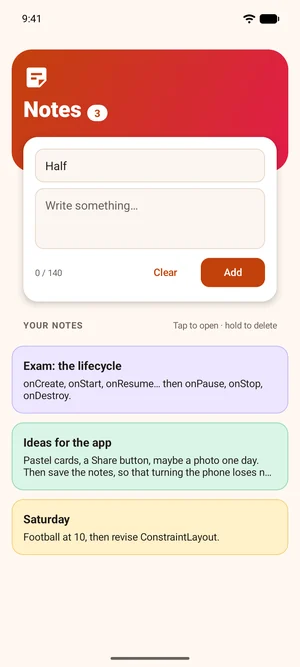

You should see After the turn: Half still in Title, the 3 seeds and pill 3, as in Lab 1.
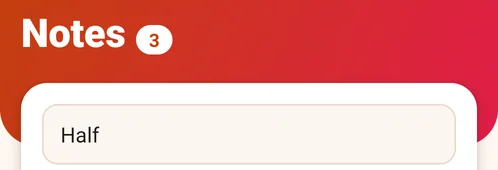
Why rememberSaveable puts the value in the bundle Android keeps through a rotation (chapter 03). The notes still go back to the seeds: keeping them on the phone comes later, in chapter 09.
Done I see Half still in Title after the turn.
Stuck? 3 symptoms · the file
rememberSaveableis red Its import is missing: do action b again.Logis red in line 91 The import went first, so the line moved up to 91. Delete it too: click in line 91,Log.d("Lifecycle", "NotesScreen draws"), then press Ctrl+Y.- Title is empty after the turn One of lines 95 and 96 still says
remember, or the app was not rerun. Check both, then click ↻ Rerun.
Behind? The files at the end of this step
package com.yourname.notes
import android.widget.Toastimport androidx.compose.foundation.Imageimport androidx.compose.foundation.backgroundimport androidx.compose.foundation.borderimport androidx.compose.foundation.combinedClickableimport androidx.compose.foundation.layout.Boximport androidx.compose.foundation.layout.Columnimport androidx.compose.foundation.layout.PaddingValuesimport androidx.compose.foundation.layout.Rowimport androidx.compose.foundation.layout.fillMaxSizeimport androidx.compose.foundation.layout.fillMaxWidthimport androidx.compose.foundation.layout.heightimport androidx.compose.foundation.layout.paddingimport androidx.compose.foundation.layout.sizeimport androidx.compose.foundation.layout.widthimport androidx.compose.foundation.lazy.LazyColumnimport androidx.compose.foundation.lazy.itemsimport androidx.compose.foundation.shape.RoundedCornerShapeimport androidx.compose.foundation.text.BasicTextFieldimport androidx.compose.foundation.text.KeyboardOptionsimport androidx.compose.material3.Buttonimport androidx.compose.material3.MaterialThemeimport androidx.compose.material3.Textimport androidx.compose.material3.TextButtonimport androidx.compose.runtime.Composableimport androidx.compose.runtime.getValueimport androidx.compose.runtime.keyimport androidx.compose.runtime.mutableIntStateOfimport androidx.compose.runtime.mutableStateOfimport androidx.compose.runtime.rememberimport androidx.compose.runtime.saveable.rememberSaveableimport androidx.compose.runtime.setValueimport androidx.compose.runtime.toMutableStateListimport androidx.compose.ui.Alignmentimport androidx.compose.ui.Modifierimport androidx.compose.ui.draw.clipimport androidx.compose.ui.draw.shadowimport androidx.compose.ui.graphics.Brushimport androidx.compose.ui.graphics.SolidColorimport androidx.compose.ui.platform.LocalContextimport androidx.compose.ui.res.painterResourceimport androidx.compose.ui.text.font.FontWeightimport androidx.compose.ui.text.input.ImeActionimport androidx.compose.ui.text.input.KeyboardCapitalizationimport androidx.compose.ui.text.style.TextAlignimport androidx.compose.ui.text.style.TextOverflowimport androidx.compose.ui.tooling.preview.Previewimport androidx.compose.ui.unit.dpimport androidx.compose.ui.unit.emimport androidx.compose.ui.unit.spimport com.yourname.notes.ui.theme.Brandimport com.yourname.notes.ui.theme.CardWhiteimport com.yourname.notes.ui.theme.ErrorRedimport com.yourname.notes.ui.theme.Fieldimport com.yourname.notes.ui.theme.HeaderEndimport com.yourname.notes.ui.theme.Inkimport com.yourname.notes.ui.theme.Lineimport com.yourname.notes.ui.theme.Mutedimport com.yourname.notes.ui.theme.NoteButterimport com.yourname.notes.ui.theme.NoteButterLineimport com.yourname.notes.ui.theme.NoteLavenderimport com.yourname.notes.ui.theme.NoteLavenderLineimport com.yourname.notes.ui.theme.NoteMintimport com.yourname.notes.ui.theme.NoteMintLineimport com.yourname.notes.ui.theme.NotePeachimport com.yourname.notes.ui.theme.NotePeachLineimport com.yourname.notes.ui.theme.NotesThemeimport com.yourname.notes.ui.theme.OnBrand
// One note: what the screen draws a card fromdata class Note(val title: String, val body: String, val colour: Int)
// The four pastels, in creation order: butter, mint, lavender, peachval NoteFills = listOf(NoteButter, NoteMint, NoteLavender, NotePeach)val NoteLines = listOf(NoteButterLine, NoteMintLine, NoteLavenderLine, NotePeachLine)
// Lab 1's three seed notes, newest first (colours 2, 1, 0: lavender, mint, butter)val SeedNotes = listOf( Note("Exam: the lifecycle", "onCreate, onStart, onResume… then onPause, onStop, onDestroy.", 2), Note( "Ideas for the app", "Pastel cards, a Share button, maybe a photo one day. Then save the notes, so that turning the phone loses nothing.", 1 ), Note("Saturday", "Football at 10, then revise ConstraintLayout.", 0))
@Composablefun NotesScreen(modifier: Modifier = Modifier) { val context = LocalContext.current val notes = remember { SeedNotes.toMutableStateList() } var added by remember { mutableIntStateOf(3) } // the seeds used colours 0, 1, 2 var title by rememberSaveable { mutableStateOf("") } var body by rememberSaveable { mutableStateOf("") } var showError by remember { mutableStateOf(false) }
Column(modifier = modifier.fillMaxSize()) { Box { // The header: a gradient with round corners Column( modifier = Modifier .padding(16.dp) .fillMaxWidth() .height(168.dp) .clip(RoundedCornerShape(28.dp)) .background(Brush.linearGradient(listOf(Brand, HeaderEnd))) .padding(start = 16.dp, top = 20.dp) ) { Image( painter = painterResource(R.drawable.ic_notes), contentDescription = "Notes logo", modifier = Modifier.size(36.dp) ) Row(modifier = Modifier.padding(top = 4.dp)) { Text( text = "Notes", color = OnBrand, fontSize = 30.sp, fontWeight = FontWeight.Black, modifier = Modifier.alignByBaseline() ) Text( text = "${notes.size}", color = Brand, fontSize = 14.sp, fontWeight = FontWeight.Bold, modifier = Modifier .padding(start = 8.dp) .alignByBaseline() .background(CardWhite, RoundedCornerShape(12.dp)) .padding(horizontal = 10.dp, vertical = 2.dp) ) } }
// The composer: a white card that overlaps the header Column( modifier = Modifier .padding(start = 32.dp, top = 136.dp, end = 32.dp) .fillMaxWidth() .shadow(6.dp, RoundedCornerShape(20.dp)) .background(CardWhite) .padding(16.dp) ) { NotesField( value = title, onValueChange = { title = it if (it.isNotEmpty()) showError = false }, hint = "Title", singleLine = true ) NotesField( value = body, onValueChange = { body = it.take(140) }, // input stops at 140, as Lab 1's maxLength hint = "Write something…", minLines = 3, modifier = Modifier.padding(top = 8.dp) ) if (showError) { Text( text = "Give your note a title first.", color = ErrorRed, fontSize = 14.sp, modifier = Modifier.padding(top = 8.dp) ) } Row( modifier = Modifier.padding(top = 8.dp), verticalAlignment = Alignment.CenterVertically ) { Text( text = "${body.length} / 140", color = if (body.length >= 120) ErrorRed else Muted, fontSize = 12.sp, modifier = Modifier.weight(1f) ) TextButton( onClick = { title = "" body = "" }, modifier = Modifier.width(88.dp) ) { Text("Clear") } Button( onClick = { if (title.isBlank()) { showError = true } else { notes.add(0, Note(title.trim(), body.trim(), added % 4)) added++ title = "" body = "" showError = false Toast.makeText(context, "Note added", Toast.LENGTH_SHORT).show() } }, shape = RoundedCornerShape(12.dp), modifier = Modifier .padding(start = 4.dp) .width(88.dp) ) { Text("Add") } } } }
// The list's title, and its hint on the right Row(modifier = Modifier.padding(start = 32.dp, top = 24.dp, end = 32.dp)) { Text( text = "YOUR NOTES", color = Muted, fontSize = 12.sp, fontWeight = FontWeight.Bold, letterSpacing = 0.1.em, modifier = Modifier.alignByBaseline() ) Text( text = "Tap to open · hold to delete", color = Muted, fontSize = 12.sp, textAlign = TextAlign.End, modifier = Modifier .padding(start = 16.dp) .weight(1f) .alignByBaseline() ) }
if (notes.isEmpty()) { Text( text = "No notes yet.\nWrite your first one above.", color = Muted, fontSize = 16.sp, textAlign = TextAlign.Center, modifier = Modifier .align(Alignment.CenterHorizontally) .padding(top = 56.dp) ) }
// The cards, newest on top; only those that fit are drawn LazyColumn( modifier = Modifier .weight(1f) .padding(top = 8.dp), contentPadding = PaddingValues(start = 16.dp, end = 16.dp, bottom = 16.dp) ) { items(notes) { note -> key(note) { // this card belongs to this note: the card below does not inherit its pressed look NoteCard( note = note, onLongClick = { notes.remove(note) Toast.makeText(context, "Note deleted", Toast.LENGTH_SHORT).show() } ) } } } }}
// Lab 1's style NotesField, as a function: the same look for both text fields@Composablefun NotesField( value: String, onValueChange: (String) -> Unit, hint: String, modifier: Modifier = Modifier, singleLine: Boolean = false, minLines: Int = 1) { BasicTextField( value = value, onValueChange = onValueChange, modifier = modifier .fillMaxWidth() .background(Field, RoundedCornerShape(12.dp)) .border(1.dp, Line, RoundedCornerShape(12.dp)) .padding(horizontal = 14.dp, vertical = 12.dp), textStyle = MaterialTheme.typography.bodyLarge.copy(color = Ink), singleLine = singleLine, minLines = minLines, keyboardOptions = KeyboardOptions( capitalization = KeyboardCapitalization.Sentences, imeAction = if (singleLine) ImeAction.Next else ImeAction.Default ), cursorBrush = SolidColor(Brand), decorationBox = { innerTextField -> Box { if (value.isEmpty()) { Text(text = hint, color = Muted) } innerTextField() } } )}
// One card: hold it to delete it@Composablefun NoteCard(note: Note, onLongClick: () -> Unit) { Column( modifier = Modifier .padding(top = 12.dp) .fillMaxWidth() .clip(RoundedCornerShape(16.dp)) .background(NoteFills[note.colour]) .border(1.dp, NoteLines[note.colour], RoundedCornerShape(16.dp)) .combinedClickable(onClick = { }, onLongClick = onLongClick) .padding(16.dp) ) { Text( text = note.title, color = Ink, fontSize = 16.sp, fontWeight = FontWeight.Bold ) if (note.body.isNotEmpty()) { Text( text = note.body, color = Ink, fontSize = 14.sp, maxLines = 2, overflow = TextOverflow.Ellipsis, modifier = Modifier.padding(top = 4.dp) ) } }}
@Preview(showBackground = true)@Composablefun NoteCardPreview() { NotesTheme { NoteCard(note = SeedNotes[1], onLongClick = { }) }}
@Preview(showBackground = true)@Composablefun NotesScreenPreview() { NotesTheme { NotesScreen() }}End of the part
Recap
Does the activity start again when you type? No: each letter calls NotesScreen again, a recomposition, and Main onCreate stays alone. A rotation does make a new activity: what remember held starts again from its first value (the 3 seeds, an empty title), and what rememberSaveable holds comes back.
- tell a recomposition (the function called again) from a recreation (a new activity);
- show both in Logcat with a
Log.dline; - keep a typed value through a rotation with
rememberSaveable.