
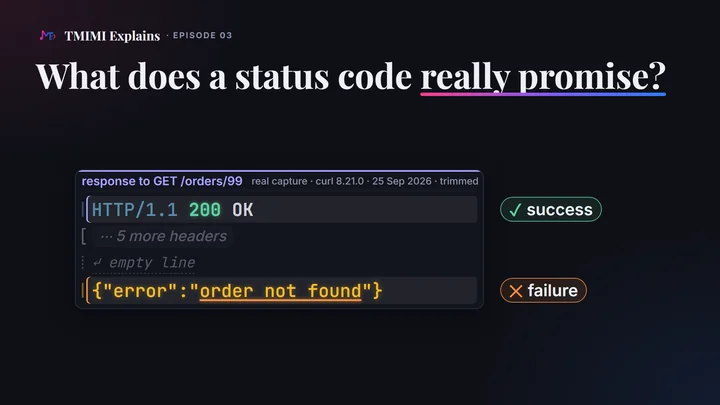
The short answerA status code is the server’s promise about what happened to your request, in three digits. The server chooses it, and nothing forces it to tell the truth. Yet every program that receives it acts on the number, not on the words: your app, your browser, caches, search engines, monitoring tools. The first digit gives the family: 2xx it worked, 3xx look somewhere else, 4xx change your request, 5xx try again later. Some promises are remembered: a browser keeps a permanent redirect, and Google shows the new address. A soft 404, an error sent as 200 OK, misleads them all. The honest answer is the right code, with a helpful body.
The status line: three parts, one that counts
Every HTTP/1.1 response starts with one line, the status line. It has three parts: the version, a three-digit status code, and a short reason phrase. Then come the headers, an empty line, and usually a body. Here is a real one, from the small orders service that episode 01 also uses, running on a laptop at home (192.168.1.10, port 3000):
              HTTP/1.1 200 OK
              Content-Type: application/json
              Content-Length: 40
              ETag: "v1"
              Date: Fri, 25 Sep 2026 13:33:26 GMT
              Connection: keep-alive
              Keep-Alive: timeout=5
              ↵ empty line
              {"id":42,"item":"notebook","quantity":1}
The three parts of the status line do not weigh the same:
- The version,
HTTP/1.1, says how the rest of the message is written. - The code,
200, is what programs act on. - The phrase,
OK, is only a label for people. The standard makes it optional, and says “A client SHOULD ignore the reason-phrase content because it is not a reliable channel for information”.
We tested that rule. A small test server sent two status lines that lie, and we opened each one in Chromium 153, as a page and from a script in the page. Both ways gave the same verdict:
| Status line sent | Status Chromium recorded | A success? |
|---|---|---|
HTTP/1.1 404 Everything is fine | 404 | No: a failure (ok: false) |
HTTP/1.1 200 Not Found | 200 | Yes: a success (ok: true) |
The phrase changed nothing. The number decided. Servers write the phrase however they like: the public test service httpbin.org answers 503 SERVICE UNAVAILABLE, in capitals, and you can see it yourself below. Over HTTP/2 and HTTP/3 there is no phrase at all: the code travels alone, as :status (episode 01 shows one).
A code is a promise
The server chooses the code. It is a program, and it writes whatever number its authors decided. Nothing on the way checks that the number is true: not the network, not the browser. The standard only says what each number means. The server is the boss, and to everyone else it is a black box.
So a status code is a promise: the server’s claim about what happened. The programs that receive it act on that claim, usually without reading the body. Here is what each one does with the number, as seen in this episode’s captures:
| Program | What it does with the number | Seen on this page |
|---|---|---|
| An app | Takes the body as the result when the code is in the 200s, and shows an error otherwise. | A script in a Chromium page: 200 gave ok: true, 404 gave ok: false. |
| The browser | Follows a redirect by itself, remembers 301 and 308, uses its own copy after a 304, answers a 401 challenge. | Chromium 153. |
| curl | Shows it. When asked, follows a redirect (-L), tries again after 408, 429, 500, 502, 503 or 504 (--retry), fails from 400 up (--fail). | curl.exe 8.21.0. |
| Caches | Keep copies of answers, and may serve them without asking the server. Some codes may be kept by default, 200, 301 and 404 among them. | Cloudflare’s stored copy of a 404. |
| Search engines | May index pages in the 200s, follow redirects, drop pages in the 400s, slow down on the 500s and 429. | Google’s documentation. |
| Monitoring | Raises an alarm from 400 up. | curl.exe --fail as a health check. |
Every one of them trusts the number. That is why it matters so much that the number is true.
Five families, five promises
The first digit gives the family. The standard defines five, and each one makes a promise that a client can rely on, even for a code it has never seen:
- 2xx The 200s promise success: the request was received, understood and accepted.
200,201,204. - 3xx The 300s send the client somewhere else: to another address, or to its own stored copy.
301,302,304,307,308. - 4xx The 400s say the problem is in the request: change it before sending it again.
401,403,404,405,409(after a429, wait). - 5xx The 500s say the server failed, although the request looked valid: try again later.
500,502,503,504.
The fifth family, 1xx, promises that the real response will follow. These interim answers, such as 100 Continue, come before the final one, and you will rarely see them.
A client must understand the family of every code. In the standard’s words, it “MUST understand the class of any status code, as indicated by the first digit, and treat an unrecognized status code as being equivalent to the x00 status code of that class”. Its own example: a client that receives an unknown 471 treats it as 400 Bad Request. So a new code may appear, but never a new family. 100 to 599 is the whole range, and a client should treat a code outside it as a server error.
Success: what the client now has
Success codes tell the client what it now has.
200 OK: the response carries the result. For aGET, it is the thing you asked for; for aPOST, the result of the action. The200above carried order 42.201 Created: something new exists, andLocationsays where.204 No Content: the work is done, with nothing to show. The response ends after its headers. The standard adds that the browser need not leave the page it is showing.
POST adds an order: 201 and its Location
The service picks the number.
                  POST /orders HTTP/1.1
                  Host: 192.168.1.10:3000
                  User-Agent: curl/8.21.0
                  Accept: */*
                  Content-Type: application/json
                  Content-Length: 28
                  ↵ empty line
                  {"item":"lamp","quantity":2}
                  HTTP/1.1 201 Created
                  Content-Type: application/json
                  Content-Length: 36
                  Location: /orders/43
                  Date: Fri, 25 Sep 2026 13:33:26 GMT
                  Connection: keep-alive
                  Keep-Alive: timeout=5
                  ↵ empty line
                  {"id":43,"item":"lamp","quantity":2}
Orders on the server: 41 · pen × 3 42 · notebook × 1 43 · lamp × 2 new
DELETE removes it: 204, nothing to show
Done, and no body.
                  DELETE /orders/43 HTTP/1.1
                  Host: 192.168.1.10:3000
                  User-Agent: curl/8.21.0
                  Accept: */*
                  ↵ empty line
                  HTTP/1.1 204 No Content
                  Date: Fri, 25 Sep 2026 13:33:26 GMT
                  Connection: keep-alive
                  Keep-Alive: timeout=5
                  ↵ empty line
                  no body
Orders on the server: 41 · pen × 3 42 · notebook × 1 43 · lamp × 2 removed
A server may also answer a DELETE with 200 and a body that describes what happened. Both are success. What matters is that the family is honest.
Errors: what to do next
Error codes tell the client what to do next, and the two error families say opposite things.
- The 400s: change the request. The problem is on the client’s side: a wrong address, a missing login, a method this address does not take. Sent again unchanged, the same request will usually fail the same way.
- The 500s: try again later. The request looked fine, and the server failed. The same request may work in a minute.
Many errors come with a header that completes the promise. Here are errors the orders service sent us, each captured with curl.exe -si on September 25, 2026. (400 Bad Request, for a message that is itself broken, is tested in episode 01.)
| Code | The promise | The client’s next step | Header that helps |
|---|---|---|---|
401 Unauthorized | You are not logged in. | Log in, then send it again. | WWW-Authenticate: Basic realm="orders admin" |
403 Forbidden | You are known, and refused. | Don’t repeat it with the same login. | none |
404 Not Found | Nothing here. | Check the address. | none |
405 Method Not Allowed | Not this method, at this address. | Use a method from Allow. | Allow: GET, HEAD, PUT, DELETE |
409 Conflict | The request clashes with the current state: “order 41 has already shipped”. | Resolve the conflict first. | none: the body explains |
429 Too Many Requests | Slow down. | Wait, then try again. | Retry-After: 10 |
500 Internal Server Error | The server failed (here, a bug in one feature). | Try later; report it if it lasts. | none |
503 Service Unavailable | Overloaded or in maintenance, for now. | Wait, then try again. | Retry-After: 120 |
                HTTP/1.1 401 Unauthorized
                Content-Type: application/json
                Content-Length: 24
                WWW-Authenticate: Basic realm="orders admin"
                Date: Fri, 25 Sep 2026 13:33:26 GMT
                Connection: keep-alive
                Keep-Alive: timeout=5
                ↵ empty line
                {"error":"log in first"}
                HTTP/1.1 405 Method Not Allowed
                Content-Type: application/json
                Content-Length: 30
                Allow: GET, HEAD, PUT, DELETE
                Date: Fri, 25 Sep 2026 13:33:26 GMT
                Connection: keep-alive
                Keep-Alive: timeout=5
                ↵ empty line
                {"error":"method not allowed"}
                HTTP/1.1 429 Too Many Requests
                Content-Type: application/json
                Content-Length: 29
                Retry-After: 10
                Date: Fri, 25 Sep 2026 13:33:26 GMT
                Connection: keep-alive
                Keep-Alive: timeout=5
                ↵ empty line
                {"error":"too many requests"}
401 or 403?
Two codes that are easy to mix up. 401 means “I don’t know who you are”, and it must carry WWW-Authenticate, which says how to log in. 403 means “I know who you are, and the answer is no”.
Chromium acts on the difference. We gave it a user name and password (salma, who is not an admin) and opened /admin/orders. The service received two requests. The first came without credentials and got 401. Then, by itself, the browser sent the same request again with Authorization: Basic c2FsbWE6ZGVtbw==, and got 403. It stopped there.
That Authorization value is only salma:demo written in base64, not encrypted: anyone who reads the message can decode it. Basic authentication is safe only inside HTTPS.
Retry-After: when to come back
503 Service Unavailable says the server cannot answer now, “due to a temporary overload or scheduled maintenance, which will likely be alleviated after some delay”. It can say how long in Retry-After: a number of seconds, or a date. We put the orders service in maintenance mode, then asked curl to retry once:
                HTTP/1.1 503 Service Unavailable
                Content-Type: application/json
                Content-Length: 32
                Retry-After: 120
                Date: Fri, 25 Sep 2026 13:33:28 GMT
                Connection: keep-alive
                Keep-Alive: timeout=5
                ↵ empty line
                {"error":"down for maintenance"}
{"error":"down for maintenance"}Warning: Problem : HTTP error. Retrying in 120 seconds. 1 retry left.
{"error":"down for maintenance"}
This terminal comes from a second run of the same command. The service’s log shows its two requests at 14:38:20.021 and 14:40:20.025 UTC; in the first run, the one in the film, they arrived at 13:33:28 and 13:35:28. Both times, curl waited exactly the 120 seconds the server asked for. It retries only the answers that promise waiting may help, “HTTP 408, 429, 500, 502, 503, 504, 522 or 524” in its manual (the last two are Cloudflare’s own codes). After a 404, curl --retry sent one request and stopped. Without Retry-After, curl picks its own waits, as you can try below. Chromium does not retry: it showed the maintenance message, and did not ask for the order again in the next 5 seconds.
Search engines separate the two families too. Google removes pages that answer in the 400s from its index (except 429). On the 500s and 429, its crawlers “temporarily slow down” and keep the pages they know; for a 503 or a 429, Google’s crawler “will retry these URLs for about 2 days”, then drops them.
Behind a gateway: 502 and 504
Big sites put a gateway in front of their servers: a reverse proxy, or a network like Cloudflare’s. When it gets no proper answer from the server behind it, the gateway writes its own code. We tried it with a small gateway in front of the orders service. With nothing behind it: 502 Bad Gateway. With a service that took 5 seconds, when the gateway waits 2: 504 Gateway Timeout.
Moved for good, or for now
Most codes in the 300s carry a Location header with a new address, and a browser goes there by itself. The four you will meet make two promises about time:
| Code | The promise | Next visit (Chromium) | A POST sent there continues as | Google Search shows |
|---|---|---|---|---|
301 Moved Permanently | Moved for good | Remembered: the old address is not asked again | a GET, without the body | the new address |
308 Permanent Redirect | Moved for good | Remembered | a POST, with the body | the new address |
302 Found | Moved for now | Asked again, every time | a GET, without the body | the old address |
307 Temporary Redirect | Moved for now | Asked again, every time | a POST, with the body | the old address |
Chromium columns: our tests in Chromium 153 on September 25, 2026, two visits to each address, and a POST sent to each one from a script. Google column: Google’s documentation, which treats 308 like 301 and 307 like 302.
                HTTP/1.1 301 Moved Permanently
                Location: /orders/42
                Content-Length: 0
                Date: Fri, 25 Sep 2026 13:33:26 GMT
                Connection: keep-alive
                Keep-Alive: timeout=5
                ↵ empty line
                HTTP/1.1 302 Found
                Location: /orders/43
                Content-Length: 0
                Date: Fri, 25 Sep 2026 13:33:26 GMT
                Connection: keep-alive
                Keep-Alive: timeout=5
                ↵ empty line
curl only reports the move: it prints the 301 and stops. With -L it follows Location and prints both answers, the 301 and then the 200 of order 42.
Who remembers
We opened each old address twice in Chromium, with a blank page in between, and read the service’s log. On the second visits, it received:
second visit to /orders/latest (302):
GET /orders/latest HTTP/1.1  →  HTTP/1.1 302 Found
GET /orders/43 HTTP/1.1      →  HTTP/1.1 304 Not Modified
second visit to /order/42 (301):
GET /orders/42 HTTP/1.1      →  HTTP/1.1 304 Not Modified
After the 302, Chromium asked the server again: the move was only for now. After the 301, it asked for the old address only once. The second time it went straight to /orders/42: its own network log shows the 301 served from its cache. 308 behaved like 301, and 307 like 302.
Search engines remember too. Google’s documentation is explicit: after a permanent redirect, it shows “the new redirect target in search results”; after a temporary one, “the source page”.
307 and 308 keep the method
The two pairs differ in one more way. We sent a POST to each redirect, from a script in a page. After 301 and 302, Chromium continued with GET /orders, without the body. After 307 and 308, it sent POST /orders again, body included, and the service created an order. The standard tells the story: early browsers disagreed, “Prevailing practice eventually converged on changing the method to GET”, and 307 and 308 were added “to unambiguously indicate method-preserving redirects”. Browsers follow the Fetch standard, which writes the rule down.
Real sites, real moves
http://github.com/answers301tohttps://github.com/. Its promise: this site is HTTPS for good.http://google.com/answers301tohttp://www.google.com/, withCache-Control: public, max-age=2592000: any cache may keep this move for 30 days (2,592,000 seconds).- Google moved its own page about status codes. Its old address answers
301, and lets your browser keep the move for 30 days too:
              HTTP/1.1 301 Moved Permanently
              content-type: text/html; charset=utf-8
              location: /crawling/docs/troubleshooting/http-status-codes
              cache-control: private, max-age=2592000
              ⋯ 12 more headers
              ↵ empty line
Sometimes the browser does not even ask
Open http://github.com/ in Chromium: it never sends that request. It switches to https:// by itself, and its network log shows 307 Internal Redirect, reason HSTS. GitHub asks for this in its header Strict-Transport-Security: max-age=31536000; includeSubdomains; preload, and Chromium ships a list of such sites, the “preload” list. curl has no such list, so it gets GitHub’s real 301. With http://google.com/, Chromium got the real 301 to www.google.com, then made the switch to https:// itself.
The cache and 304
A cache keeps copies of answers, to use them again without downloading them again, or even without asking. Your browser has one. So do the big networks in front of many sites, like Cloudflare in front of example.com.
To check that a copy is still good, the server gives it a version tag, ETag, or a date, Last-Modified. Our orders service tagged order 42 "v1" (look at the first answer on this page). The client sends the tag back, in If-None-Match. If nothing changed, the server answers 304 Not Modified, with no body, and the client uses the copy it already has, “as if it were the content of a 200 (OK) response”, in the standard’s words. So 304 belongs to the 300s: it sends the client somewhere else, to its own copy.
Chromium checks its copy of order 42
It sent the tag back by itself.
                  GET /orders/42 HTTP/1.1
                  Host: 192.168.1.10:3000
                  ⋯ 6 more headers
                  If-None-Match: "v1"
                  ↵ empty line
                  HTTP/1.1 304 Not Modified
                  ETag: "v1"
                  Date: Fri, 25 Sep 2026 13:35:37 GMT
                  Connection: keep-alive
                  Keep-Alive: timeout=5
                  ↵ empty line
                  no body: use your copy
The tab showed order 42, from the copy. Chromium’s own network log recorded the 304, then gave the page the stored order as a 200. curl does the same exchange only when you ask: with the header If-None-Match: "v1" added (-H), it got the same 304. Dates work the same way: example.com sent Last-Modified: Tue, 22 Sep 2026 21:15:25 GMT, and that date sent back in If-Modified-Since got 304 Not Modified. You can try it below.
Which answers a cache may keep
A cache may keep some answers even when the server says nothing about caching. The standard calls them heuristically cacheable: 200, 203, 204, 206, 300, 301, 308, 404, 405, 410, 414 and 501. 301 is on the list: that is how the browser remembered the move above. 404 is too, and here is Cloudflare serving one from its copy:
              HTTP/1.1 404 Not Found
              Date: Fri, 25 Sep 2026 13:42:38 GMT
              Content-Type: text/html
              Transfer-Encoding: chunked
              Connection: keep-alive
              Server: cloudflare
              Age: 10610
              cf-cache-status: HIT
              CF-RAY: a40a7407fde16488-MRS
              ↵ empty line
cf-cache-status: HIT means Cloudflare answered from its copy, and Age: 10610 says that copy was almost three hours old: example.com’s own server was not asked. A stored 404 is fine when the page really does not exist. A stored lie would be repeated just as faithfully.
A server can set the rules itself with Cache-Control. Our orders service sent none, so Chromium checked its copy each time. google.com’s 301 says max-age=2592000, 30 days; GitHub’s home page says max-age=0, private, must-revalidate: check every time.
The soft 404
Back to the film’s question. We ran the same orders service twice: the honest one, and a careless copy that sends every error as 200 OK, with the same body. Same request, GET /orders/99, for an order that does not exist. Two answers:
                HTTP/1.1 404 Not Found
                Content-Type: application/json
                Content-Length: 27
                Date: Fri, 25 Sep 2026 13:33:26 GMT
                Connection: keep-alive
                Keep-Alive: timeout=5
                ↵ empty line
                {"error":"order not found"}
                HTTP/1.1 200 OK
                Content-Type: application/json
                Content-Length: 27
                Date: Fri, 25 Sep 2026 13:33:28 GMT
                Connection: keep-alive
                Keep-Alive: timeout=5
                ↵ empty line
                {"error":"order not found"}
Developers call the second one a soft 404: a page that says the thing does not exist, sent with a success code. In a browser tab, both answers show exactly the same text, {"error":"order not found"}. A person reads the words and is not fooled. Programs read the number:
| Program | Honest 404 | Soft 404 (200 OK) |
|---|---|---|
A script in the page (Chromium’s fetch) | status 404, ok: false: an error | status 200, ok: true: a success |
A health check (curl.exe --fail) | exit code 22, and curl: (22) The requested URL returned error: 404 | exit code 0: all is well |
| Google Search (documentation) | does not index the URL, and removes it if it was indexed | may index it, unless it guesses from the words that it is an error page |
A lie in the phrase changes nothing; a lie in the number misleads every program. Google even gives this lie a name and a report: when its algorithms detect “that the page is actually an error page based on its content”, Search Console shows a soft 404. That detection is a guess, made from the words, and it can miss.
The careless service even answered the browser’s request for /favicon.ico, the tab’s icon, with 200 OK: an error message, promised as an icon.
The honest code
The honest answer to order 99 is 404 Not Found, with a helpful body. Its two parts have two readers:
- The body is for people. It can explain what went wrong, and offer a way back. The standard asks for it: for errors, “the server SHOULD send a representation containing an explanation of the error situation, and whether it is a temporary or permanent condition”.
- The code is for programs. Google says it plainly: “Custom 404 pages are created solely for users. Since these pages are useless from a search engine’s perspective, make sure the server returns a 404 HTTP status code to prevent having the pages indexed.”
What each code means is a convention, written in the standard. Following it is the server’s choice: the server is the boss. But every tool on the way trusts the number, so breaking the convention misleads them all. Even careful sites slip. Here is example.com refusing a DELETE:
              HTTP/1.1 405 Method Not Allowed
              Date: Fri, 25 Sep 2026 14:22:49 GMT
              Content-Type: text/html
              Transfer-Encoding: chunked
              Connection: keep-alive
              Cache-Control: private, max-age=0, no-store, no-cache, must-revalidate, post-check=0, pre-check=0
              Expires: Thu, 01 Jan 1970 00:00:01 GMT
              Referrer-Policy: same-origin
              X-Frame-Options: SAMEORIGIN
              Server: cloudflare
              CF-RAY: a40aaee8ea516924-LIS
              ↵ empty line
              <!doctype html><html lang="en"><head><title>Example Domain</title>
              ⋯ the rest of the page
The standard says a server “MUST generate an Allow header field in a 405 response”, listing the methods that work. This one has none, although the same page answers a GET with Allow: GET, HEAD. A program that reads Allow to find a working method learns nothing here.
| Situation | Honest code | With |
|---|---|---|
| Here is what you asked for | 200 OK | the result, in the body |
| Created | 201 Created | Location |
| Done, nothing to show | 204 No Content | no body |
| Moved for good | 301 or 308 | Location |
| Moved for now | 302 or 307 | Location |
| Your copy is still good | 304 Not Modified | ETag, no body |
| No such thing | 404 Not Found, or 410 Gone if it is gone for good | a helpful body |
| Not logged in | 401 Unauthorized | WWW-Authenticate |
| Logged in, not allowed | 403 Forbidden | a helpful body |
| Not this method | 405 Method Not Allowed | Allow |
| It clashes with the current state | 409 Conflict | a body that explains the clash |
| Too many requests | 429 Too Many Requests | Retry-After |
| Our own bug | 500 Internal Server Error | a helpful body |
| Down for maintenance, for now | 503 Service Unavailable | Retry-After |
What the film simplified
- “Every response starts with a status line” is HTTP/1.1. HTTP/2 and HTTP/3 send only the number, as
:status. - The 100s’ promise, “the real response will follow”, fits
100 Continue. After101 Switching Protocols, the connection changes protocol instead. - “The 400s ask for a changed request” has exceptions: after
429or408, the same request may be sent again, later. And waiting does not cure every 500:501 Not Implementedwill not change, and a bug stays until someone fixes it. - “The browser remembered the move”: Chromium kept our
301with no end date, because the service gave none;Cache-Controlcan set one, as ongoogle.com. A302can be stored too, when the server gives it a lifetime; ours gave none. - “Next time, the browser sends that tag back”: because order 42 came with no
Cache-Control. With amax-age, the browser uses its copy without asking until it expires. - The version tag
"v1"is readable on purpose. Real servers send opaque tags, likeexample.com’s"6ab2efed-22f", or GitHub’sW/"a1632db9d50246841854d4f7736c12be", whereW/marks a weak tag. - “After a 404, it never retries” is curl’s default. curl
--retryskips a404unless you add both--retry-all-errorsand--fail: we tried--retry-all-errorsalone, and curl still sent one request. - “Your app” is, in our tests, a script in a Chromium page; the phone in the film is an illustration. “A monitoring tool” is
curl.exe --fail. - What search engines do comes from Google’s documentation, not from an observation. Google also weighs other signals, and detects many soft 404s, not all.
Try it yourself
Ask real servers for their codes
No programming: a terminal is enough. On Windows, type curl.exe, not curl (episode 01 explains why). On macOS and Linux, type curl. The option -I asks for the status line and the headers only. Every output below is real, from September 25, 2026; yours will differ in dates and a few values.
A. In a terminal
-
A 404 is an answer.
curl.exe -I https://example.com/this-page-does-not-existcurl.exe -I https://example.com/this-page-does-not-exist Sep 25, 2026 HTTP/1.1 404 Not Found Date: Fri, 25 Sep 2026 14:22:49 GMT Content-Type: text/html Connection: keep-alive Server: cloudflare Age: 10907 cf-cache-status: HIT CF-RAY: a40aaee48c4de3cd-LIS ↵ empty lineA server answered, from Cloudflare’s copy:
cf-cache-status: HIT. -
A move for good.
curl.exe -I http://github.com/curl.exe -I http://github.com/ Sep 25, 2026 HTTP/1.1 301 Moved Permanently Content-Length: 0 Location: https://github.com/ ↵ empty lineAdd
-Land curl followsLocation: a second status line appears.curl.exe -sIL http://github.com/curl.exe -sIL http://github.com/ Sep 25, 2026 HTTP/1.1 301 Moved Permanently Content-Length: 0 Location: https://github.com/ ↵ empty line HTTP/1.1 200 OK ⋯ 5 more headers Cache-Control: max-age=0, private, must-revalidate Strict-Transport-Security: max-age=31536000; includeSubdomains; preload ⋯ 12 more headers ↵ empty line -
Your copy is still good. First ask for the page’s date:
curl.exe -I http://example.com/curl.exe -I http://example.com/ Sep 25, 2026 HTTP/1.1 200 OK Date: Fri, 25 Sep 2026 14:22:49 GMT Content-Type: text/html Connection: keep-alive Server: cloudflare Last-Modified: Tue, 22 Sep 2026 21:15:25 GMT Allow: GET, HEAD Accept-Ranges: bytes Age: 7615 cf-cache-status: HIT CF-RAY: a40aaee7d9926924-LIS ↵ empty lineThen send that date back, as if your copy were from then. Put the
Last-Modifieddate that your command printed:curl.exe -I -H "If-Modified-Since: Tue, 22 Sep 2026 21:15:25 GMT" http://example.com/the same, with If-Modified-Since Sep 25, 2026 HTTP/1.1 304 Not Modified Date: Fri, 25 Sep 2026 14:22:49 GMT Connection: keep-alive Allow: GET, HEAD Age: 5121 Server: cloudflare Last-Modified: Tue, 22 Sep 2026 21:15:25 GMT etag: "6ab2efed-22f" cf-cache-status: HIT CF-RAY: a40aaee85c84cd5d-MRS ↵ empty line -
A refusal without its
Allow.curl.exe -i -X DELETE http://example.com/The answer is
HTTP/1.1 405 Method Not Allowed, with the page’s HTML after it, and noAllowline: compare with step 3’sAllow: GET, HEAD. -
A health check.
--failmakes curl fail on any code from 400 up. On macOS and Linux, write-o /dev/null.curl.exe -sS -o NUL --fail https://example.com/this-page-does-not-existcurl.exe -sS -o NUL --fail https://example.com/this-page-does-not-exist Sep 25, 2026 curl: (22) The requested URL returned error: 404
Then type
$LASTEXITCODEin PowerShell, orecho %errorlevel%in the Command Prompt:22. A monitoring script reads that number. Against a soft 404, it would read0. -
A 503, with its phrase in capitals.
httpbin.organswers with any code you ask for.curl.exe -I https://httpbin.org/status/503curl.exe -I https://httpbin.org/status/503 Sep 25, 2026 HTTP/1.1 503 SERVICE UNAVAILABLE Date: Fri, 25 Sep 2026 14:22:50 GMT Content-Type: text/html; charset=utf-8 Content-Length: 0 Connection: keep-alive Server: gunicorn/19.9.0 Access-Control-Allow-Origin: * Access-Control-Allow-Credentials: true ↵ empty lineNow let curl retry it twice. There is no
Retry-Afterhere, so curl picks its own waits:curl.exe --retry 2 https://httpbin.org/status/503curl.exe --retry 2 https://httpbin.org/status/503 Sep 25, 2026 Warning: Problem : HTTP error. Retrying in 1 second. 2 retries left. Warning: Problem : HTTP error. Retrying in 2 seconds. 1 retry left.
-
Google’s own move.
curl.exe -I https://developers.google.com/search/docs/crawling-indexing/http-network-errorsYou get the
301shown above, with itslocationand its 30 days ofcache-control.
B. In your browser (Chrome, Edge or another Chromium browser)
- Press F12 (on a Mac: Cmd+Option+I), open the Network tab, and tick Preserve log, so each address you type adds to the list instead of clearing it.
- Type
http://google.comin the address bar. In the Status column:301forgoogle.com, the server’s move towww.google.com; then307, the browser’s own switch tohttps://; then200. - Now type
http://github.com: no301at all, only the browser’s307. It never asked.
Quick check
Pick an answer, then see why
1. A monitoring tool checks an order page every minute, and raises an alarm from 400 up. The server answers 200 OK, with the body {"error":"order not found"}. What does the monitoring report?
Show the answer
B. It reads the number, and 200 promises success. Against our careless service, curl.exe --fail exited with 0. The phrase is not read at all, and the body is for people.
2. A shop renames its catalogue for good, from /catalog to /products. What should /catalog answer?
Show the answer
B (or 308). A move for good is remembered: browsers go straight to /products next time, and Google shows the new address. With A, browsers ask /catalog every time and Google keeps the old address. C moves only the people who click; for programs, /catalog still exists.
3. Your app receives 503 Service Unavailable with Retry-After: 120. What should it do?
Show the answer
C. A code in the 500s says the request looked fine and the server failed; 503 adds “for now”, and Retry-After says 120 seconds. curl --retry did exactly that. Changing the request (B) is the answer to the 400s.
4. A client receives 471, a code it has never seen. According to the standard, it should…
Show the answer
A. The first digit gives the family, and a client must treat an unknown code as the x00 of its family. This is the standard’s own example: “it can see from the first digit that there was something wrong with its request”.
Common mistakes
- Sending errors with 200. A friendly error page does not need a success code: a
404can carry the friendliest body. With a200, apps, health checks and search engines all believe it worked. Tested on September 25, 2026: against a service that sends200 OKwith{"error":"order not found"}, Chromium’sfetchreportedok: true, andcurl.exe --failexited with 0. - Using 302 for a permanent move. Browsers ask the old address every time, and Google keeps showing it. Use
301or308. In Chromium 153, the old address of a302was asked on every visit. - Using 301 for a temporary move. A browser may keep a
301with no end date, and you cannot call it back. For a move that may change, use302or307, or give the301a lifetime withCache-Control. In Chromium 153, a301sent withoutCache-Controlcame from the browser’s cache on the next visit. - Mixing up 401 and 403.
401means “log in”, and says how inWWW-Authenticate;403means “known, and refused”. Chromium 153, given a login, answered the401by itself, then stopped at the403. - Retrying at once, whatever the code. A
404sent again fails again, and hammering a503makes an overload worse. After the 400s, change the request; after the 500s, wait, forRetry-Afterwhen there is one.curl --retrywaited exactly the 120 seconds a503asked for, and did not retry a404.
English → French glossary
| English | Français |
|---|---|
| status code | code d’état |
| status line | ligne d’état |
| success / client error / server error | succès / erreur client / erreur serveur |
| redirect (permanent / temporary) | redirection (permanente / temporaire) |
| header / body | en-tête / corps |
| cache; a cached copy | cache ; une copie en cache |
| conditional request | requête conditionnelle |
| to retry | réessayer |
| gateway; reverse proxy | passerelle ; proxy inverse |
| search engine | moteur de recherche |
Let’s recap
- The status code is the server’s promise, and programs act on the number.
- The first digit gives the family.
- Success codes say what the client now has.
- The 400s ask for a changed request.
- The 500s ask the client to try later.
- Only a move for good is remembered.
- 304 says your copy is still good.
- A soft 404 misleads every tool.
- So send the honest code, with a helpful body.
Each point links to its section, if you want to read it again.
Before and after
Sources and credits
- HTTP semantics, RFC 9110: status codes and their five classes, unknown codes treated as the x00 of their class, codes outside 100 to 599 treated as server errors (§15); reason phrases only recommendations, and the heuristically cacheable codes (§15.1); 1xx (§15.2);
200(§15.3.1),201(§15.3.2),204(§15.3.5); redirection, and why 301 and 302 may turn a POST into a GET (§15.4),301(§15.4.2),302(§15.4.3),304(§15.4.5),307(§15.4.8),308(§15.4.9); client errors, and the explanation a server should send (§15.5),401(§15.5.2),403(§15.5.4),404(§15.5.5),405(§15.5.6),408(§15.5.9),409(§15.5.10),410(§15.5.11); server errors (§15.6),500(§15.6.1),501(§15.6.2),502(§15.6.3),503(§15.6.4),504(§15.6.5);Allow(§10.2.1),Location(§10.2.2),Retry-After(§10.2.3);ETag(§8.8.3);If-None-Match(§13.1.2) andIf-Modified-Since(§13.1.3). - The status line, and why clients ignore the phrase: RFC 9112 §4. HTTP/2’s
:status: RFC 9113 §8.3.2. Caches: heuristic freshness (RFC 9111 §4.2.2) and validation (§4.3).429 Too Many Requests: RFC 6585 §4. Basic authentication, base64 and not secure on its own: RFC 7617 (§2, §4). HSTS, the browser switchinghttptohttpsby itself: RFC 6797 §8.3. The browser’s rule for aPOSTafter301or302: the Fetch Standard, HTTP-redirect fetch. - Google’s documentation, read on September 25, 2026: How HTTP status codes affect Google’s crawlers (updated February 4, 2026); Redirects and Google Search (April 14, 2026); Troubleshoot Google Search crawling errors: soft 404 errors, and the “about 2 days” of retries (December 18, 2025). The curl manual:
--retry,--retry-all-errorsand--fail. Cloudflare’s documentation: cache responses (HIT: “The resource was found in Cloudflare’s cache”) and its own 5xx errors, among them 522 and 524. - Every request and response on this page was captured on September 25, 2026, on the laptop at home (Windows 11,
192.168.1.10):curl.exe8.21.0; Chromium 153.0.8010.12, driven by Playwright 1.63.0; Node.js 22 for the test programs. The orders service, its careless copy, the service in maintenance, the gateway and the server with lying phrases are small test programs; they are not shown, because this episode is about the codes. The public sites (example.com,github.com,google.com,developers.google.comandhttpbin.org) were asked the same day. The course version of this topic: module 0, HTTP Status Codes. - The film is animated in code with Remotion. Its narration is a synthetic voice, designed for this series with Qwen3-TTS. The script, the film and this page were prepared with AI assistance.