
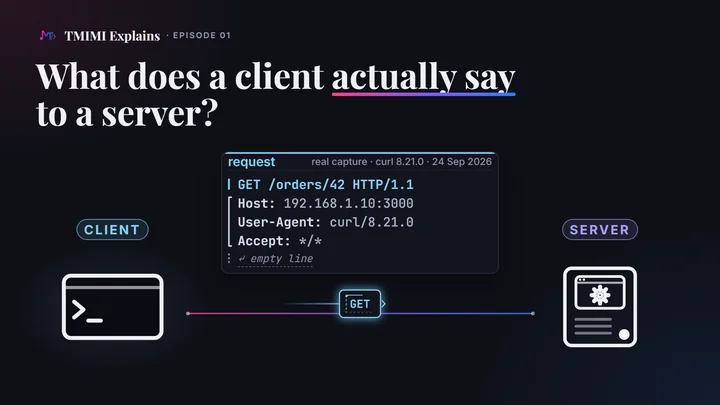
The short answerA request is a few lines of text: a first line with a method, a path and the version; headers, one per line; an empty line; and, when the client sends data, a body. The server answers with a status line that holds a three-digit status code, headers, an empty line, and usually a body. A browser, an app, a phone or a thermostat all send the same kind of message. The rules for these messages are HTTP, the Hypertext Transfer Protocol. Every message must respect this shape. What each method means is a convention, written in the standard. Following it is the server’s choice, and browsers and tools expect it to.
Two roles, many clients
Every exchange has two roles. The client asks. The server answers. Both are programs: the HTTP standard calls a client “a program that establishes a connection to a server” to send requests, and a server a program that accepts connections to answer them.
The client can be almost anything. A browser is the one you know, but the standard itself says browsers are “only a small percentage” of the kinds of client that exist. It lists others: “command-line tools, billboard screens, household appliances, scales, light bulbs, firmware update scripts, mobile apps”. Whatever the client is, the mechanism is the same.
- A browser on a laptop
- A desktop app
- A mobile app
- The software in a small device, like a thermostat
The client speaks first. A server waits for requests and answers them; it never starts an exchange on its own. The standard puts it simply: servers “only expect a request”, and clients “only expect a response”. Episode 02 shows why this rule matters for your home router.
A server is only a program, not a special machine. It can even run on your laptop: in this episode, it does. And a server can also be a client. When it calls another server, it sends its own request.
Three real requests, one shape
We ran a small orders service on a laptop at home. On the home network, the laptop’s address is 192.168.1.10, and the service answers on port 3000. Then three different clients asked it for the same order, http://192.168.1.10:3000/orders/42:
- a browser on the laptop: Chromium 153;
- a phone: Chrome 133 on Android 16, run in the Android Emulator;
- a command-line tool:
curl.exe8.21.0, the one built into Windows.
Here is exactly what the service received from each, in the order it arrived. Nothing is left out or moved.
                GET /orders/42 HTTP/1.1
                Host: 192.168.1.10:3000
                Connection: keep-alive
                Upgrade-Insecure-Requests: 1
                User-Agent: Mozilla/5.0 (Windows NT 10.0; Win64; x64) AppleWebKit/537.36 (KHTML, like Gecko) Chrome/153.0.0.0 Safari/537.36
                Accept: text/html,application/xhtml+xml,application/xml;q=0.9,image/avif,image/webp,image/apng,*/*;q=0.8,application/signed-exchange;v=b3;q=0.7
                Accept-Encoding: gzip, deflate
                Accept-Language: en-US,en;q=0.9
                ↵ empty line
                GET /orders/42 HTTP/1.1
                Host: 192.168.1.10:3000
                Connection: keep-alive
                Upgrade-Insecure-Requests: 1
                User-Agent: Mozilla/5.0 (Linux; Android 10; K) AppleWebKit/537.36 (KHTML, like Gecko) Chrome/133.0.0.0 Mobile Safari/537.36
                Accept: text/html,application/xhtml+xml,application/xml;q=0.9,image/avif,image/webp,image/apng,*/*;q=0.8,application/signed-exchange;v=b3;q=0.7
                Accept-Encoding: gzip, deflate
                Accept-Language: en-US,en;q=0.9
                ↵ empty line
                GET /orders/42 HTTP/1.1
                Host: 192.168.1.10:3000
                User-Agent: curl/8.21.0
                Accept: */*
                ↵ empty line
The first line says what the client wants. It has a method, GET; a path, /orders/42; and the version of HTTP, HTTP/1.1. It is the same in all three requests.
The headers follow, one per line. Each header is a name, a colon, and a value. Host says which site the request is for. User-Agent says which client sent it. An empty line ends the headers. A GET normally carries no body, so nothing comes after it.
In HTTP/1.1, these lines are plain text: you could type them yourself. Each line ends with two invisible characters, a carriage return and a line feed.
What differs, and what doesn’t
- The
User-Agent. Each client describes itself:Windows NT 10.0andChrome/153,Android 10; KandMobile,curl/8.21.0. - How many headers. Each browser sent 7; curl sent 3.
- Their order. The browsers put
User-Agentfourth; curl puts it right afterHost. - The shape doesn’t change: a first line, headers, an empty line.
There is no fixed list of headers. The standard defines common ones, like Host, User-Agent and Content-Type, and there is an official register of many more. But a client can add any header, as long as it has that shape: a name, a colon, and a value.
- A server ignores a header it doesn’t know. We sent our own header,
Student: Salma, to the orders service and toexample.com. Both answered200 OK, as usual. You can try it below. - Servers and companies invent headers too. The answers from
example.comcarry two headers made up by Cloudflare, the company that serves the site:cf-cache-statusandCF-RAY. - The shape has a few rules. A name has no spaces, and capitals don’t matter:
hostandHostare the same header. A value stays on one line. - Size has a limit. The standard sets none, but servers do. To a header of 20,000 characters, the orders service answered
431 Request Header Fields Too Large.
A User-Agent is self-declared. A client writes what it wants there. The phone runs Android 16, yet Chrome says Android 10; K: to reveal less about you, Chrome sends fixed values instead of the real version and phone model. The laptop runs Windows 11, and Chromium says Windows NT 10.0. Both browsers give only their main version number: Chromium 153.0.8010.12 says Chrome/153.0.0.0. And Windows PowerShell’s web command, captured the same day, starts its User-Agent with Mozilla/5.0, like a browser. A server can read this header, but it can’t trust it.
Both browsers then sent a second request of the same shape, for /favicon.ico: the small icon in the browser tab. Every request is a complete message on its own.
From the address bar to the request
The address you type is not sent as it is. The client splits it.
The address the browser opened
- /orders/42goes into the first line:
GET /orders/42 HTTP/1.1The path: what the client wants from this site. - 192.168.1.10:3000goes into the Host header:
Host: 192.168.1.10:3000The site. Here, it is the laptop’s address at home and port 3000: episode 02 explains both. - http://is not in the request at all.It tells the client how to connect: also episode 02.
Host.The standard is strict about Host: it must be identical to the site part of the address, including the port when the address has one. A query string, such as ?page=2 in /orders?page=2, stays with the path in the first line. With https://, the client connects to port 443, unless the address gives another port, and it encrypts the whole message: first line, headers and body. What stays visible is episode 02 too.
Four methods on one order
The method is the verb of the request. We sent the four most common methods to the same orders service, with curl.exe. At the start, the service had one order: number 42, a notebook.
| Method | First line | Body? | Asks the server to… | Typical success |
|---|---|---|---|---|
| GET | GET /orders/42 | No | send order 42 | 200 OK |
| POST | POST /orders | Yes | process this data; here, create a new order (the server picks its number) | 201 Created, with Location |
| PUT | PUT /orders/42 | Yes: the complete order | replace order 42 with this one (or create it) | 200 or 204; 201 if it created it |
| DELETE | DELETE /orders/42 | No | remove order 42 | 204, 200 or 202 |
The four real exchanges, in the order we sent them. Each request is on the left, and the server’s response on the right (below it on a phone).
GET reads order 42
“Show me order 42.”
                  GET /orders/42 HTTP/1.1
                  Host: 192.168.1.10:3000
                  User-Agent: curl/8.21.0
                  Accept: */*
                  ↵ empty line
                  HTTP/1.1 200 OK
                  Content-Type: application/json
                  Content-Length: 40
                  Date: Thu, 24 Sep 2026 06:18:24 GMT
                  Connection: keep-alive
                  Keep-Alive: timeout=5
                  ↵ empty line
                  {"id":42,"item":"notebook","quantity":1}
Orders on the server: 42 · notebook × 1
POST sends data to process: a new order
“Here is a new order.”
                  POST /orders HTTP/1.1
                  Host: 192.168.1.10:3000
                  User-Agent: curl/8.21.0
                  Accept: */*
                  Content-Type: application/json
                  Content-Length: 28
                  ↵ empty line
                  {"item":"lamp","quantity":2}
                  HTTP/1.1 201 Created
                  Content-Type: application/json
                  Content-Length: 36
                  Location: /orders/43
                  Date: Thu, 24 Sep 2026 06:18:24 GMT
                  Connection: keep-alive
                  Keep-Alive: timeout=5
                  ↵ empty line
                  {"id":43,"item":"lamp","quantity":2}
Orders on the server: 42 · notebook × 1 43 · lamp × 2 new
The request goes to /orders, not /orders/43: the server picks the new order’s number, then gives its address in Location.
PUT replaces order 42 with a complete new version
“Here is the whole of order 42.”
                  PUT /orders/42 HTTP/1.1
                  Host: 192.168.1.10:3000
                  User-Agent: curl/8.21.0
                  Accept: */*
                  Content-Type: application/json
                  Content-Length: 32
                  ↵ empty line
                  {"item":"notebook","quantity":3}
                  HTTP/1.1 200 OK
                  Content-Type: application/json
                  Content-Length: 40
                  Date: Thu, 24 Sep 2026 06:18:24 GMT
                  Connection: keep-alive
                  Keep-Alive: timeout=5
                  ↵ empty line
                  {"id":42,"item":"notebook","quantity":3}
Orders on the server: 42 · notebook × 3 replaced 43 · lamp × 2
DELETE removes order 42
“Delete order 42.”
                  DELETE /orders/42 HTTP/1.1
                  Host: 192.168.1.10:3000
                  User-Agent: curl/8.21.0
                  Accept: */*
                  ↵ empty line
                  HTTP/1.1 204 No Content
                  Date: Thu, 24 Sep 2026 06:18:24 GMT
                  Connection: keep-alive
                  Keep-Alive: timeout=5
                  ↵ empty line
                  no body
Orders on the server: 42 · notebook × 3 removed 43 · lamp × 2
- The method only asks; the server decides. A server can refuse a method.
example.comanswers405 Method Not AllowedtoDELETE,PUTandPOST: you can try it below. GETandDELETEdon’t carry a body. The standard gives data sent with them no general meaning, and some servers reject it.- To change only one field, APIs use another method,
PATCH. It comes in module 5 of the JavaScript & Node.js course.
The body, and how the server knows its size
POST and PUT requests carry data. That data goes after the empty line: that part is the body. Two headers describe it. Content-Type says what the body is: here, application/json, data written as text. Content-Length says how many bytes it has, so the server knows where the message ends.
{"item":"lamp","quantity":2} 28 characters, 28 bytes: Content-Length: 28
{"item":"notebook","quantity":3} 32 characters, 32 bytes: Content-Length: 32
The first lines of an HTTP/1.1 message are always text, but the body can be anything: JSON here, an image or a video elsewhere. Some servers send the body in pieces instead, and say so with Transfer-Encoding: chunked; you will see it on example.com below.
How does a client know what it can ask for?
The server is the boss. It decides which paths and methods it accepts, and what it does with them. And to the client, it is a black box: the client sees the answers, never the program inside.
So, like a restaurant, the server publishes a menu for its customers: the paths, the methods each one accepts, and what to send. Developers call it the API documentation. API stands for Application Programming Interface: the part of a server that programs talk to. The client reads the menu, and follows it.
Here is the menu of our orders service, written the way API documentation usually is. It describes what the service really did in our tests.
| Method and path | What it does | You send | You get back |
|---|---|---|---|
GET /orders/{id} | Reads one order. | Nothing. | 200 and the order, in JSON. 404 if there is no such order. |
POST /orders | Adds an order. The service picks its number. | The order in JSON: item and quantity. | 201, the new order, and its path in Location. |
PUT /orders/{id} | Replaces an order with the one you send. | The complete order, in JSON. | 200 and the order as stored. |
DELETE /orders/{id} | Removes an order. | Nothing. | 204, with no body. |
{id} stands for an order’s number, as in /orders/42. Any other method on these paths gets 405 Method Not Allowed, and an unknown path gets 404 Not Found. We checked both with PATCH /orders/42, GET /orders and GET /menu, sent to the service itself. Public services put their menu on their website, often in a standard format called OpenAPI, which tools can read too.
What every message must respect, and what is a convention
The shape is required. A first line; headers, each a name, a colon and a value; an empty line; and a body when the headers announce one. Break it, and the server can’t use the message: it refuses it, or waits for the rest. We tried it on the orders service:
- no
Hostheader:400 Bad Request; - lines that end with a line feed only, without the carriage return:
400 Bad Request(the standard allows a server to accept this one, but ours didn’t); - no empty line: no answer at all, because the server kept waiting for the end of the headers.
What each method means is a convention, written in the standard. GET is “safe”: the client asks for no change. PUT and DELETE are “idempotent”: sending the same request twice has the same effect as sending it once. POST is neither.
Following the conventions is the server’s choice. A good server follows them. But the server is the boss, and nothing checks what it does inside its black box. It could add an order when it receives GET /orders/add?item=lamp. The message has the right shape, so it would work, until other programs meet it. Browsers and other tools all expect GET to only read:
- Browsers may load a link before you click it, to save time. Each early load would add an order.
- Search engines follow every link they find, with
GET. Their robots would add orders all day. - Caches may answer a repeated
GETwith a copy they kept. The server never sees that request, so some orders would never be added. - After a network error, a browser may send the same
GETagain on its own, because repeating a read is supposed to be harmless.
The standard itself warns of “unfortunate side effects when automated processes perform a GET on every URI reference”. So two rules. As a client, read the server’s documentation, because only the server knows what it really does. When you build a server, follow the conventions: to add an order, use POST. They let every client work with every server.
The response and its status code
The server answers with the same shape. It starts with a status line: the version, a three-digit status code, and usually a short phrase. Then come headers, an empty line, and usually a body. Look at the DELETE above: 204 No Content has nothing after the empty line.
The first digit gives the family. A client must understand at least the family of every code it receives.
- 2xx The 200s: success.
200 OK,201 Created,204 No Content. - 3xx The 300s: look somewhere else.
301: it moved.304: use the copy you already have. - 4xx The 400s: the request has a problem.
404 Not Found,405 Method Not Allowed. - 5xx The 500s: the server has a problem.
500 Internal Server Error: it failed.
There is a fifth family, 1xx: short information messages sent before the real answer, such as 100 Continue. You will rarely see them.
Your app asks for order 99 and gets 404 Not Found. Is the server down?
No. The server answered. It simply has no order 99. A status code is an answer.
GET asks for order 99
The service has no order 99.
                  GET /orders/99 HTTP/1.1
                  Host: 192.168.1.10:3000
                  User-Agent: curl/8.21.0
                  Accept: */*
                  ↵ empty line
                  HTTP/1.1 404 Not Found
                  Content-Type: application/json
                  Content-Length: 27
                  Date: Thu, 24 Sep 2026 06:18:24 GMT
                  Connection: keep-alive
                  Keep-Alive: timeout=5
                  ↵ empty line
                  {"error":"order not found"}
When nothing answers, there is no status code at all, only an error. Open http://no-such-site.invalid/ in Chromium: no status, just net::ERR_NAME_NOT_RESOLVED. That name can’t exist, so nobody ever received a request.
The number counts, not the phrase. OK or Not Found is only a label for people. Clients act on the number, and the standard tells them to ignore the phrase. We tested it in Chromium 153: a server answering HTTP/1.1 404 Everything is fine was recorded as a 404, a failure.
What your DevTools will show: HTTP/2 and HTTP/3
Many websites, this one included, answer over newer versions: HTTP/2 and HTTP/3. They carry the same parts, but packed into binary frames, so you can no longer read them by eye. In your browser’s DevTools, the Protocol column then shows h2 or h3, and the parts get new names:
- the first line becomes special fields:
:method,:pathand:scheme(httporhttps); Hostbecomes:authority;- the status line becomes
:status, a number with no phrase; - header names are written in lowercase.
This site answers over HTTP/2. Here is a request for its home page, sent by a small test program, and the start of the answer, decoded:
              sent
              :method: GET
              :path: /
              :authority: mehditmimi.com:443
              :scheme: https
              received
              :status: 200
              cache-control: public, max-age=3600
              expires: Thu, 24 Sep 2026 01:16:23 GMT
              content-type: text/html
              ⋯ 9 more headers, then the page
Our test program wrote the port in :authority, mehditmimi.com:443. A browser leaves it out, because 443 is already the default port of https: both mean the same site.
The missing phrase shows in DevTools too. https://example.com/this-page-does-not-exist answers over HTTP/2, and Chromium shows status 404 with no text after it. Over http://, the same page answers 404 Not Found in HTTP/1.1.
Try it yourself
See real requests on your own computer
No programming: a browser and a terminal are enough.
A. In your browser (on a computer, 5 minutes)
- Open a website you use. Press F12 (on a Mac: Cmd+Option+I), open the Network tab, and reload the page.
- Right-click the column titles and add Method and Protocol.
- Click the first row: the page itself. In Headers, under General, find Request Method, Status Code and Remote Address. Under Request Headers, find
User-Agent, andHost(called:authorityif the Protocol column saysh2orh3). - Type
method:POSTin the filter box, then use the site: search, like a post, send a form. Click aPOSTrow and open Payload: that is the body. - Open
https://example.com/this-page-does-not-exist. Status: 404. A server answered. - Now open
http://no-such-site.invalid/. No status code at all, only an error. Nobody answered. Why that can happen is episode 02.
B. In a terminal
- On Windows, type
curl.exe, notcurl. In Windows PowerShell 5.1, plaincurlis a shortcut for another command,Invoke-WebRequest. The options below don’t work with it:curl -i http://example.comstops and asks you for a “Uri”. In the Command Prompt (cmd), both work. On macOS and Linux, typecurl. -
Type this, then press Enter:
curl.exe -i http://example.comIt prints the response: the status line, the headers, an empty line, and the body, the page’s HTML.
curl.exe -i http://example.com Sep 24, 2026 HTTP/1.1 200 OK Date: Thu, 24 Sep 2026 06:51:44 GMT Content-Type: text/html Transfer-Encoding: chunked Connection: keep-alive Server: cloudflare Last-Modified: Tue, 22 Sep 2026 20:16:57 GMT Allow: GET, HEAD ⋯ 4 more headers ↵ empty line <!doctype html><html lang="en"><head><title>Example Domain</title> ⋯ the rest of the page -
curl.exe -v http://example.comThis one prints your request too. Lines that start with
>are the request, and lines that start with<are the response. The lone>is the empty line. Lines that start with*are curl’s own notes about the connection.curl.exe -v http://example.com Sep 24, 2026 * Host example.com:80 was resolved. ⋯ 5 more lines that start with * > GET / HTTP/1.1 > Host: example.com > User-Agent: curl/8.21.0 > Accept: */* > * Request completely sent off < HTTP/1.1 200 OK < Date: Thu, 24 Sep 2026 06:51:44 GMT < Content-Type: text/html ⋯ 9 more lines of headers < ⋯ then the page’s HTML, and one last line that starts with *
-
curl.exe -v -H "Student: Salma" http://example.comThe
-Hoption adds a header of your own. Your request now has a> Student: Salmaline, and the answer is still200 OK: the server ignores a header it doesn’t know. -
curl.exe -i -X DELETE http://example.com/This sends a
DELETE. The answer starts withHTTP/1.1 405 Method Not Allowed. The method only asks, and the server decides. TheAllowheader above had already said which methods this page accepts. -
Optional: send a
PUTwith a body to a service that sends back what it received.curl.exe -X PUT https://httpbin.org/anything/orders/42 -d "status=paid"Look for
"method": "PUT"and your data. The"origin"line is your public address, which is episode 02. Don’t post it anywhere.
Quick check
Pick an answer, then see why
1. Your app sends DELETE /orders/42 to a shop’s server and gets 405 Method Not Allowed. What happened?
Show the answer
B. The server received the request and answered: 405 means “not this method, here”. The method only asks, and the server decides. A deletion that worked comes back in the 200s, like the 204 No Content above. And a server that is down sends no status code at all.
2. Order 42 has the wrong delivery address. The app sends the whole corrected order. Which request fits?
Show the answer
C. PUT asks the server to replace what is at /orders/42 with what you send. POST /orders would ask for a new order: number 43. To send only the field that changed, APIs use PATCH (module 5).
3. A shop’s server receives your order, then asks a payment service to charge your card. In that second exchange, the shop’s server is…
Show the answer
B. Whoever sends the request is the client. In the standard’s words, “the terms client and server refer only to the roles that these programs perform for a particular connection”.
4. Which of these requests will every HTTP/1.1 server refuse, whatever its program does?
Show the answer
C. Host is part of the required shape in HTTP/1.1, and a server must answer 400 Bad Request when it is missing: the orders service did. A is fine: there is no fixed list of headers, and a server ignores one it doesn’t know. B breaks a convention, not the shape, and the server is the boss, so it would run it. That is exactly why it is dangerous.
Common mistakes
- Changing data with a GET. A link such as
/orders/42/deletelooks handy. But browsers, search engines and caches treat everyGETas a harmless read: they may load it early, follow it, or answer it with a copy. For anything that changes data, usePOST,PUTorDELETE. The standard says the server’s owner “MUST disable or disallow” such an action when it arrives with a safe method likeGET. - Thinking POST hides or protects data.
POSTputs the data in the body instead of the address. Anyone who can read the message reads the body just as easily: DevTools’ Payload tab shows it in clear. What protects both is HTTPS encryption (episode 02). - Using PUT to change one field.
PUTasks the server to replace the whole thing with what you send, so a field you leave out can be erased. For partial changes, APIs usePATCH(module 5 of the JavaScript & Node.js course). - Reading the words instead of the number. The phrase after the code is only a label, and the standard says clients should ignore it. Tested in Chromium 153.0.8010.12 on September 24, 2026: a server answering
HTTP/1.1 404 Everything is finewas recorded as status 404, a failure.
Let’s recap
- The client speaks first, the server answers.
- A request has a method, a path, headers, and sometimes a body.
- A response has the same shape: a status line, headers, and usually a body.
GETreads, whilePOST,PUTandDELETEchange data.- The server is the boss, so read its documentation.
- A status code’s first digit gives its family.
Each point links to its section, if you want to read it again.
Before and after
Sources and credits
- HTTP semantics, RFC 9110: client and server are programs, and roles (§3.3); a server responds to a client’s request (§3.4); every kind of client, from browsers to light bulbs (§3.5); header names, not case-sensitive, with an official register, and unknown headers ignored (§5.1); no fixed size limit, but a server refuses what is too big for it (§5.4); new headers as HTTP’s main way to grow (§16.3); the default port may be left out of an address (§4.2.3);
Host(§7.2);Content-Type(§8.3) andContent-Length(§8.6); the methods (§9.1); safe methods, prefetching and robots, and the “MUST disable or disallow” rule (§9.2.1); idempotent methods and automatic retries (§9.2.2);GET(§9.3.1),POSTand201withLocation(§9.3.3),PUT(§9.3.4),DELETE(§9.3.5);User-Agent(§10.1.5); status codes and their five families (§15),404(§15.5.5),405(§15.5.6). - HTTP/1.1, RFC 9112: message format, the empty line, and “only expect a request” (§2.1); the first line (§3);
Hostmust match the address (§3.2); the status line, and why clients ignore the phrase (§4); headers (§5); the body and its length (§6). - HTTP/2 and HTTP/3 fields such as
:methodand:status: RFC 9113 §8.3 and RFC 9114 §4.3. Names ending in.invalidare reserved and can never exist: RFC 2606 §2.431 Request Header Fields Too Large: RFC 6585 §5. How caches answer with a stored copy: RFC 9111 §4. The OpenAPI format for API documentation: spec.openapis.org. - Every request and response on this page was captured on September 24, 2026: Chromium 153.0.8010.12; Chrome 133.0.6943.137 on Android 16 in the Android Emulator;
curl.exe8.21.0 on Windows; Windows PowerShell 5.1. The orders service is a small test program that ran on the laptop; it is not shown, because this episode is about the messages. The HTTP/2 exchange with mehditmimi.com was also made by a small test program. The same day, we sent the broken requests and the 20,000-character header to the orders service, and theStudent: Salmaheader to both the orders service andexample.com. The menu describes what the service answered. The course version of this topic: module 0, Anatomy of HTTP messages. - The film is animated in code with Remotion. Its narration is a synthetic voice, designed for this series with Qwen3-TTS. The script, the film and this page were prepared with AI assistance.