
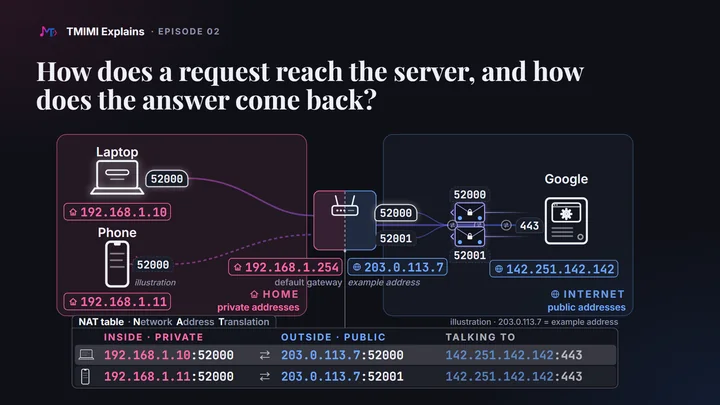
The short answerYour devices use private addresses that only mean something inside your home. Your router has the one public address the internet can see. When your laptop talks to Google, the router replaces the laptop’s address (and, if needed, its port) with its own, and writes the pair in its NAT table. Google answers the router. The router finds the matching row and hands the answer to the laptop. No row, no way in.
The map
Everything in this episode happens on one map: a laptop on a cable and a phone on Wi-Fi, a router with two sides, the internet, and Google. The numbers 1 to 4 follow one conversation, from the laptop to Google and back. Each term is explained further down.
-
1Laptop to router
- From
- 192.168.1.10:52000
- To
- 142.251.142.142:443
The laptop’s private address, and the temporary port it picked.
-
2Router to Google
- From
- 203.0.113.7:52000 rewritten
- To
- 142.251.142.142:443
The router puts its public address in From, and writes row 1 of its NAT table.
-
3Google to router
- From
- 142.251.142.142:443
- To
- 203.0.113.7:52000
Google answers the only address it can see.
-
4Router to laptop
- From
- 142.251.142.142:443
- To
- 192.168.1.10:52000 put back
Row 1 says port 52000 belongs to the laptop. The phone gets nothing.
The router’s ruleGoing out, it rewrites From. Coming back, it rewrites To.
The router’s NAT table one row per conversation
| Row | Inside (private) | Outside (public) | Talking to |
|---|---|---|---|
| 1 · laptop | 192.168.1.10:52000 | 203.0.113.7:52000 | 142.251.142.142:443 |
| 2 · phone | 192.168.1.11:52000 | 203.0.113.7:52001 | 142.251.142.142:443 |
203.0.113.7 is an example address reserved for documentation: we never show the real one. The phone’s address and port 52001 are illustrations. The router knows no names: “laptop” and “phone” are there to help you read.Private addresses stay inside
Every device on a network has an IP address. At home, the router gives each device a private address, automatically (the method is called DHCP). In the film, the laptop is 192.168.1.10 and the phone 192.168.1.11. Here is what ipconfig printed on that laptop:
Ethernet adapter Ethernet:

   Connection-specific DNS Suffix  . :
   IPv4 Address. . . . . . . . . . . : 192.168.1.10
   Subnet Mask . . . . . . . . . . . : 255.255.255.0
   Default Gateway . . . . . . . . . : 192.168.1.254
On a French Windows, the same lines read Adresse IPv4, Masque de sous-réseau and Passerelle par défaut. The subnet mask says which addresses are on the same local network; you don’t need it for this episode.
Why can’t the internet use these addresses? Because millions of homes use the same numbers. Your neighbour’s laptop may be 192.168.1.10 too. An address that isn’t unique can’t be used to find you.
And why not give every device a public address? There aren’t enough. An IPv4 address is 32 bits long: about 4.3 billion addresses in total, fewer than the devices in use, and they have run out. The newer IPv6 has 128-bit addresses, enough for everyone (see what the film simplified).
Three kinds of address, plus one
| Kind | Examples | What it means | Reachable from |
|---|---|---|---|
| Loopback | 127.0.0.1 (localhost) | this very device | only itself |
| Private | 10.x.x.x, 172.16.x.x to 172.31.x.x, 192.168.x.x | a device on its own local network; the same numbers are reused in millions of networks | that network only |
| Shared | 100.64.x.x to 100.127.x.x | your provider’s own NAT network (see the note below) | inside the provider’s network |
| Public | Google’s 142.251.142.142 | unique on the whole internet | anywhere |
The router has two sides
So your router has two sides. Inside, it has a private address: 192.168.1.254 here. Your laptop calls it the default gateway: the way out to everything that isn’t on the home network. You saw it in ipconfig above.
Outside, it has one public address, given by your internet provider. To the internet, your whole home is just that one address. In this episode it is 203.0.113.7, an example address reserved for documentation: we never publish a real one.
A note from the film: when your provider adds a second NAT
Some providers share one public address between many homes. It is common on 4G and 5G, and on some home connections. Your router’s outside address is then itself private or shared (often between 100.64.0.0 and 100.127.255.255), and a second router, in the provider’s network, does the same job again. This is called carrier-grade NAT. Everything below still happens, twice.
DNS: from a name to an address
Now, the trip. First, the laptop needs Google’s address. It asks a DNS server, the internet’s address book: “What is the address of google.com?” The answer is an IP address. Here is the answer the laptop got:
Name:    google.com
Addresses:  2a00:1450:4003:805::200e
	  142.251.142.142
- Two kinds of address came back: a long one with colons, which is IPv6, and one with dots, which is IPv4. This episode follows IPv4.
- Your answer may differ. Google has many addresses. A later lookup on the same laptop, the same day, gave
142.251.140.238.
Ports: which program, which conversation
Addresses find machines. Ports find programs on those machines. A port is a number from 0 to 65535. We write an address and a port together, with a colon, 142.251.142.142:443, but they are two different things.
- Servers listen on known ports. Google’s web server listens on port 443, the port of secure websites (
https). Plainhttpuses 80, and DNS uses 53. In the course, you will run your own servers on ports such as 3000. - Clients use a temporary port. The laptop picks a free port for each conversation, and lets it go when the conversation ends. It is called a temporary, or ephemeral, port. Windows picks it between 49152 and 65535, the range reserved for this; Linux uses 32768 to 60999 by default.
You can watch Windows pick one: curl.exe -v prints it. On the laptop in the film, two runs in a row gave ports 61577 and 61578: Windows often takes the next free one. This is the second:
* Established connection to example.com (172.66.147.243 port 80) from 192.168.1.10 port 61578
172.66.147.243 is example.com’s public address. It is not private: the private range is only 172.16 to 172.31.
In the film, the laptop uses port 52000. Our test program asked for that port on purpose, so that the number is easy to read. The connection itself was real, as netstat shows below.
A conversation is identified by five values: the protocol (here TCP), both addresses and both ports. Keep that in mind for the router.
Packets carry two labels
The request travels in small pieces called packets. Each packet carries two labels: From, the sender’s address and port, and To, the receiver’s. The request itself is inside, and it is encrypted: that is the “s” of https. The router only reads the labels.
1A packet leaves the laptop
- From
- 192.168.1.10:52000
- To
- 142.251.142.142:443
- Inside
- the HTTP request of episode 01, encrypted: the router can’t read it
While that connection was open, netstat showed it on the laptop:
  Proto  Local Address          Foreign Address        State
  TCP    192.168.1.10:52000     142.251.142.142:443    ESTABLISHED
- Local Address is the laptop’s side; Foreign Address is Google’s side. On a French Windows: Adresse locale and Adresse distante.
- TCP is the connection that carries the packets, and makes sure they all arrive, in order.
- Before the request, the first packets open the connection (TCP) and set up the encryption (TLS). They carry the same two labels.
- These labels are, technically, the IP and TCP headers of each packet. They are not the HTTP headers of episode 01, which travel inside, encrypted.
The way back: how the answer finds the laptop
This is the question students ask most. The answer comes back to the router: how does the router know it is for the laptop, and not for the phone? Follow the four legs on the map.
- 1The packet leaves the laptop with From 192.168.1.10:52000.
- 2Google can’t answer a private address: it isn’t unique. So the router replaces the laptop’s address in From with its own public address, 203.0.113.7. It often keeps the same port. And it writes the change in a table, the NAT table. NAT stands for Network Address Translation.
- 3Google answers the only address it can see: To 203.0.113.7:52000.
- 4The router does not guess, and it doesn’t send the answer to every device. It looks up port 52000 in its NAT table, finds the laptop’s row, puts the laptop’s address back in To, and delivers the answer. The phone gets nothing.
The rule: going out, the router rewrites From. Coming back, it rewrites To. It never changes the destination of a packet going out.
Test yourself: cover the packets under the map, and say what From and To contain on each leg. Then check.
Two devices, one port
Now the phone opens Google too. By chance, it also picks port 52000. What should the router do?
It can’t reuse public port 52000 with Google. Both answers would come back with the same labels, From 142.251.142.142:443 To 203.0.113.7:52000, and the router couldn’t tell them apart. So it gives the phone another free port, for example 52001. Now there are two rows, one for each conversation.
| Row | Inside (private) | Outside (public) | Talking to |
|---|---|---|---|
| 1 · laptop | 192.168.1.10:52000 | 203.0.113.7:52000 | 142.251.142.142:443 |
| ✕ refused | 192.168.1.11:52000 | 203.0.113.7:52000 same as row 1 | 142.251.142.142:443 same |
| 2 · phone | 192.168.1.11:52000 | 203.0.113.7:52001 another port | 142.251.142.142:443 |
The phone’s conversation then follows the same four legs, with its own port:
| Leg | From | To |
|---|---|---|
| 5Phone → router | 192.168.1.11:52000 | 142.251.142.142:443 |
| 6Router → Google | 203.0.113.7:52001 | 142.251.142.142:443 |
| 7Google → router | 142.251.142.142:443 | 203.0.113.7:52001 |
| 8Router → phone | 142.251.142.142:443 | 192.168.1.11:52000 |
Two answers now arrive from Google: one to port 52000, one to port 52001. Each follows its own row to its own device. Port 52001 is an illustration: many routers pick a random free port instead of the next one.
The NAT table, row by row
- A row is written by the first packet going out: the one that opens the connection, before the request is even sent.
- It stays while packets flow. The router deletes it when the conversation ends, or after a silence. The standards ask for minimums. A row for an open but idle TCP connection should last at least 2 hours and 4 minutes. A UDP row should last at least 2 minutes, and 5 or more is recommended. Real routers vary, and some use shorter times.
- Many routers keep the port when they can, and change it on a clash, as for the phone.
- Strictly, the router matches the whole row, all five values, not only the port. The film says “port 52000” because that is the part that differs here.
No row, no way in
Each row exists only because a device inside spoke first. Remember episode 01: the client speaks first. So, can a machine on the internet start a conversation with your laptop? By default, no. Its packets arrive at the router’s public address, match no row, and the router stops them.
A packet from an unknown machine
- From
- 198.51.100.23:61000 example address
- To
- 203.0.113.7:3000
No row has port 3000 on the outside, so the router stops it here.
- Port forwarding is a permanent row that you add yourself, in the router’s settings: “send what arrives on port 3000 to 192.168.1.10:3000”. Later in the course, this is why a friend can’t open the server you run on your laptop, unless you add such a row.
- Behind a provider’s second NAT (carrier-grade NAT), you can’t add that row at all: the provider’s own router would need one too.
- This protection is a side effect of sharing one address. NAT is not a firewall. Where there is no NAT, as with IPv6, most home routers block conversations started from outside on purpose, with a firewall that is on by default.
What the film simplified
- The first packets aren’t the request. The TCP connection opens first, then TLS sets up the encryption, and only then does the request go out.
- Routers match full rows, not just the port. And on a clash, many pick a random free port rather than the next number.
- One address, many machines. Behind Google’s one address sit many machines, and DNS answers vary: we got two different IPv4 answers on the same day.
- HTTP/3 uses UDP, not TCP. Browsers often use it with big sites. The rows work the same way, with shorter timers.
- IPv6 has enough addresses for every device, so there is usually no NAT: each device gets its own public address. The home router usually still blocks conversations started from outside. When both IPv4 and IPv6 work, browsers prefer IPv6.
- Inside the home, the router delivers packets to devices using their hardware (MAC) addresses: another kind of label.
- The DNS server is often the router itself. On the laptop in the film, it was
fe80::1, the router’s own IPv6 address on the home network. - Your public address can change. Many providers lend it for a limited time, so tomorrow you may see another one.
Try it yourself
Find your own addresses, ports and conversations
No programming. On Windows, open PowerShell or the Command Prompt, and type curl.exe, not curl (episode 01 explains why). On a French Windows, the labels are in French: both are given below.
-
Your private address and your gateway.
ipconfigFind the adapter that has a Default Gateway (Passerelle par défaut). Its IPv4 Address (Adresse IPv4) is your private address, and the gateway is your router’s inside side.
Adapters named vEthernet, WSL, VirtualBox or VMware, with addresses such as
172.21.x.xor192.168.56.x, are virtual networks inside your own computer: skip them. The laptop in the film has two. On macOS:ipconfig getifaddr en0, thenroute -n get defaultand read the gateway line. On Linux:ip -4 addrandip route(the linedefault via …).Check: does your address start with
10.,172.16.to172.31., or192.168.? Then it is private. -
Your public address. Open ifconfig.me, or type:
curl.exe -4 ifconfig.me(macOS and Linux:
curl -4 ifconfig.me.) It differs from step 1: it is your router’s outside side, or your provider’s. Every device on your Wi-Fi gets the same answer. Try your phone on the Wi-Fi, then on 4G. If the website shows a long address with colons, that is IPv6: the command, with-4, asks for the IPv4 one.Don’t post this address publicly.
-
Ask DNS.
nslookup google.comThe first lines name the DNS server that answered, often your router; UnKnown there is normal. Then you’ll see Non-authoritative answer (Réponse ne faisant pas autorité). It means the answer comes from your DNS server, not from Google’s own DNS servers: yours asked them for you, or remembered an earlier answer. A long address with colons (IPv6) and one with dots (IPv4) come back. Yours may differ from the film’s: Google has many.
-
See your conversations. Open two websites, then:
netstat -nEach
ESTABLISHEDline is one conversation. Local Address (Adresse locale) is your private address and a temporary port, between 49152 and 65535 on Windows. Foreign Address (Adresse distante) is the server, on:443. Open another site and run it again: new lines, with new temporary ports.Lines with
127.0.0.1on both sides are programs on your own computer talking to each other, and addresses in square brackets are IPv6: skip both. On macOS:netstat -an -p tcp | grep 443. On Linux:ss -tn. Some browser conversations use HTTP/3, over UDP, and don’t appear in this TCP list. -
Your own temporary port, live.
curl.exe -v http://example.comLook for the line that starts with
* Established connection: it ends with your private address and the port Windows just picked.Older versions of curl write
* Connected toinstead, without your port. This command prints your address and port with any version (on macOS and Linux, writecurland-o /dev/null):curl.exe -s -o NUL -w "%{local_ip}:%{local_port}" http://example.com -
Optional: the first hop.
tracert -4 -d -h 3 google.com(macOS and Linux:
traceroute -n -m 3 google.com.) Hop 1 is your default gateway:192.168.1.254on the laptop in the film. The next hops are your provider’s routers. The-4keeps it on IPv4, like this episode. - Optional: in the browser. Open DevTools (F12), then Network, reload, click the page, and open Headers. Under General, Remote Address shows the server’s address and its port, 443.
Quick check
Pick an answer, then see why
1. Salma’s laptop, at home in Fès, is 192.168.1.10. Youssef’s laptop, at home in Agadir, is also 192.168.1.10. Both open Google at the same time. What happens?
Show the answer
B. Private addresses are reused on purpose: the standard says the same space “can be used by many enterprises”. Each home’s router replaces them with its own public address, so Google sees two different senders.
2. The NAT table has one row: 192.168.1.10:52000 inside, 203.0.113.7:52000 outside, talking to 142.251.142.142:443. A packet arrives for 203.0.113.7:52001. The router…
Show the answer
C. Rows are written by packets going out. In the standard’s words, “sessions are uni-directional, outbound from the private network”. Port forwarding is how you add a row on purpose.
3. Google’s server talks to millions of devices, all on its port 443. Your laptop and your phone both reach it from 203.0.113.7. How does Google keep the two conversations apart?
Show the answer
B. A conversation is identified by five values: the protocol, both addresses and both ports. The User-Agent of episode 01 is inside the encrypted request; the labels outside are what tell conversations apart. It is exactly why the router gave the phone another port.
Common mistakes
- Sending your private address to someone outside your network. “Open
http://192.168.1.10:3000” works only on your own network. On theirs, that address is someone else’s device, or nobody’s. Even your public address won’t work unless your router has a row for it (port forwarding), and behind a provider’s second NAT you can’t create one at all. - Typing
localhoston your phone to reach your laptop.localhost(127.0.0.1) always means “this very device”, so on the phone it is the phone. On the same Wi-Fi, use the laptop’s private address, for example192.168.1.10. A phone on 4G is on another network entirely. - Taking the
ipconfigaddress for your internet address.ipconfigshows your private address; websites see your router’s public one (ifconfig.me). Then look at your router’s status page. If its outside address is between100.64and100.127, or another private one, and differs from what ifconfig.me shows, your provider is adding a second NAT.
English → French glossary
| English | Français |
|---|---|
| IP address | adresse IP |
| private / public address | adresse privée / publique |
| router (“the box”) | routeur (la box) |
| default gateway | passerelle par défaut |
| port; temporary (ephemeral) port | port ; port éphémère |
| packet | paquet |
| NAT table | table NAT |
| request / response | requête / réponse |
| header / body | en-tête / corps |
| status code | code d’état |
Let’s recap
- Private addresses stay inside your home.
- The router faces the internet with one public address.
- DNS gives the laptop Google’s address.
- Ports find programs, and each conversation gets its own port.
- On the way out, the router puts its public address on the packets, and writes a row in its NAT table.
- On the way back, the port finds that row, and the right device.
- With no row, nothing gets in.
Each point links to its section, if you want to read it again.
Before and after
Sources and credits
- Private addresses, reused by many networks: RFC 1918 §3. DHCP lends addresses: RFC 2131 §1. IPv4 addresses are 32 bits: RFC 791 §2.3; IPv6 addresses 128 bits: RFC 4291 §2. Documentation addresses such as
203.0.113.7and198.51.100.23: RFC 5737 §3. - NAT: RFC 3022: one address for a home (§1), sessions outbound only (§2), both directions translated (§2.2), rows created and deleted (§3.1, §3.3). NAT behaviour for UDP and TCP: RFC 4787 (§4.1; port preservation, §4.2.1; UDP timers, §4.3) and RFC 5382 (inbound connections filtered, §4.3; TCP timers, §5; no port overloading, §7.1). Rows created by outgoing packets, and permanent rows: RFC 6887 §3. Port randomisation: RFC 7857 §9.
- Ports and their ranges: RFC 6335 §6 and §8.1.2. The five values of a conversation: RFC 6056 §2.2. Port 443 for https: RFC 9110 §4.2.2. Linux’s range: the kernel’s ip-sysctl documentation,
ip_local_port_range. - Carrier-grade NAT and shared addresses: RFC 6598 and RFC 6888 §1. IPv6 and NAT: RFC 4864; home routers filtering inbound IPv6: RFC 6092; browsers preferring IPv6: RFC 8305. HTTP/3 runs over QUIC (RFC 9114), which travels in UDP (RFC 9000).
- What a “non-authoritative answer” means: the answering DNS server is not an authority for the name, the AA bit of RFC 1035 §4.1.1.
- The
ipconfig,nslookup,netstatandcurl.exeoutputs come from the laptop in the film, running Windows 11, on September 24, 2026. The connection on port 52000 was opened by a test program that asked for that port. The router’s real public address is never shown. - The film is animated in code with Remotion. Its narration is a synthetic voice, designed for this series with Qwen3-TTS. The script, the film and this page were prepared with AI assistance.