
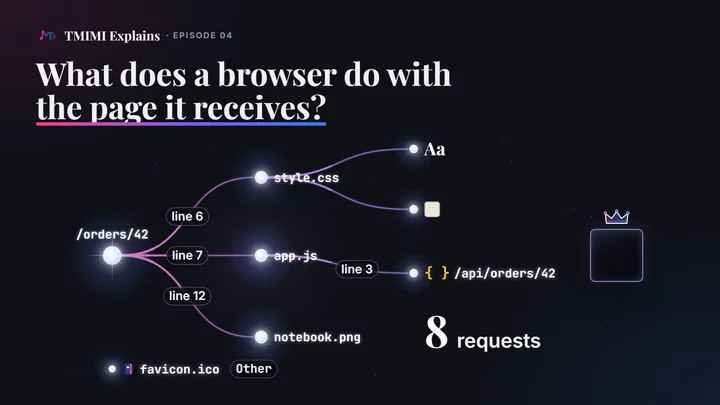
The short answerThe page arrives as text, written by the server. The browser reads it from top to bottom and builds a tree of nodes, the DOM. Each line that names a file makes the browser ask the server for it, and those files ask for more: the developer tools call whoever asked the initiator, and the links form a request initiator chain. The style rules become the CSSOM, and the browser waits for the stylesheet before it paints anything. A script stops the parser, unless it has defer. Then the browser works out where every box goes (layout), fills the boxes (paint) and puts the layers together (composite). After every change, it does part of that work again.
One address, eight requests
We built a tiny site for this episode: the orders of episode 01 and episode 03, served this time as a web page. It runs on a laptop at home, at the private address 192.168.1.10, port 3000. The page for order 42 is 16 lines of HTML. It names a stylesheet, a script and an image. The stylesheet names a font and a background image, and the script asks the service for the order’s data.
We opened http://192.168.1.10:3000/orders/42 in Chromium 153, with an empty cache, and read two witnesses: the browser’s developer tools, and the service’s own log.
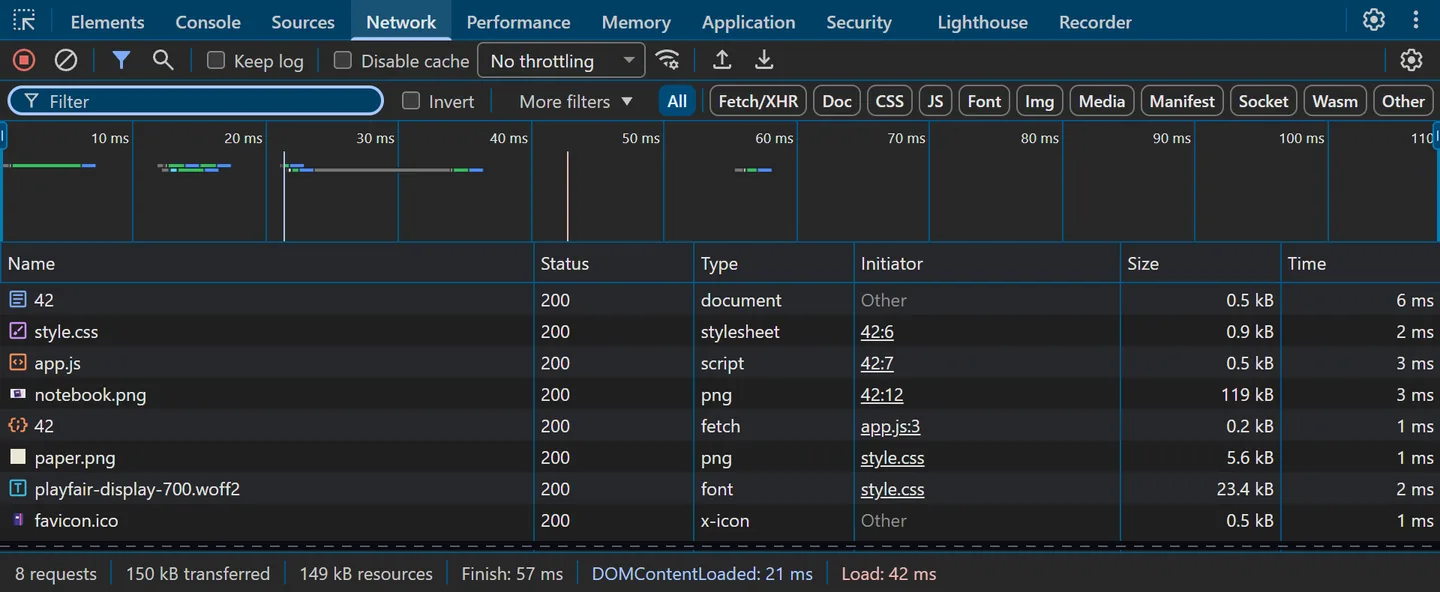
/orders/42) and the data (/api/orders/42) both show as “42”.00:08:25.920 GET /orders/42 → 200 OK 00:08:25.927 GET /style.css → 200 OK 00:08:25.929 GET /img/notebook.png → 200 OK 00:08:25.930 GET /app.js → 200 OK 00:08:25.931 GET /img/paper.png → 200 OK 00:08:25.940 GET /fonts/playfair-display-700.woff2 → 200 OK 00:08:25.941 GET /api/orders/42 → 200 OK 00:08:25.947 GET /favicon.ico → 200 OK
Eight requests for one address, all answered 200 OK, 150 kB in all, within 30 milliseconds of the first on this home network. Seven of them come from the page itself, as the rest of this page shows. The eighth, /favicon.ico, is the browser’s own: the page names no icon, so Chromium asked for the site’s default one, for the tab. Its Initiator column says Other, like the page’s own request.
The screenshot and the log come from two loads of the same page, about an hour and a half apart; they show the same eight requests. In the log run, with no developer tools attached, the last request ended 28 ms after the first began.
The page is text, and the DOM is a tree
The answer to GET /orders/42 is an ordinary HTTP response. Its Content-Type says what the body is: HTML text, in UTF-8.
              HTTP/1.1 200 OK
              Content-Type: text/html; charset=utf-8
              Content-Length: 345
              Date: Sat, 26 Sep 2026 00:08:13 GMT
              Connection: keep-alive
              Keep-Alive: timeout=5
              ↵ empty line
              ⋯ the body: 16 lines of HTML, below with their numbers
 1  <!DOCTYPE html>
 2  <html lang="en">
 3  <head>
 4    <meta charset="utf-8">
 5    <title>Order 42</title>
 6    <link rel="stylesheet" href="/style.css">
 7    <script src="/app.js" defer></script>
 8  </head>
 9  <body>
10    <main>
11      <h1>Order 42</h1>
12      <img src="/img/notebook.png" alt="A notebook" width="320" height="200">
13      <p>1 notebook</p>
14    </main>
15  </body>
16  </html>
That body is only text. It is HTML, words wrapped in tags. The server wrote it, and the browser does what it says. Inside the browser, a parser reads it from top to bottom. In Chromium’s trace, the parser read all 16 lines in one pass that took 0.21 milliseconds.
Each opening tag becomes a node, called an element. An element that opens inside another becomes its child. The words also become nodes, text nodes. So the text grows into a tree of nodes: the DOM, the Document Object Model. The DOM Standard says each document “is represented as a node tree”, and everything that follows works on it: scripts read and change it, style rules are matched to it, and the pixels are drawn from it.
html lang="en"
├─ head
│  ├─ meta charset="utf-8"
│  ├─ title
│  │  └─ text "Order 42"
│  ├─ link rel="stylesheet" href="/style.css"
│  └─ script src="/app.js" defer
└─ body
   └─ main
      ├─ h1
      │  └─ text "Order 42"
      ├─ img src="/img/notebook.png" …
      └─ p
         └─ text "1 notebook"
The DOM also keeps the line breaks and spaces between the tags, as text nodes of whitespace: 12 of them in this page. DevTools’ Elements panel hides them, and so does this tree.
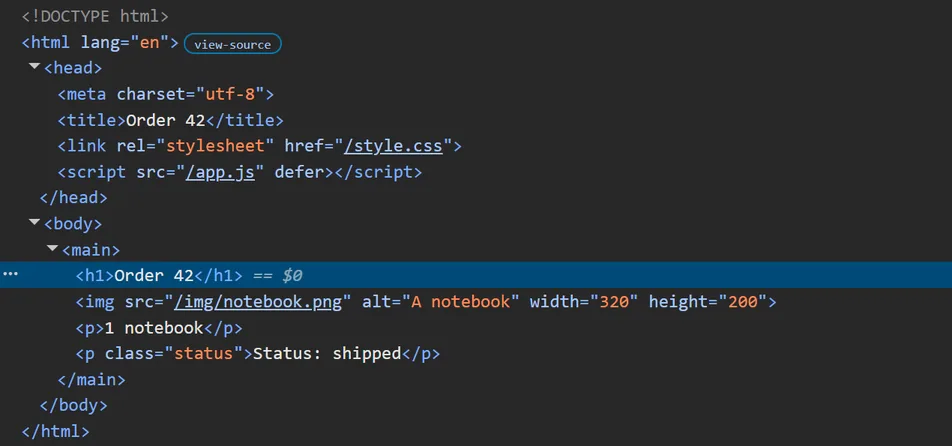
<p class="status">. Chrome DevTools, Chromium 153, September 26, 2026.The request initiator chain
While the parser reads, the browser meets lines that name other files. Line 6 names a stylesheet, and line 7 names a script. Further down, line 12 names an image. The browser asks the server for each one at once. The browser’s developer tools show who asked for each file, and they call that the initiator.
Those files ask for more. The stylesheet needs a font, and a background image: the stylesheet is their initiator. The page asks for the script, then line 3 of the script asks for the order’s data. Each request points to the one that caused it, and the links form a request initiator chain. In this page the chains make a tree of seven requests, with the browser’s own icon request beside it:
/orders/42initiator Other: the address you opened/style.cssinitiator 42:6: the page, line 6/img/paper.pnginitiator style.css/fonts/playfair-display-700.woff2initiator style.css
/app.jsinitiator 42:7: the page, line 7/api/orders/42initiator app.js:3: the script, line 3
/img/notebook.pnginitiator 42:12: the page, line 12
/favicon.icoinitiator Other: the browser’s own, for the tab
| Request | DevTools’ Initiator column | The page’s own view (initiatorType) | Sent after the page’s request |
|---|---|---|---|
/orders/42 | Other | the navigation itself | 0 ms |
/style.css | 42:6 | link | 4.5 ms |
/app.js | 42:7 | script | 4.8 ms |
/img/notebook.png | 42:12 | img | 4.9 ms |
/img/paper.png | style.css | css | 11.3 ms |
/fonts/playfair-display-700.woff2 | style.css | css | 11.5 ms |
/api/orders/42 | app.js:3 | fetch | 20.7 ms |
/favicon.ico | Other | other | 26.9 ms |
DevTools’ documentation lists who can start a request: “Parser. Chrome’s HTML parser”, “Script. A JavaScript function”, a redirect, and “Other. Some other process or action, such as navigating to a page using a link or entering a URL in the address bar”. The column also gives the file and the line, as a link: 42:6 is the page’s line 6, app.js:3 the script’s line 3. The font and the background image are marked style.css, without a line.
The page can read its own list too, with no developer tools: the browser’s Resource Timing interface gives each file an initiatorType. It says link, script and img for the three tags, fetch for the data, and css for the font and the background image. The standard is explicit: a font from @font-face “is a result of processing a CSS directive. Therefore, the initiatorType for this font resource is ‘css’.”
Three ways to see the chain in DevTools
1. The Initiator column, in the Network panel above: each row names its initiator.
2. Shift and hover. In DevTools’ words: “hold Shift and hover over the request … DevTools colors initiators green, and dependencies red.”
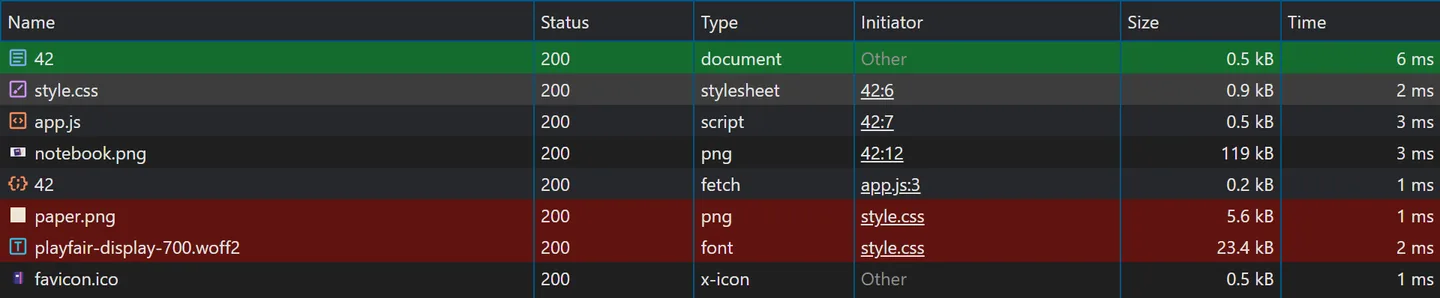
style.css: its initiator, the page, turns green; its two dependencies, the background image and the font, turn red. Chrome DevTools, Chromium 153, September 26, 2026.3. The Initiator tab. Click a request, then open its Initiator tab. For a request made by a script, it shows the call that made it (“Request call stack”) and the whole chain above it (“Request initiator chain”):
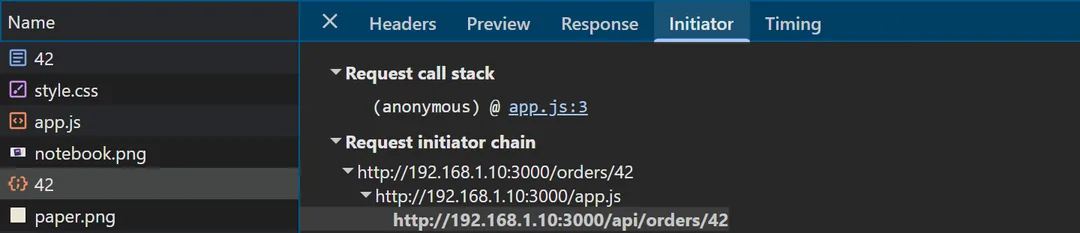
app.js, then /api/orders/42, made by line 3 of the script. Chrome DevTools, Chromium 153, September 26, 2026.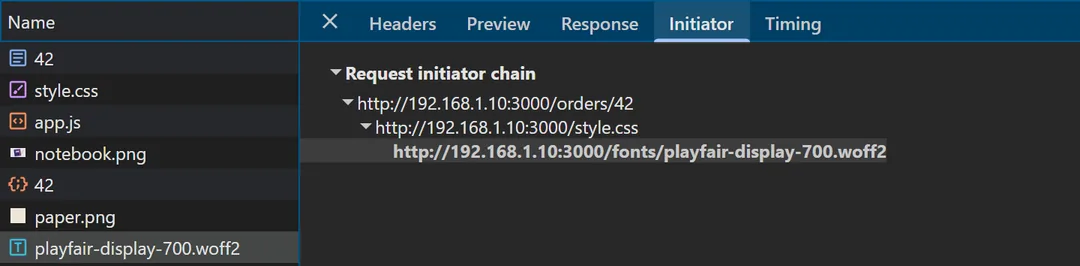
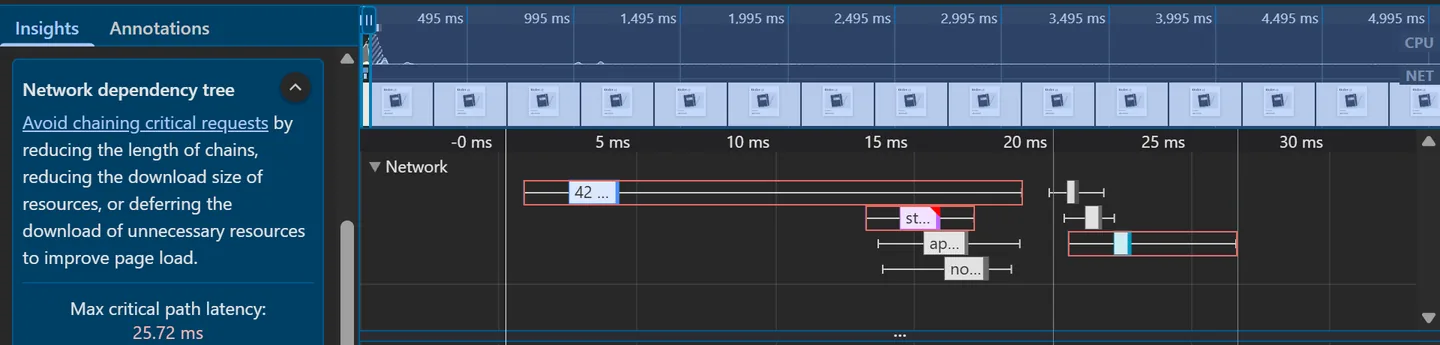
style.css, then the font. Chrome DevTools, Chromium 153, September 26, 2026.A fourth view, in the Performance panel. After “Record and reload”, its Network dependency tree insight draws the longest chain, the one the page waited for, and gives its time. Here: the page, then style.css, then the font, with a “Max critical path latency” of 25.72 ms. It is DevTools’ own name for the same idea: “Avoid chaining critical requests”.
Other: requests the page did not ask for
Two rows say Other. The first is the page itself: you asked for it, by typing its address (in our test, a script drove the browser there). The second, /favicon.ico, is the browser’s idea. The HTML Standard allows it: “In the absence of a link with the icon keyword”, a browser “may” fetch /favicon.ico from the page’s site, to show in the tab. “May” means another browser, or the same browser next time, might not ask. Chromium did.
What the server sees
The server never sees the initiator. Each request after the first did carry a hint, though: the Referer header, the address of a document that led to it.
Referer header · Chromium 153 Sep 26, 2026GET /style.css Referer: http://192.168.1.10:3000/orders/42 GET /img/notebook.png Referer: http://192.168.1.10:3000/orders/42 GET /app.js Referer: http://192.168.1.10:3000/orders/42 GET /img/paper.png Referer: http://192.168.1.10:3000/style.css GET /fonts/playfair-display-700.woff2 Referer: http://192.168.1.10:3000/style.css GET /api/orders/42 Referer: http://192.168.1.10:3000/orders/42 GET /favicon.ico Referer: http://192.168.1.10:3000/orders/42
The font and the background image arrived with the stylesheet’s address. The data arrived with the page’s address, not the script’s: app.js runs inside the page, and its request carried the page’s address. So the server can rebuild part of the chain from its own log, but not all of it. The server is still the boss: it wrote the page, the stylesheet and the script, so it decided which files the browser would ask for, all but the icon.
Real pages grow bigger trees
Our page is tiny on purpose. We opened four public pages the same day, once each, in a fresh Chromium profile, and counted the requests made up to five seconds after each one had loaded:
| Page | Requests | Links in the longest chain below the page |
|---|---|---|
example.com | 1 | 0 |
mehditmimi.com, the home page | 11 | 2 |
| Wikipedia, the “Web browser” article | 47 | 3 |
| MDN, “How browsers work” | 78 | 3 |
| This episode’s orders page | 8 | 2 |
Chromium 153, September 26, 2026, one visit each. These counts change from one visit to the next, with the cache, the network and what each page decides to load.
Fonts and images come from the CSS, and only when used
The stylesheet declares its font with @font-face and points to its background image with url():
 1  @font-face {
 2    font-family: "Playfair Display";
 3    src: url("/fonts/playfair-display-700.woff2") format("woff2");
 4    font-weight: 700;
 5    font-display: swap;
 6  }
    ⋯
 8  body {
    ⋯
10    background: #efe7d8 url("/img/paper.png");
    ⋯
24  h1 {
25    margin: 0 0 18px;
26    font: 700 48px/1.1 "Playfair Display", Georgia, serif;
27  }
The browser asks for such files only when a rule that applies to the page needs them. CSS Fonts Level 4 makes it a rule for fonts: “user agents must only download those fonts that are referred to within the style rules applicable to a given page”. In Chromium’s trace, the stylesheet arrived 17.55 ms after the navigation began. The browser matched its rules to the DOM at 19.58 ms, then asked for the paper texture at 19.87 ms and the font at 20.03 ms: the body rule uses one, the h1 rule the other.
Our stylesheet says font-display: swap. Until the font arrives, the text is drawn in a stand-in font, the next one in the list (Georgia), and then swapped. CSS Fonts 4 describes swap as “an extremely small block period” and “an infinite swap period”. Even with nothing slowed down, the first frame that showed the page still had the stand-in; the next one, about a millisecond later, had Playfair Display:

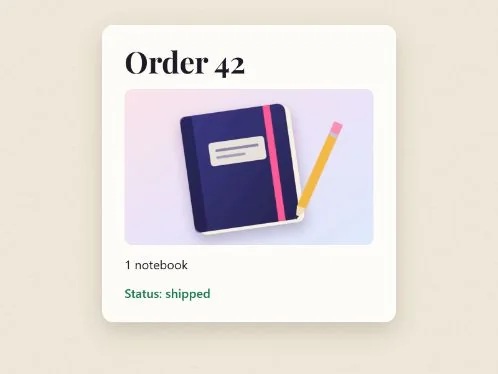
Two frames of the trace’s own filmstrip (DevTools’ screenshots), Chromium 153, September 26, 2026, times from the start of the navigation. The swap changed the heading’s width, so the text under it moved a little: Chromium recorded a layout shift of 0.00036, a very small one.
The CSSOM, and the cascade
The stylesheet is a list of rules. Each rule picks some elements, with its selector, and gives them styles. The browser also turns these rules into objects: the CSSOM, the CSS Object Model, whose standard “defines APIs (including generic parsing and serialization rules) for Media Queries, Selectors, and of course CSS itself”. It is a list of rule objects, not a second tree shaped like the page. Then the browser matches the rules to the DOM, and every element gets its final style.
The page’s rules are not the only ones. The browser has its own, the user agent stylesheet, and when two rules set the same property the cascade decides which wins. DevTools shows it in the Styles pane:
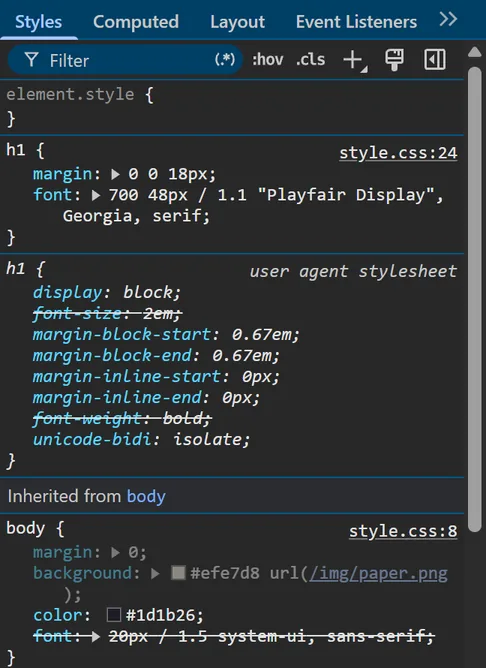
<h1>. The page’s rule (style.css:24) wins over the browser’s own h1 rule, whose font-size and font-weight are struck through. Chrome DevTools, Chromium 153, September 26, 2026.Why the browser waits for the stylesheet
To see the browser wait, we slowed the server down on purpose: it held style.css back for one second, and the font and the data too, to separate the stages. At 504 ms, the DOM was complete, all 11 elements, and the page had applied no stylesheet and painted nothing. The first paint came at 1,048 ms, right after the stylesheet arrived:
 5 msBlank, and nothing new is shown until 1,047 ms.
 1,047 msThe first paint: styled, in the stand-in font.
 2,049 msThe font has arrived.
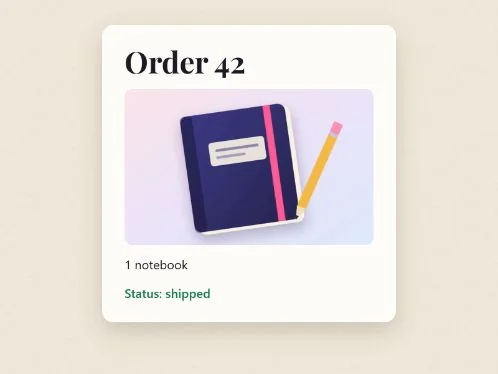 2,549 msThe data has arrived: the script’s line.
DevTools’ filmstrip of that load: the trace’s own screenshots, Chromium 153, September 26, 2026. Delays added on purpose by the server: style.css 1 s, the font 1 s, the data 1.5 s.
This wait is in the standard. The HTML Standard says a stylesheet link “is implicitly potentially render-blocking if the element was created by its node document’s parser”. While such a stylesheet is pending, the document is “render-blocked”, and the step that updates the screen skips it: “Remove from docs any Document object doc for which … doc is render-blocked”. The standard also allows an “implementation-defined timeout”, so a browser does not wait forever.
Why wait? Without the wait, you would first see the page in the browser’s default styles. Then everything would jump, in what web developers call a flash of unstyled content. Here is the same page with an empty stylesheet, next to what the browser painted first:
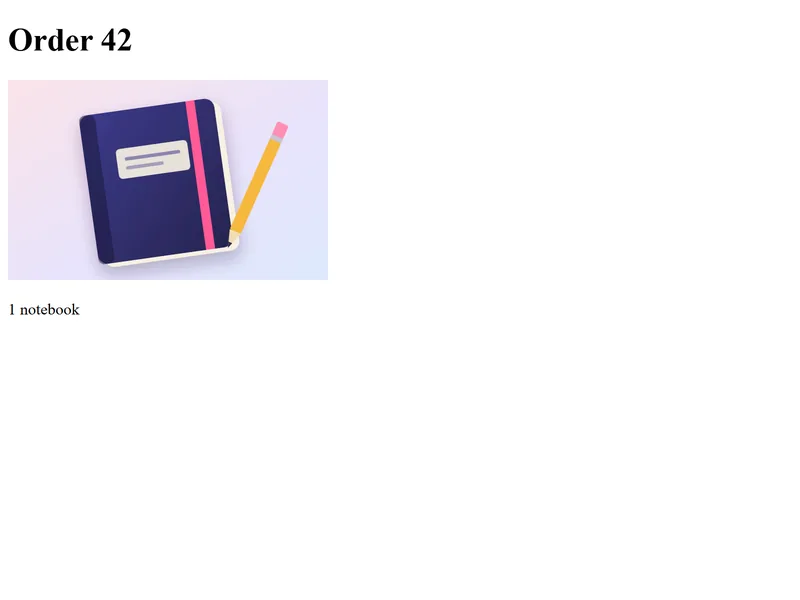
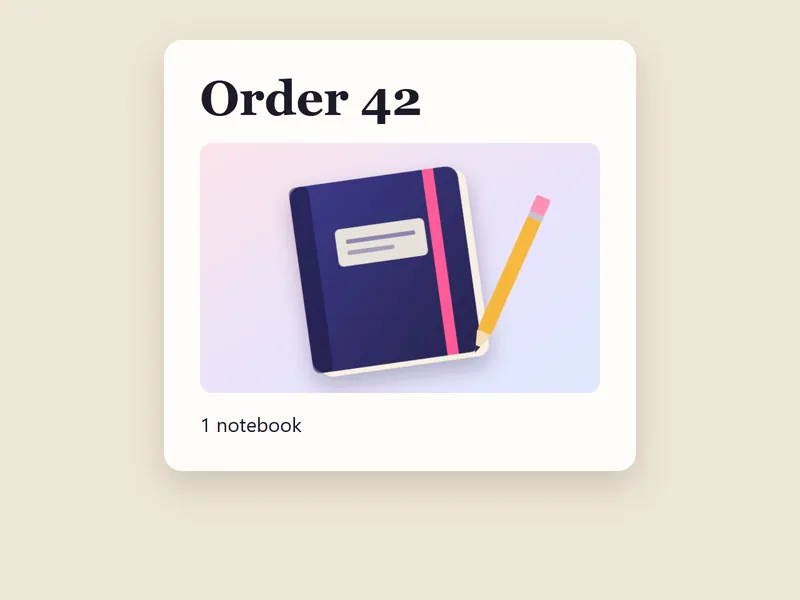
So the first thing the browser paints is the styled page. The browser itself says which file held the paint back. The page’s own Resource Timing marks style.css with renderBlockingStatus: "blocking", and every other file "non-blocking". The Performance panel names it too:
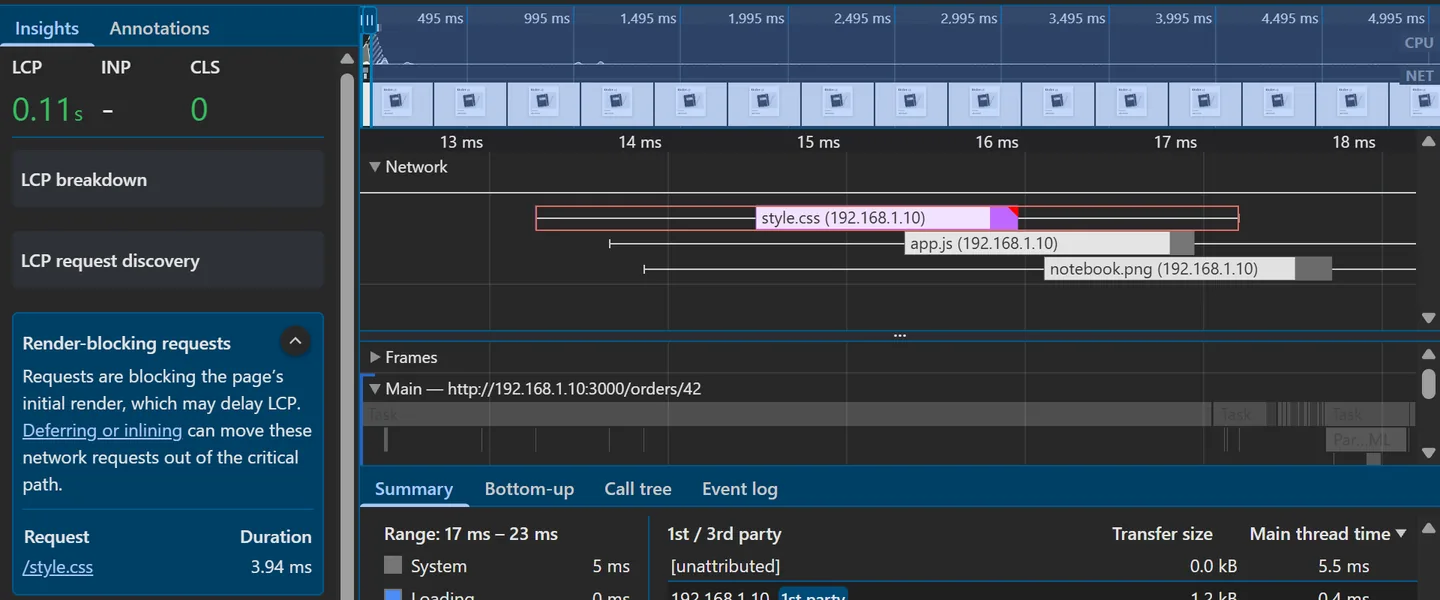
/style.css. Chrome DevTools, Chromium 153, September 26, 2026.Images, fonts, the deferred script and the data did not hold the first paint back. In the slowed load the font arrived at 2,042 ms, a second after the first paint, and in a load where only the script was late, the page was painted at 32 ms (see below).
Chromium may still work on the unstyled page while it waits: in some of our runs it computed styles and layout for it, then painted nothing from them. Only one kind of stylesheet waits like this: a link the parser met in the <head>, as here.
Scripts: by default, the parser waits
A script might change the page, so by default the parser stops for it: the browser downloads the script, runs it, and only then reads on. The HTML Standard calls such a script a classic script (one that is not a module). With a src and neither defer nor async, it is “fetched and evaluated immediately, blocking parsing until these are both complete”.
We tested it with our own script, app.js:
 1  const main = document.querySelector('main');
 2
 3  fetch('/api/orders/42')
 4    .then((response) => response.json())
 5    .then((order) => {
 6      const line = document.createElement('p');
 7      line.className = 'status';
 8      line.textContent = `Status: ${order.status}`;
 9      main.append(line);
10    });
The server held app.js back for one second, on purpose, and we loaded the page twice: once with line 7 as <script src="/app.js"></script>, the default, and once as written, with defer. Chromium’s trace recorded:
| What happened | By default | With defer |
|---|---|---|
| The parser reads | lines 1 to 7 at 9.4 ms, then stops | lines 1 to 17 at 8.5 ms, in one pass |
app.js arrives, and runs | 1,023.7 ms, and 1,023.9 ms | 1,021.6 ms, and 1,021.8 ms |
| The parser reads lines 7 to 17 | at 1,024.6 ms: it waited about one second at line 7 | already done |
| First paint | 1,042.3 ms | 31.8 ms |
DOMContentLoaded | 1,033.3 ms | 1,022.2 ms, after the script |
| The status line | never shown: the script failed | added |
defer Chromium 153 · Sep 26, 2026Uncaught (in promise) TypeError: Cannot read properties of null (reading 'append')
By default, the script ran before the rest of the page existed. At 511.6 ms, while the parser waited, the page had six elements: html, head, meta, title, link and script, and no body. So line 1 found no <main> and got null; when the data came, line 9 failed, and the status line was never added. With defer, the script ran once the tree was complete, and it worked.
With defer, the page appeared after about thirty milliseconds, not after a second. The script downloaded while the parser read on, then ran when parsing was done. DOMContentLoaded waited for it, as MDN notes: “Scripts with the defer attribute will prevent the DOMContentLoaded event from firing until the script has loaded and finished evaluating.” The page was on screen a second before that event.
Five more loads of the unslowed page painted first between 28 and 36 ms. The film rounds the 31.8 ms of this run to “about thirty milliseconds”.
| The tag | Download | Runs |
|---|---|---|
<script src> | when the parser reaches it, and parsing stops | at once, then parsing continues: “blocking parsing until these are both complete” |
<script src defer> | “in parallel”, while parsing continues | “when the page has finished parsing”, in the order of the page, before DOMContentLoaded |
<script src async> | “in parallel to parsing” | “as soon as it is available (potentially before parsing completes)” |
<script type="module"> | “in parallel to parsing”, with its imports | “when the page has finished parsing”, like defer; with async, as soon as it is available |
A script written inside the page (<script>…</script>, with no src) runs as soon as the parser reaches it; defer has no effect on it (MDN: “This attribute must not be used if the src attribute is absent”).
A deferred script also waits for the stylesheet. In the slowed load of the section above, app.js arrived after 16 ms but ran only at 1,038 ms, right after style.css. The HTML Standard’s last parsing step, “the end”, waits until the first deferred script is ready “and the parser’s Document has no style sheet that is blocking scripts”. That is why the data, which the script asks for, left late in that load.
The preload scanner: the browser reads ahead
When the parser stopped at line 7, the image on line 12 was requested anyway, at 7.95 ms, a second before the parser got there. Chromium has a second, lighter HTML reader for this, the preload scanner, “a secondary HTML parser” in web.dev’s words. It looks ahead for files to request while the main parser is blocked. It does not build the DOM, so the TypeError above happened anyway. DevTools still names the page and its line as the initiator (42:12).
From the tree to pixels
To show the page, the browser turns the tree into pixels. Chromium’s rendering pipeline, RenderingNG, names its stages: “Style: apply CSS to the DOM, and create computed styles. Layout: determine the size and position of DOM elements on the screen”, then pre-paint, “Paint: compute a display list”, then commit, layerize, raster, and finally “Draw: execute the aggregated compositor frame on the GPU to create pixels on-screen”. The film keeps the three that web.dev also teaches, after style: “Layout > Paint > Composite”.
- Layout works out the size and position of every box.
- Paint fills each box with color and text: in Chromium, it records the drawing commands, and raster turns them into pixels.
- Composite stacks the painted layers, like sheets of glass, into one frame.
Not every node gets a box. web.dev: “Some nodes are not visible (for example, script tags, meta tags, and so on), and are omitted”, and so is any element with display: none. In our page, the head and everything in it get no box. This is layout’s answer for the card and what is in it, in CSS pixels, in an 800 × 600 window:
| Element | Position (x, y) | Size (width × height) |
|---|---|---|
main, the card | 164, 40 | 472 × 476.8 |
h1 | 200, 72 | 400 × 52.8 |
img | 200, 142.8 | 400 × 250 |
p, “1 notebook” | 200, 408.8 | 400 × 30 |
p.status, added by the script | 200, 454.8 | 400 × 30 |
| Step, as DevTools names it | Time | What it did here |
|---|---|---|
| Recalculate style | 0.60 ms | recalculated the style of 5 elements |
| Layout | 5.68 ms | laid out 9 of 9 objects |
| Pre-paint | 0.08 ms | prepared the paint |
| Paint | 0.14 ms | recorded the drawing commands |
| Layerize and Commit | 0.05 + 0.05 ms | handed the layers to the compositor |
These are the main thread’s steps only. Raster and draw happen on other threads and in the GPU process. Our page painted into a single layer: Chromium’s layer tree held five layers, and one of them drew the page’s content. The compositor then joined it with the rest of the browser’s window. Chromium’s documentation says what layers are for: layerize “break[s] up the display list into a composited layer list for independent rasterization and animation”.
When the page changes
The work does not stop at the first frame. In the slowed load, when the font arrived at 2,042 ms, the heading changed shape, so Chromium ran layout again (6 of 9 objects, 1.23 ms), then paint. When the data came at 2,539 ms and the script added its element, layout ran again for 6 of 11 objects. JavaScript can change the DOM at any time, and each change asks for part of this work again.
We then changed the finished page three times from a script, one change per frame, and read the trace:
| The change | Steps Chromium ran | Layout |
|---|---|---|
The heading’s color becomes crimson | style, pre-paint, paint, layerize, commit | skipped |
The card’s max-width becomes 460px | style, layout, pre-paint, paint, layerize, commit | 4 of 11 objects |
The image gets transform: rotate(-3deg) | style, layout, pre-paint, paint, layerize, commit | 5 of 11 objects |
A new color skips layout. A new size needs layout, then paint. A color changes no box, so there is nothing to measure again. web.dev lists such “paint-only” properties, “such as background-image, color, or box-shadow”. A width changes boxes, so their neighbors are laid out again.
The transform surprised us: it went through layout too. That image had no transform before, and our change was a one-off, not an animation. Chromium’s documentation says “animations of visual effects, and scroll, can skip layout, pre-paint and paint”. We did not test an animation, so this page makes no claim about it. Every change repeats some of this work; which part depends on the change.
What the film simplified
- “The browser asks the server for each one at once”: Chromium’s preload scanner spotted lines 6, 7 and 12 first (the requests left at 7.9 to 8.1 ms, the main parser ran at 9.4 ms). DevTools still names the parser and the line as their initiator.
- “That body is only text”: bytes, which the browser decodes as UTF-8 because
Content-Typesays so. - “Each opening tag becomes a node”: the doctype, comments and the parser’s repairs of broken HTML are left out, and so are the 12 text nodes of whitespace.
- “The browser waits for the stylesheet before it paints”: for a stylesheet
linkthe parser met in the head, as here. The standard lets a browser give up after a timeout. - “So the first thing the browser paints is the styled page”: the first paint, as the browser’s Paint Timing counts it. Before it, the trace also records tiny paints of the tab’s blank page, which draw only white.
- “By default, a script stops the parser”: an external script with neither
defer,asyncnortype="module". It also waits for stylesheets that are still loading. - “It runs once the tree is complete”: a deferred script also waits for pending stylesheets, as the slowed load shows.
- “About thirty milliseconds”: 31.8 ms in the traced run, 28 to 36 ms in five more.
- “Paint fills each box”: Chromium’s paint records drawing commands; raster fills the pixels, on other threads.
- “Composite stacks the painted layers”: our page painted into one layer, which the compositor joined with the browser’s window.
- The times are those of a laptop talking to itself over its home network: real, and much faster than the internet. The one-second waits were added on purpose, as the film says.
- “You open one address”: in our tests, a script drove Chromium to the address; the typing in the film is an illustration.
Try it yourself
Find the chain on a real page
In Chrome, Edge or another Chromium browser. Press F12 (on a Mac: Cmd+Option+I) to open the developer tools. They can also be found in the browser’s menu, under More tools › Developer tools.
A. The Network panel, on this page
- Open the Network tab, then reload the page (Ctrl+R, or Cmd+R on a Mac). The status bar at the bottom gives the number of requests.
- Read the Initiator column. This page asks for its stylesheets and its script: the Initiator column shows the page and a line. The font files are asked for by Google’s font stylesheet, which this page links. Most pictures further down say Other: they load lazily, when you scroll near them, so the browser starts them itself.
- Hold Shift and hover over a font file: its initiator turns green.
- Click a font file, then its Initiator tab: the request initiator chain, from this page to the font.
B. The Performance panel
- Open the Performance tab and click Record and reload (the round arrow). Keep Screenshots ticked.
- In the Insights list, open Render-blocking requests, then Network dependency tree.
- In the Main track, find Parse HTML, Evaluate script, Recalculate style, Layout and Paint.
C. Slow it down
- In the Network panel, change No throttling to Slow 4G. DevTools’ documentation: “To emulate fast 4G, slow 4G, or 3G, select the corresponding preset from the Throttling drop-down menu”.
- Record and reload again in the Performance panel. The screenshots now show the page appearing in stages. Set the throttling back to No throttling afterwards.
Quick check
Pick an answer, then see why
1. In the Network panel, the font’s Initiator cell reads style.css. What does that tell you?
Show the answer
B. The stylesheet’s @font-face rule names the font, and the browser asked for it when a rule the page uses needed it. The font was asked for only after the stylesheet had arrived (20.03 ms against 17.55 ms), and its Referer was the stylesheet’s address.
2. The HTML has arrived, but the server holds the stylesheet back for one second. What is on screen during that second?
Show the answer
B. A stylesheet linked in the head is render-blocking: the DOM was complete at 504 ms, yet nothing was painted until 1,048 ms, right after the stylesheet. That wait prevents the flash of unstyled content (A).
3. A script without defer sits in the <head>, and its first line is document.querySelector('main'). What does that line get?
Show the answer
B. The parser stops at the script, so the rest of the page does not exist yet. Our app.js, loaded that way, got null and later failed with Cannot read properties of null (reading 'append'). With defer, it runs once the tree is complete.
4. After the load, a script changes the heading’s color. Which step does Chromium skip?
Show the answer
A. A color changes no size or position. The trace shows style, pre-paint, paint, layerize and commit, and no layout. A new width, by contrast, laid out 4 of the page’s 11 objects again.
Common mistakes
- A script in the head that reads the page. Without
defer, it runs before the body exists. Adddefer, or wait forDOMContentLoaded. Tested on September 26, 2026: ourapp.js, loaded withoutdefer, found no<main>and failed with a TypeError; the status line never appeared. - Thinking a stylesheet never blocks anything. A stylesheet in the head holds back the first paint, and the deferred scripts behind it. With
style.cssheld back one second, the first paint came at 1,048 ms, andapp.js, which had arrived at 16 ms, ran at 1,038 ms. - Thinking
defermakes a script download faster. It changes when the script runs, not how fast it arrives. In both of our loads,app.jsarrived after the same one-second wait (1,021.6 and 1,023.7 ms); only the parser and the first paint changed. - Making every script
async. Anasyncscript runs “as soon as it is available”, so a script that needs another one may run first.deferkeeps the page’s order. The HTML Standard, and MDN: “Scripts with the defer attribute will execute in the order in which they appear in the document.” - Reading
42:6as “order 42”. DevTools names each request after the last part of its address:42is the page/orders/42, and:6is its line 6. In the Network panel above, the page and the data are both named “42”.
English → French glossary
| English | Français |
|---|---|
| parser | analyseur (parseur) |
| DOM tree; node; element | arbre DOM ; nœud ; élément |
| stylesheet; style rule | feuille de style ; règle de style |
| developer tools | outils de développement |
| initiator; request initiator chain | initiateur ; chaîne d’initiateurs d’une requête |
| render-blocking | bloquant pour le rendu |
| to defer a script | différer un script |
| layout; paint; compositing | mise en page ; peinture ; composition |
| layer | calque |
Let’s recap
- The server sends text, and the browser builds the DOM from it.
- The page asks for files, and those files ask for more.
- The developer tools show the initiator chain of every request.
- The style rules become the CSSOM, matched to the DOM.
- The browser waits for the stylesheet before it paints.
- A script stops the parser, unless it has defer.
- JavaScript can change the DOM at any time.
- After layout places the boxes, paint and composite make the pixels.
- And any change can repeat these steps.
Each point links to its section, if you want to read it again.
Before and after
In the course, the page’s own language comes next: module 1, HTML Essentials.
Sources and credits
- The HTML Standard (WHATWG): tree construction and “the end” of parsing; the
scriptelement,deferandasyncand the pending parsing-blocking script; thestylesheetlink type, implicitly potentially render-blocking; the render-blocking mechanism; update the rendering; theiconlink type and the/favicon.icodefault. - The DOM Standard: node trees. CSS Object Model (CSSOM). CSS Fonts Level 4: font loading, and
font-display. The Fetch Standard: a request’s initiator type. Resource Timing:initiatorType, and"css"for fonts. - Chrome for Developers: Network features reference (initiators and dependencies, the Initiator column, throttling); the Performance insights Network dependency tree and Render-blocking requests; RenderingNG architecture (the rendering pipeline). web.dev: render-tree construction, layout, and paint, render-blocking CSS, the pixel pipeline, the preload scanner. MDN: the
<script>element. All read on September 26, 2026. - Every capture on this page was made on September 26, 2026, on the laptop at home (Windows 11,
192.168.1.10): Chromium 153.0.8010.12, driven by Playwright 1.63.0, and the DevTools bundled with it;curl.exe8.21.0; Node.js 22 for the small test site. The one-second waits were added on purpose by the test site. The public pages were opened the same day. The course version of this topic: module 0, The Web Trio: HTML, CSS & JavaScript. - The test page’s heading uses Playfair Display (SIL Open Font License 1.1). Its notebook picture and paper texture were drawn for this episode.
- The film is animated in code with Remotion. Its narration is a synthetic voice, designed for this series with Qwen3-TTS. The script, the film and this page were prepared with AI assistance.