
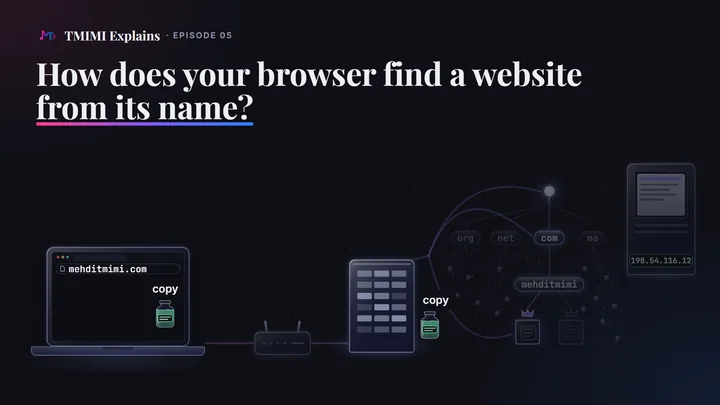
The short answerThe network delivers to numbers, IP addresses, so a website’s name must become its server’s number first. That is the job of DNS, the Domain Name System. Your computer looks for a copy of an earlier answer. If it has none, the question goes out through your home router to a resolver, a server that finds answers for you, usually run by your internet provider. With no copies of its own, the resolver walks the tree of names: the root servers and the .com servers only point the way, and the owner’s own name server, the boss, holds the answer. Every answer comes with a time to live. Until it runs out, copies can be used: that is why a second visit is instant, and why a change takes time to show. Your question usually travels like a postcard, readable on the way; secure DNS seals it up to your resolver.
A name is not an address
Routers forward each packet by its destination address, a number such as 198.54.116.12. A name such as mehditmimi.com means nothing to them. So before your browser can open a connection to a website, it needs the website’s address. DevTools shows the order: in a request’s Timing tab, DNS lookup comes before Initial connection (pictured below).
Each website lives on a computer, called a server, and the name stands for that server’s number, its IP address. Ask DNS about this website’s name, and you get one IP address. We asked on October 2, 2026, from a Windows 11 laptop, with PowerShell’s Resolve-DnsName. The question went to a public resolver, Cloudflare’s 1.1.1.1, so that the capture names its server (more about public resolvers below):
PS> Resolve-DnsName -Name mehditmimi.com -Type A -Server 1.1.1.1 -DnsOnly

Name           Type TTL   Section IPAddress
----           ---- ---   ------- ---------
mehditmimi.com A    14400 Answer  198.54.116.12
One row, five columns. Name is the name asked about. Type A means an IPv4 address (“A for address”; the other types are below). TTL is the time to live, in seconds: 14,400 seconds is four hours (below). Section says the row is the answer itself. IPAddress is the number: 198.54.116.12. The option -DnsOnly asks DNS and nothing else: in Microsoft’s words, it “resolves this query using only the DNS protocol”.
The same question to Google’s resolver, 8.8.8.8, got the same address and the same 14400. The film shows this row cropped, as “mehditmimi.com → 198.54.116.12”, tagged “asking 1.1.1.1”.
The name still travels with the request. Once the address is known, the browser also sends the name inside the request: in the HTTP Host header and, for HTTPS, in the TLS SNI that opens the connection, where boxes on the way can read it. And two cases skip the look-up: a request sent through a proxy, which looks the name up itself, and a request on a connection that is already open (visit 2, below).
The phone’s contacts, and what the picture gets wrong
The film starts with your phone’s contacts: you tap a name, but the call goes to a number. The picture is right about one thing: people use names, and the network uses numbers. It is wrong about five others:
- Who writes it. You write your contacts. A website’s number is written by the name’s owner, on servers the owner chose.
- Where it is. Your contacts are on your phone before you tap. A website’s number usually has to be fetched over the network. The closest thing to a contact list in DNS is the hosts file, a list kept on your own computer.
- Expiry. Contacts never expire. Every DNS answer comes with a time limit (below).
- One number, one person. One server can carry many websites, and a big website can have several addresses: on October 2, 2026,
example.comhad two,172.66.147.243and104.20.23.154. An address can also lead to a front server, such as a content delivery network’s, rather than the site’s own machine. - Changes. When a friend changes number, you edit the contact. When a website moves, its owner changes the answer, and your copy updates only when it expires (below).
And there is no single list of every name, as the walk below shows.
The website’s server and the name servers
The film says “The website lives on another server.” For this name, that is literally true. The website answers from 198.54.116.12, a LiteSpeed web server (its HTTP answers say server: LiteSpeed), in an address block registered to Namecheap, Inc. The two name servers that hold its DNS answers, 156.154.132.200 and 156.154.133.200, are in a block registered to Vercara, LLC: different machines, run by different companies (ARIN’s public registry, checked in October 2026). On a small set-up, one machine can run both.
First, a copy on your computer
The film: “First, your browser checks for an earlier answer, kept on your computer. This time, there is none.” What does that look like on a real computer? Chromium keeps a record of its own network work, the NetLog. We started Chromium 153 with a fresh profile and that log switched on, and opened https://mehditmimi.com/. Here is its first look-up, decoded:
tasks CACHE_LOOKUP > HOSTS > DNS > SYSTEM; not in the host cache; done in 309 ms
job started: HOST_RESOLVER_DNS_TASK (secure false), questions A + HTTPS, secure_dns_mode 1
HTTPS asked at +0 ms, ended at +309 ms, no answer (net_error -3)
      ATTEMPT to [fe80::1]:53: sent 32 bytes, received nothing
A     asked at +1 ms, ended at +7 ms, rcode 0, 1 answer(s)
      ATTEMPT to [fe80::1]:53: sent 32 bytes, received 48 after 6 ms
gave up waiting for the HTTPS record at +309 ms
result: A 198.54.116.12
The NetLog is a large JSON file; a small script of ours turned this look-up’s events into these lines.
The first line is Chromium’s plan, in order: CACHE_LOOKUP, its own copy of earlier answers (its host cache); HOSTS, the hosts file; DNS, its own built-in DNS client; and SYSTEM, Windows’ resolver, only as a fallback. The profile was new, so the name was “not in the host cache”, and the hosts file had no line for it. Chromium’s own DNS client then asked the network, and the system step never ran. The rest of the log is the question going out: the next section.
These four names are values of the TaskType list in Chromium’s source (net/dns/host_resolver_manager.h). The built-in client is switched on by default on Windows (kAsyncDns). Chromium’s documentation lists four conditions that must all hold for it to be used: the client is enabled for insecure requests or secure DNS is not off; Windows’ DNS settings could be read; the name does not end in .local; and the request is not an address query with the canonical-name flag. In the same NetLog, the look-ups of wpad went to Windows only.
Other browsers do it differently, and the copy is still on your computer. Edge uses its built-in DNS client by default too (Microsoft’s “BuiltInDnsClientEnabled” policy page). Firefox checks its own short-lived copy, then asks Windows by default (Mozilla’s wiki: network.trr.mode 0 is “Off (default). use standard native resolving only”), and Windows keeps a copy as well. Safari leaves names to macOS, whose resolver keeps the copy (not tested here). In every case, the copy is on your computer, which is why the film says it that way.
The hosts file
Before asking the network, a computer also reads a small text file of its own: the hosts file. Each line pairs an address with a name, and the computer believes it, without asking DNS. Microsoft’s TCP/IP documentation: “This file maps host names to IP addresses.” An illustration, with an address reserved for documentation:
203.0.113.7 example.com
With that line, this computer would send its requests for example.com to 203.0.113.7, whatever DNS says. Developers use such lines to try a site on a new server before its name points there. Editing the file needs administrator rights. The hosts file is the real thing behind the phone’s contacts: a list on your own computer, written by you.
Who reads it? Chromium, when it uses its own client, reads the file itself: its DNS settings in the NetLog say "num_hosts": 7 (it counts names; the file has 3 active lines). Otherwise Windows reads it, and loads its lines into its own cache: “the contents of the Hosts file are loaded into the DNS client resolver cache”.
On this laptop the hosts file has 27 lines, 3 of them active, and none of the active ones mentions a name used on this page, so none of these captures was redirected by it. We only counted the lines and searched them for a few names; the file itself was never printed or copied.
Windows keeps a copy too
Windows has its own DNS cache, run by its DNS Client service. Microsoft: it holds “entries preloaded from the local Hosts file and any recently obtained resource records”, and the service uses it “to resolve frequently queried names quickly, before querying its configured DNS servers”. An ordinary program that asks Windows for an address goes through it. We timed it with one name, dns2.namecheaphosting.com:
cache: dns2.namecheaphosting.com : DNS record does not exist
07:17:09.293 getaddrinfo path, 1st: [System.Net.Dns]::GetHostAddresses -> 156.154.133.200 in 38.85 ms
cache: TTL 1800
07:17:09.302 getaddrinfo path, 2nd: [System.Net.Dns]::GetHostAddresses -> 156.154.133.200 in 0.23 ms
07:17:09.302 getaddrinfo path, 3rd: [System.Net.Dns]::GetHostAddresses -> 156.154.133.200 in 0.22 ms
⋯ two Resolve-DnsName questions in between
07:17:09.314 getaddrinfo path, 4th: [System.Net.Dns]::GetHostAddresses -> 156.154.133.200 in 0.21 ms
The first question went out and took 38.85 ms; the next ones came from the cache, in about a fifth of a millisecond. (Resolve-DnsName itself, without -CacheOnly, asked the router every time, in about 6 ms.)
Chromium does not use this cache. We checked with a fresh name that had never been looked up, from a public test service: dns-film-32e6a927.127.0.0.1.sslip.io. It was not in Windows’ cache before Chromium opened it, still not there after, and there only once Windows’ own resolver had been asked. For a name that does not exist, though, Chromium also asked Windows, and Windows then kept the negative answer.
To look at your own cache, ask about one name: Resolve-DnsName mehditmimi.com -CacheOnly (Microsoft: “Resolves this query using only the local cache”). The full listing, ipconfig /displaydns, asks for administrator rights on this Windows build (“The requested operation requires elevation.”). It would list every name the computer looked up recently, so we never ran it. ipconfig /flushdns empties the cache.
Through your home router, to a resolver
The film: “So the question leaves your computer, through your home router. It goes to a resolver. That is a server that finds answers for you. Usually, your internet provider runs it.” In the NetLog above, Chromium sent its questions to [fe80::1]:53: the router, at its link-local address, on port 53, the DNS port. In Windows’ settings, this laptop’s DNS server is the router (192.168.1.254, and fe80::1): two private addresses that only mean something inside the home network.
RFC 9076, on DNS privacy, describes this exact set-up as “the typical case” for homes: the device is given “the addresses of the DNS proxy in the Customer Premises Equipment (CPE)”, the box at home, “which in turn points to the DNS recursive resolvers” of the internet provider.
An earlier question had put it there. The address question was 32 bytes; the 48-byte answer came back 6 ms later. It carried 10,370 seconds of time to live, not the 14,400 that the domain’s own server gives. So it was a copy on the way, stored 4,030 seconds earlier, at about 05:51:33 UTC, before our first capture of the morning. Whose question put it there, we cannot know. That is what a resolver does with what it fetches: RFC 1034 has it “cache the data as well as returning it back to the client”.
Where exactly that copy sat, in the router or at the provider, was not checked. One hint points upstream: asked twice through the router within 30 ms, the same name came back with two different times to live (13,326, then 10,217 seconds): two independent copies, behind a router that seems to pass questions on. RFC 9499 has a word for such a relay, a forwarder, and notes that “forwarders often stand between stub resolvers and recursive servers”.
We never asked, looked up or named the provider’s resolvers: their addresses would say which provider this is. No address on this page belongs to the laptop’s internet connection.
Public resolvers: 1.1.1.1 and 8.8.8.8
You can also choose a public resolver: Cloudflare’s 1.1.1.1 and Google’s 8.8.8.8 are two of them. You set one in your system’s network settings, or in your browser’s secure DNS setting (below). Every capture on this page that needed a resolver named one of these two. nslookup -debug prints the header of each answer:
Got answer:
    HEADER:
        opcode = QUERY, id = 2, rcode = NOERROR
        header flags:  response, want recursion, recursion avail.
        questions = 1,  answers = 1,  authority records = 0,  additional = 0

    QUESTIONS:
        mehditmimi.com, type = A, class = IN
    ANSWERS:
    ->  mehditmimi.com
        internet address = 198.54.116.12
        ttl = 14400 (4 hours)
“want recursion” is the question’s flag: please find the answer for me. “recursion avail.” is the resolver’s: I can. A resolver that does the whole search for you is a recursive resolver. The small part on your computer that only asks is a stub resolver, “a resolver that cannot perform all resolution itself” (RFC 9499). Before each question, nslookup also looked up the resolver’s own name: 1.1.1.1 is one.one.one.one, and 8.8.8.8 is dns.google.
The two resolvers gave the same answers, with one difference: the time to live of the name-server records. Cloudflare passed on the zone’s own 1,800,000 seconds (20.8 days); Google gave 21,600 seconds, six hours. Google’s documentation says its TTLs are “generally limited to six hours even if the actual TTL is longer”, and RFC 2181 allows it: “Implementations are always free to place an upper bound on any TTL received.”
One address, many machines. We asked both resolvers for the same name every five seconds, thirteen times each. The time to live did not count down smoothly:
time (UTC)     resolver           TTL     round trip
07:09:16.446   Cloudflare 1.1.1.1  14400     91.98 ms
07:09:16.540   Google 8.8.8.8      14400     48.45 ms
07:09:21.604   Cloudflare 1.1.1.1  14395     32.65 ms
07:09:21.638   Google 8.8.8.8      14400     69.25 ms
07:09:26.711   Cloudflare 1.1.1.1  14400     97.16 ms
07:09:26.808   Google 8.8.8.8      14400      65.6 ms
07:09:31.887   Cloudflare 1.1.1.1  14400     62.66 ms
07:09:31.950   Google 8.8.8.8      14400     51.65 ms
07:09:37.007   Cloudflare 1.1.1.1  14400     92.51 ms
07:09:37.100   Google 8.8.8.8      13550     27.12 ms
07:09:42.137   Cloudflare 1.1.1.1  13580     31.75 ms
07:09:42.169   Google 8.8.8.8      12620     26.52 ms
07:09:47.200   Cloudflare 1.1.1.1  14370     31.77 ms
07:09:47.232   Google 8.8.8.8      14370     38.24 ms
⋯ six more rounds, to 07:10:17, in the same pattern
Each of these addresses is answered by many machines in many places: the network delivers each question to a nearby one, which is called anycast. Google says it plainly: “each machine maintains its own independent cache”. A full 14400 came from a machine with no copy, which fetched the answer from the domain’s own server: those answers took 46.14 to 97.16 ms. The answers from a copy took 18.81 to 42 ms. From this laptop, never 6 ms: the copy behind the router was closer.
The walk from the root
The film: “How does the resolver know where to ask? The name shows the way.” And: “Suppose the resolver has no earlier answers yet. It starts at the very top, with the root servers.” We cannot watch a resolver’s own walk from home. So we did it by hand, in its place: three questions over UDP port 53, from a small Node.js program with no DNS library, each one with recursion not wanted (“tell me what you know”) and no extension (no EDNS). The first server’s address came from the root hints file, the list every resolver starts from; the next ones came from the answers themselves.
;; 1. a.root-servers.net (198.41.0.4) · round trip 44.16 ms · answer 492 bytes
;; header: NOERROR, flags: qr tc; QUERY 1, ANSWER 0, AUTHORITY 13, ADDITIONAL 11
com                         172800  IN  NS    l.gtld-servers.net
com                         172800  IN  NS    j.gtld-servers.net
⋯ 11 more: h, d, b, f, k, m, i, g, a, c and e.gtld-servers.net
b.gtld-servers.net          172800  IN  A     192.33.14.30
⋯ 10 more addresses of .com servers

;; 2. b.gtld-servers.net (192.33.14.30) · round trip 53.48 ms · answer 175 bytes
;; header: NOERROR, flags: qr; QUERY 1, ANSWER 0, AUTHORITY 2, ADDITIONAL 4
mehditmimi.com              172800  IN  NS    dns1.namecheaphosting.com
mehditmimi.com              172800  IN  NS    dns2.namecheaphosting.com
dns1.namecheaphosting.com   172800  IN  A     156.154.132.200
dns2.namecheaphosting.com   172800  IN  A     156.154.133.200
⋯ and their two IPv6 addresses

;; 3. dns1.namecheaphosting.com (156.154.132.200) · round trip 46.4 ms · answer 103 bytes
;; header: NOERROR, flags: qr aa; QUERY 1, ANSWER 1, AUTHORITY 2, ADDITIONAL 0
mehditmimi.com               14400  IN  A     198.54.116.12
⋯ authority: the same two NS records, TTL 1800000

;; three questions, three servers: 44.16 + 53.48 + 46.4 = 144.04 ms of round trips
| Server asked | Round trip | What it said |
|---|---|---|
1. A root server, a.root-servers.net | 44.16 ms | Not the address (ANSWER 0). “Ask the .com servers”: 13 of them, with some of their addresses. |
2. A .com server, b.gtld-servers.net | 53.48 ms | Not the address either (ANSWER 0). “Ask the owner’s name servers”: two of them, with their addresses. |
3. The owner’s name server, dns1.namecheaphosting.com | 46.4 ms | The answer: 198.54.116.12, for 14,400 seconds, with the aa flag: an authoritative answer. |
The root and dot com only pointed the way. Both said ANSWER 0: no address, only a referral, the names of servers closer to the answer. RFC 1034: “the response contains an error, the answer, or a referral to some other server ‘closer’ to the answer.” The addresses that come with a referral are called glue: without them, the resolver would first have to look up the next server’s name. Note who does the asking: the resolver (here, our program) asks each server in turn, and no server passes the question on.
About 140 milliseconds. The three round trips took 144.04 ms. We ran the walk five more times, at 07:14 UTC: 139.6, 144.0, 141.9, 146.9 and 144.4 ms. Six runs, 140 to 147 ms. These are round trips from a laptop at home; a resolver in a data centre sits closer to these servers.
The tree of names
The film: “Picture all names as one big tree. Dot com is a branch near the top. This name hangs from it.” RFC 1034 says it plainly: “The domain name space is a tree structure.” Read a name from its end. mehditmimi.com is the label mehditmimi, under com, under the root, which has no name: on the wire, it is an empty label at the end (below). The last label, such as com, org, net or a country’s two letters, like ma for Morocco, is the top-level domain (TLD); the root delegates each one to its own servers. Each branch further down is held by its own servers, for its own owner. So the name tells the resolver which zones to visit: the root, then com, then mehditmimi.com. Which servers to ask, it learns from each reply.
The root: 13 names, about two thousand places
IANA, which manages the root zone, describes the root servers as “a network of hundreds of servers in many countries around the world. They are configured in the DNS root zone as 13 named authorities”: a.root-servers.net to m.root-servers.net. Twelve independent organizations operate them; a.root-servers.net, the one we asked, is Verisign’s, at 198.41.0.4. The operators’ own site, root-servers.org, counted more that morning: “As of 2026-10-02T07:20:34Z, the root server system consists of 2045 operational instances operated by the 12 independent root server operators.” An instance is one copy of one of the 13, and several letters share cities. As with the public resolvers, many machines answer for one address.
Every resolver starts from a short built-in list of the 13 and their addresses, the root hints, which IANA publishes (the copy we read said “last update: September 30, 2026”). Our walk took its first line: A.ROOT-SERVERS.NET. 3600000 A 198.41.0.4.
A cut answer, and EDNS
The root’s answer in our walk carried a tc flag: truncation. Over UDP, a DNS message without extensions is limited to 512 bytes. RFC 1035: “Messages carried by UDP are restricted to 512 bytes (not counting the IP or UDP headers). Longer messages are truncated and the TC bit is set in the header.” The root had 13 names and 26 addresses to send; ours held 11 of the addresses, in 492 bytes. The cut part was optional: the .com servers’ names end in .net, a sibling of com under the root, so their addresses are “sibling glue”, which a server may drop: it “MAY set TC=1 but is not obligated to do so” (RFC 9471). A resolver that gets TC can ask again over TCP, also on port 53.
Today’s resolvers add EDNS (RFC 6891), an extension that says how big an answer they can take. Asked again with EDNS and a size of 1,232 bytes (a 43-byte question), the root sent the whole referral at once: 839 bytes, 13 names and 26 addresses, no TC.
How a working resolver really walks
The film’s walk starts “with no earlier answers”. A working resolver rarely starts at the root. RFC 1034 has it start from the closest servers it already knows, “starting at SNAME, then the parent domain name of SNAME, the grandparent, and so on toward the root”. The .com servers came with a time to live of 172,800 seconds, two days, so a busy resolver almost always knows them already, and starts there. Three more differences from our walk:
- It sends EDNS, as above.
- It can ask the root only about
com, not about the full name: QNAME minimisation (RFC 9156). In the RFC’s words, “Before QNAME minimisation, when a resolver received the query … it sent to the root … the very same question.” Our walk sent the full name at every step, the old way. - Started with an empty cache, it first asks a root server for the current list of root servers (a “priming” question), then walks.
Whether 1.1.1.1 or 8.8.8.8 minimise their questions could not be observed from here: their own walks happen in their data centres.
The boss: the owner’s own name server
The film: “The resolver asks one of them, and at last it gets the answer. This server is the boss. It holds the answers the owner wrote.” The third answer of our walk carried a flag the first two did not: aa. RFC 1035 defines it: “AA Authoritative Answer - this bit is valid in responses, and specifies that the responding name server is an authority for the domain name in question section.” RFC 9499 defines an authoritative server as “a server that knows the content of a DNS zone from local knowledge”. The root and the .com server know who is in charge, not the answer. The second name server, dns2.namecheaphosting.com, gave the same answer, also with aa.
The boss answers only for its own names. We asked dns1 about a name it does not hold, google.com, with recursion wanted:
;; question: google.com A, RD=1, id 20740
;; header: REFUSED, flags: qr rd; QUERY 1, ANSWER 0, AUTHORITY 0, ADDITIONAL 0
REFUSED, and no ra flag: this server does not look anything up for anyone. RFC 1035 lists REFUSED for a server that will not answer “for policy reasons”. That was one question to one server: other servers answer such a question with a referral up toward the root, or not at all.
Who is who: the owner, the host, the registrar, the registry
The .com server pointed to two name servers for this website: dns1.namecheaphosting.com and dns2.namecheaphosting.com. Their names end in the host’s own domain. That is the usual set-up: an owner rents the website’s hosting from a company, and the name servers come with it. The host runs them; the owner only chooses them. The film no longer shows these names, because what matters is not whose machines they are, but whose answers they hold.
The owner is still in charge of the answers. The owner writes them in the host’s control panel, and the host’s name servers serve them. RFC 1034: “Once an organization controls its own zone it can unilaterally change the data in the zone.” Four parties have a part:
| Who | Their part | Here |
|---|---|---|
| The owner | Writes the answers (the zone), in the host’s panel; chooses the name servers, through the registrar. | The owner of mehditmimi.com |
| The host | Runs the name servers, and serves the zone from them. | dns1 and dns2.namecheaphosting.com, at addresses registered to Vercara, LLC, a DNS service provider the host relies on |
| The registrar | Where the name was registered; sends the delegation, the name servers’ names, to the registry. | not captured |
| The .com registry | Publishes the delegation in the .com zone, which the .com servers serve. | b.gtld-servers.net’s referral, kept for 172,800 seconds |
Some values come from the host rather than from the owner’s hand: the NS and SOA records are the host’s, and very likely the 14,400-second time to live too (who chose it was not captured). And the delegation itself stays with the parent: through the registrar, the registry can renew, transfer or suspend the name. So the owner is in charge of the answers, not of the name’s existence.
The machines that answer as dns1 and dns2 hold copies of the zone, probably many machines behind each address, and a secondary server answers with aa too: authority comes from holding the zone. That is the meaning of “the boss” in the film: everyone else only asks for the answer, passes it on, and keeps a copy of it.
Records: what the boss holds
The owner’s answers are stored as records. Each has a name, a time to live, a class (IN, the internet), a type and a value. We asked dns1 for each type:
www.mehditmimi.com       14400  IN  CNAME mehditmimi.com
mehditmimi.com           14400  IN  A     198.54.116.12
mehditmimi.com           14400  IN  MX    5 mx1-hosting.jellyfish.systems
mehditmimi.com           14400  IN  MX    10 mx2-hosting.jellyfish.systems
mehditmimi.com           14400  IN  MX    20 mx3-hosting.jellyfish.systems
mehditmimi.com         1800000  IN  NS    dns1.namecheaphosting.com
mehditmimi.com         1800000  IN  NS    dns2.namecheaphosting.com
mehditmimi.com         1800000  IN  SOA   dns1.namecheaphosting.com cpanel.tech.namecheap.com 1778826001 86400 7200 3600000 86400
;; AAAA:  NOERROR, no answer · authority: mehditmimi.com 86400 IN SOA …
;; HTTPS: NOERROR, no answer · authority: mehditmimi.com 86400 IN SOA …
| Type | What it holds | For mehditmimi.com |
|---|---|---|
A | An IPv4 address: “a host address” | 198.54.116.12 |
AAAA | An IPv6 address, the newer, longer kind (RFC 3596), such as 2001:db8::7 (a documentation address) | None |
CNAME | Another name for the same thing: “the canonical name for an alias” | www.mehditmimi.com is an alias of mehditmimi.com |
NS | The name servers of a name: “an authoritative name server” | dns1 and dns2.namecheaphosting.com |
MX | Where the name’s email goes: “mail exchange”, with a preference (“Lower values are preferred”) | Three mail servers, preferences 5, 10 and 20 |
SOA | The zone’s own settings: it “marks the start of a zone of authority” | Primary server dns1, the host’s contact, a serial number, and four timers in seconds; the last one caps how long a “no record” answer is kept |
HTTPS | How to connect to a website, before connecting (RFC 9460) | None |
No AAAA, so no IPv6 address. The answer said NOERROR with nothing in it, plus the zone’s SOA record. Such a “no record” answer is kept as a copy too, for a negative TTL: the smaller of the SOA record’s own TTL and its last field (RFC 2308), 86,400 seconds here, one day. Cloudflare passed on that 86,400; Google gave 1,800. Chromium did not even ask for AAAA: this laptop has no IPv6 route.
www is another name, and the server decides what to do with it. www.mehditmimi.com is a CNAME, so DNS sends both names to the same address. The web server then sends the www visitors on to the main name:
              HTTP/1.1 301 Moved Permanently
              date: Fri, 02 Oct 2026 07:32:05 GMT
              server: LiteSpeed
              location: https://mehditmimi.com/
              strict-transport-security: max-age=31536000; includeSubDomains
A 301 is a permanent redirect (episode 03). DNS only gives the address; what the server does with each name is the server’s choice. http://mehditmimi.com/ got the same 301 to the same place.
The HTTPS record. Chromium asked for type HTTPS (type 65) with every look-up. This record can tell a browser how to reach a website before it connects: RFC 9460 created it “to facilitate the lookup of information needed to make connections to network services, such as for HTTP origins”. This domain has none, which matters twice below: for a 308 ms wait, and for what secure DNS cannot hide.
The time to live, and the copies
The film: “One minute later, you open the same site. How far does the question travel this time? Not even out of your computer. Its copy is still good.” Every answer comes with a time limit, given by the boss: the time to live, or TTL. In the boss’s answer, it sits in four bytes, 00 00 38 40: 14,400 seconds, four hours.
RFC 1035: the TTL “specifies the time interval that the resource record may be cached before the source of the information should again be consulted”. RFC 1034: “The TTL is assigned by the administrator for the zone where the data originates.” It is a maximum, not a promise. RFC 2181: “The TTL specifies a maximum time to live, not a mandatory time to live.” Caches may keep a copy for less (Google caps at six hours). And RFC 8767 lets a resolver serve an expired copy when the domain’s servers do not answer: such a record “MAY be used as though it is unexpired”. The same RFC recommends a cap of “604,800 seconds (7 days)”.
Why the laptop’s copy had 2 h 52 min, not 4 hours
The copy that reached Chromium came from the copy behind the router, with 10,370 seconds left, not 14,400. A copy handed on keeps only what is left. So every copy of one answer runs out at the same instant. Three of them, captured:
| The copy | How we saw it | Runs out at |
|---|---|---|
| Behind the router (the router’s or the provider’s) | Asked through the router at 06:48:30, three rounds: 10,982, 10,979, 10,972, 10,969, 10,962, 10,959 s left | 09:51:33 |
| Chromium’s host cache | Written at the first visit (06:58:43) with 10,370 s; its expiry is in the NetLog | 09:51:33.185 |
| Windows’ cache | Written at 07:01:16 by Resolve-DnsName, read with -CacheOnly every 10 s from 07:04:03: 10,050, 10,039, 10,029, 10,019, 10,009, 9,999, 9,989 s | 09:51:33 |
Chromium’s entry gives its expiry itself (timed_expiration, in microseconds since 1601); the other two are the time of a reading plus the seconds left. The Windows entry was written by Resolve-DnsName, not by the browser, which keeps its own copy. The film draws these copies as jars at the same level, with no numbers.
Four visits, seen in DevTools
We opened https://mehditmimi.com/ four times in the same tab, with DevTools’ Network panel open and “Disable cache” ticked, so that every visit asked the server for the page. Between visits, we used Chromium’s internal page chrome://net-internals to close the open connections, or to empty the host cache:
| Visit | Before it | DevTools’ “DNS lookup” | Chromium’s own record |
|---|---|---|---|
| 1 | Nothing: a fresh profile | 307.96 ms | A real look-up: its DNS client asked the router |
| 2 | Nothing | no DNS row | No look-up at all: the open HTTP/2 connection was reused |
| 3 | “Flush socket pools”: connections closed | 0 μs | “HOST CACHE HIT”: the copy on the computer |
| 4 | “Clear host cache”, then “Flush socket pools” | 307.61 ms | A real look-up again |
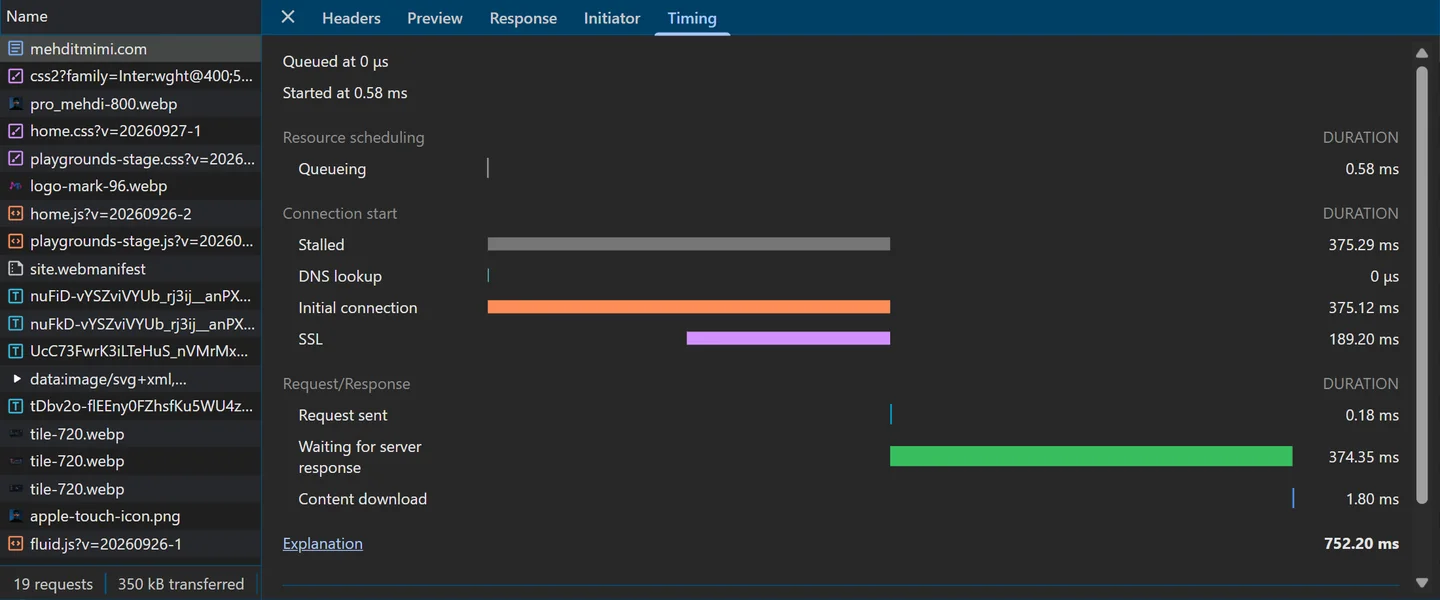
Visit 3 is the film’s second visit: a new connection, and the address from the copy on the computer, in “0 μs”. That is how DevTools shows a host-cache hit: the copy answers in microseconds, which the panel rounds to zero. Visit 2 is a revisit with the connection still open: the browser did not need the address at all. (The film’s “one minute later” is a story; visit 3 came 15 seconds after visit 1.)
The page itself can read the same numbers, with no DevTools: Navigation Timing’s domainLookupStart and domainLookupEnd were 307.9 ms apart on visit 1, and equal on visits 2 and 3. The W3C standard covers the copy: “In case where the user agent already has the domain information in cache, domainLookupStart and domainLookupEnd represent the times when the user agent starts and ends the domain data retrieval from the cache.”
Without “Disable cache”, visits 2 to 4 came from Chromium’s HTTP cache: no request reached the network, so no name was looked up at all (the first run of the morning, 06:43 UTC).
Copies also save time
The film: “Copies also save time. With no copies, the trip to the boss took about one hundred and forty milliseconds. A copy on the way answered in six milliseconds. And the copy on your computer answered in almost no time.”
| The answer came from | Time | Seen with |
|---|---|---|
| The boss, after the walk from the root, with no copies (asked by hand) | 140 to 147 ms, six runs | Our Node.js program, 06:47 and 07:14 UTC |
| A copy on the way, behind the router (first visit) | 6 ms | Chromium’s NetLog, 06:58:43 UTC |
| The copy on your computer (Chromium’s host cache, visit 3) | 0 μs, as DevTools shows it | Chrome DevTools, 06:58:58 UTC |
The 140 ms is a laptop’s walk, not a resolver’s: the film’s bar says “by hand”.
Why DevTools said 308 ms, when the address came in 6
On visit 1, DevTools did not show 6 ms. It showed DNS lookup 307.96 ms:
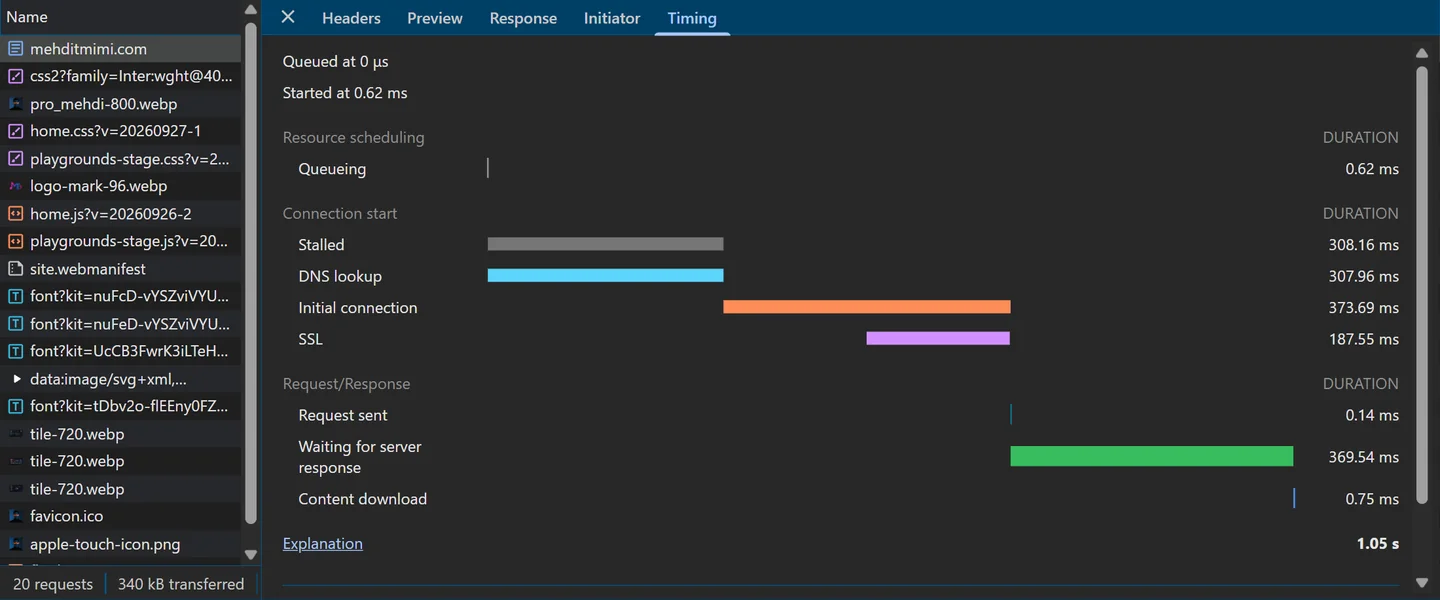
The NetLog explains it. Chromium asked two questions at once: A, the address, answered in 6 ms; and HTTPS, the record above, which got no answer at all. We asked the router again by hand: it answered A in 5.2 to 5.7 ms every time, and never answered an HTTPS question within 3 seconds. Cloudflare’s 1.1.1.1 answered the same HTTPS question (“no record”) in 34 to 102 ms. So Chromium waited about 300 ms for the HTTPS record, gave up (HOST_RESOLVER_DNS_TASK_TIMEOUT), and used the address.
That wait comes from a field trial active in this build, DnsHttpsSvcbTimeout, whose settings ask for an extra wait of at least 300 ms (UseDnsHttpsSvcbInsecureExtraTimeMin; the value compiled into Chromium is 5 ms). Chrome’s own users get their trial settings from Google’s servers; what they get was not checked. To be sure, we ran the four visits again with the HTTPS-record question switched off (--disable-features=UseDnsHttpsSvcb):
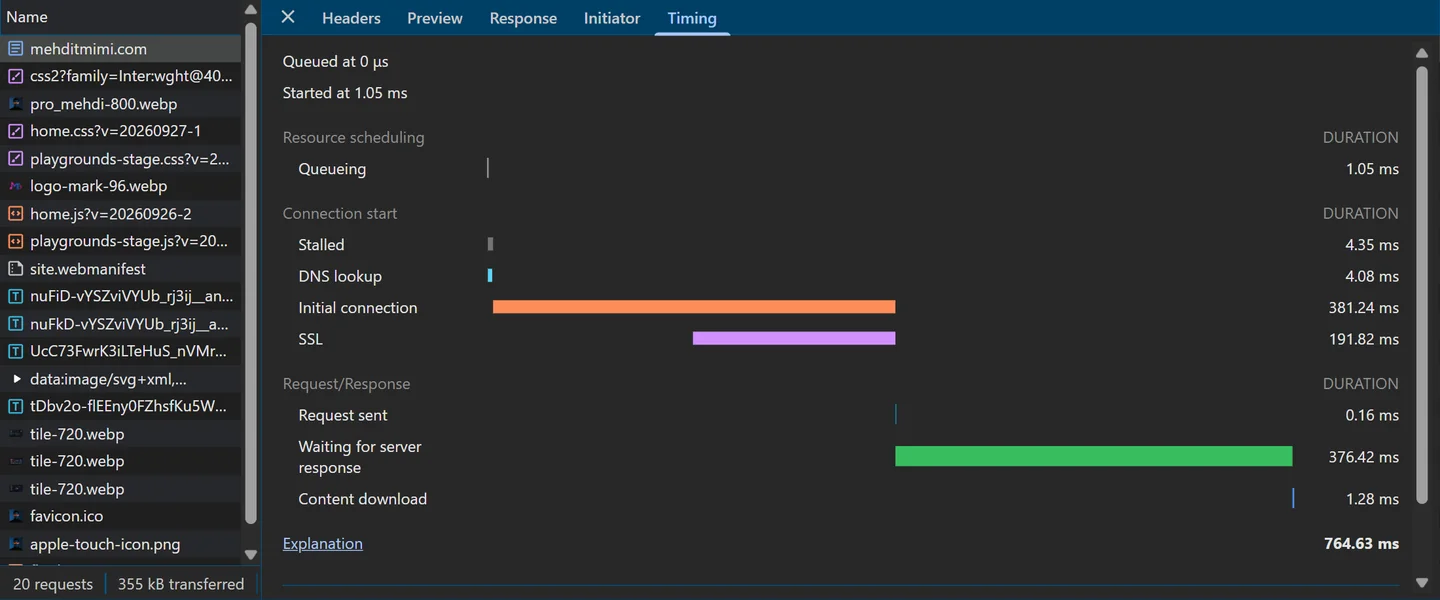
--disable-features=UseDnsHttpsSvcb, October 2, 2026 (06:59 UTC), the real mehditmimi.com.4.08 ms on visit 1, and 4.72 ms on visit 4. So DevTools’ “DNS lookup” counts the wait for every record type Chromium asked for, not only the address. DevTools’ own definition is short: “The browser is resolving the request’s IP address.” A lesson worth more than DNS: read what a number measures before you believe it. With secure DNS on (below), the same first look-up took 18.59 ms: Cloudflare answers HTTPS-record questions.
Across the morning, the fresh look-ups (visits 1 and 4) of the five default runs took 307.6 to 315.7 ms.
Why DNS changes take time to propagate
The film: “Say the owner moves the site, and changes the address. The boss has the new answer at once. But the copies may keep the old address until their time runs out. For this address, that can take up to four hours. Nobody pushes the new answer to them.” The film’s new address, 203.0.113.50, is an illustration: the owner’s zone was never touched.
Nothing travels; copies expire. We could not move this website for a test, so we watched a copy expire instead, one with a short time to live: example.com’s, 300 seconds. In Windows’ cache, every 15 seconds:
07:14:34.654  example.com  A  101 s left  (two addresses)
07:14:49.667  example.com  A   86 s
07:15:04.681  example.com  A   71 s
07:15:19.697  example.com  A   56 s
07:15:34.706  example.com  A   41 s
07:15:49.716  example.com  A   26 s
07:16:04.731  example.com  A   11 s
07:16:19.743  not in the cache (example.com : DNS record does not exist)
07:16:19.750  asked again:  example.com  A  174 s
When the copy ran out, Windows asked again, and the new copy came with 174 seconds, not 300: another copy upstream still had it, with less time left. That is all “propagation” is: each copy, in each cache, running out on its own clock. Nobody tells the caches. RFC 1034’s advice is to plan ahead: “If a change can be anticipated, the TTL can be reduced prior to the change to minimize inconsistency during the change.”
What else a change involves
- The boss is several servers. “The boss has the new answer at once” is true in the film’s one-server picture. A real host first publishes the change to all its name servers, often after a nudge called NOTIFY (RFC 1996), after which they fetch it. That delay was not measured here.
- New askers get the change at once. A resolver with no copy asks the boss, and gets the new answer.
- A change of name servers is another matter. The .com referral keeps the name servers for 172,800 seconds, two days, and the zone’s own NS records say 1,800,000 seconds, 20.8 days, which RFC 2181 ranks higher than the referral. Cloudflare passed the 1,800,000 on; Google capped it at six hours. The often-quoted “48 hours” matches the referral’s 172,800 seconds; what resolvers really do with such a change was not tested here.
- A brand-new name may have been asked about before it existed, and a “no such name” answer is kept too: for this domain, up to a day (its negative TTL, 86,400 seconds).
- Open connections keep the old address, whatever DNS says, until they close.
The question on the wire
The film’s postcard carries real bytes: the 32 bytes of our hand-made question to dns1. Chromium’s own questions to the router were the same size (“sent 32 bytes”), but their bytes were not recorded, only their count.
0000  b6 dd 00 00 00 01 00 00 00 00 00 00 0a 6d 65 68
0010  64 69 74 6d 69 6d 69 03 63 6f 6d 00 00 01 00 01

b6 dd                              ID 46813, a random number
00 00                              flags: a query, recursion not wanted
00 01  00 00  00 00  00 00         1 question, 0 answers, 0 authority, 0 additional
0a 6d 65 68 64 69 74 6d 69 6d 69  length 10: mehditmimi
03 63 6f 6d                        length 3: com
00                                 length 0: the root, the end of the name
00 01                              type 1: A
00 01                              class 1: IN, the internet
No dots on the wire. The name travels as labels, each after its length: 10 letters, then 3, then a zero for the root. And it travels as plain letters: anyone who sees these bytes can read mehditmimi and com. The answer, 103 bytes, repeats the question and adds the record. Its key line:
0020  c0 0c 00 01 00 01 00 00 38 40 00 04 c6 36 74 0c

c0 0c        the name: a pointer to byte 12, where it already appears
00 01 00 01  type A, class IN
00 00 38 40  TTL: 14400 seconds
00 04        4 bytes of data follow
c6 36 74 0c  198.54.116.12
The answer’s flags are 84 00: QR=1, a response, and AA=1, authoritative. The pointer c0 0c is DNS compression: instead of repeating a name, the message points to where it already appears (RFC 1035, section 4.1.4).
UDP, TCP, and port 53
- Ordinary DNS goes over UDP, port 53: one packet out, one back, with no connection to set up. RFC 1035: “Messages sent using UDP user server port 53.”
- An answer too big for UDP is cut and flagged TC. The asker can then use TCP, also on port 53 (RFC 1035: “Messages sent over TCP connections use server port 53”), or EDNS for bigger UDP answers (above).
- DNS over TLS (RFC 7858) uses TCP port 853. DNS over HTTPS (RFC 8484) is HTTPS, on HTTPS’s usual port, 443 (next).
Neither DNS over TCP nor DNS over TLS was captured for this page.
Who can read your question, and secure DNS
The film: “One last thing. Is your question secret? Usually not. It travels like a postcard, so anyone along the way can read the name.” RFC 9076: “For unencrypted transports, DNS traffic can be seen by an eavesdropper like any other traffic … if an initiator starts an HTTPS communication with a recipient, the HTTP traffic will be encrypted, but the DNS exchange prior to it will not be.” Along the way means your local network, and your provider’s network up to the resolver. And the resolver itself reads the question: that is its job.
The film goes on: “Many browsers can switch on secure DNS. It seals the question with the same kind of lock as secure websites. Then nobody between you and your resolver can read it.” Where the switch is (checked on October 3, 2026):
| Browser | Where | The setting |
|---|---|---|
| Chrome | Settings › Privacy and security › Security | “Use secure DNS”: on by default, in automatic mode |
| Edge | Settings › Privacy, search, and services › Security | “Use secure DNS to specify how to lookup the network address for websites” |
| Firefox | Settings › Privacy & Security | A section called “DNS over HTTPS”: Default Protection, Increased Protection, Max Protection, Off |
| Safari | no setting of its own | iCloud Private Relay (part of iCloud+) encrypts DNS, as can an encrypted-DNS profile |
“On” in Chrome does not always mean sealed. Chrome’s help page: “By default, secure DNS in Chrome is turned on in automatic mode. If Chrome has issues looking up a site in this mode, it’ll look up the site in the unencrypted mode.” Automatic mode encrypts only if your current DNS provider offers DNS over HTTPS (Chromium’s blog, 2020: “Chrome will automatically switch to DNS-over-HTTPS if your current DNS provider supports it”). This laptop showed exactly that: secure_dns_mode 1, automatic, with no secure server known for the router, and the questions went out as plain UDP. To be sure, choose a provider in the setting. Firefox turns its DNS over HTTPS on by default only in the United States, Canada, Russia and Ukraine.
The sealed run. We set a test profile’s secure DNS to Cloudflare, as Chrome’s setting does (https://chrome.cloudflare-dns.com/dns-query), and opened the site again. The laptop’s own settings were never touched. Chromium’s plan became SECURE_CACHE_LOOKUP > HOSTS > SECURE_DNS: no plain DNS, and no fallback to Windows. Each question became an HTTPS request:
POST https://chrome.cloudflare-dns.com/dns-query   (the DNS message in the body: 128 bytes)
  > :method: POST
  > :authority: chrome.cloudflare-dns.com
  > :scheme: https
  > :path: /dns-query
  > content-length: 128
  > accept: application/dns-message
  > accept-language: *
  > user-agent: Chrome
  > accept-encoding: identity
  > content-type: application/dns-message
  > priority: u=4, i
  < HTTP/1.1 200
  < server: cloudflare
  < date: Fri, 02 Oct 2026 07:00:09 GMT
  < content-type: application/dns-message
  < access-control-allow-origin: *
  < x-content-type-options: nosniff
  < content-length: 468
  < cf-ray: [removed: names a Cloudflare data centre]
  < alt-svc: h3=":443"; ma=86400
The body is the same kind of DNS message as on the wire above, padded to 128 bytes (RFC 8467: “Clients SHOULD pad queries to the closest multiple of 128 octets”); the answer came back as 468 bytes. Everything travels inside the encrypted HTTPS connection, HTTP/2 here (the NetLog prints “HTTP/1.1 200” even for HTTP/2). The first look-up took 18.59 ms. One detail: to reach chrome.cloudflare-dns.com, Chromium first had to find that server’s own address, in plain DNS, through the router.
What secure DNS does not hide
- Your resolver reads every question. Sealed up to the resolver, opened there: you trust it instead of everyone on the way.
- The resolver’s own questions travel in plain DNS. When it has no copy, it asks the root, the .com servers and the boss the usual way, under its own address. RFC 9076: “the authoritative name servers see a part of the traffic”.
- The website’s name still shows when your browser connects, in the TLS SNI. A newer feature, Encrypted Client Hello, can hide it, but it needs the site’s HTTPS record, and this domain has none.
- A secure website’s own lock never covers the DNS question. The website’s HTTPS starts after the answer; secure DNS is a separate lock, of the same kind.
What the film simplified
- “The network that carries your request does not read names”: routers forward by address. The name still rides inside the request (the
Hostheader, the TLS SNI); with a proxy, the proxy looks the name up. - “Before your request can leave, the name must become a number”: a request on an open connection needs no look-up at all (visit 2).
- “Each website lives on a computer, called a server”: this one answers from one address; big websites use many servers, and one server can carry many websites.
- “Ask DNS about this name, and you get one IP address”: one A record. Chromium also asked for an HTTPS record, and not for AAAA (no IPv6 route). The row on screen was asked of 1.1.1.1.
- “The owner of this name is in charge of that answer”: through the host’s panel and the registrar; some values are the host’s defaults.
- “First, your browser checks for an earlier answer, kept on your computer”: Chromium checks its own copy, then the hosts file, then asks the router itself. Firefox asks Windows, whose cache is on the computer too; Safari leaves it to macOS. The hosts file is left out of the film.
- “Usually, your internet provider runs it”: the usual home set-up, not looked at here. Whether the router keeps copies itself was not checked.
- “The name shows the way”: it gives the zones to visit; which servers to ask comes from each reply.
- “Suppose the resolver has no earlier answers yet. It starts at the very top”: true from an empty cache. A working resolver usually starts at .com. Our walk was asked by hand, with the full name at every step and no EDNS.
- “It knows which name servers the owner chose”: the delegation, sent by the registrar and published by the .com registry; possibly the host’s default.
- “This server is the boss. It holds the answers the owner wrote”: written in the host’s panel and served by the host’s DNS platform, from copies; a secondary server answers with authority too.
- “The website lives on another server”: true here (Namecheap’s address block against Vercara’s); on a small set-up, one machine can run both.
- “That leaves each owner in charge of their own name”: of its answers. The delegation stays with the parent (registrar and registry).
- “Everyone else only asks for it. They pass it on, and keep a copy of it”: the askers. The resolver and the browser keep copies (captured); the router passes the answer on, and whether it keeps one was not checked.
- “Not even out of your computer. Its copy is still good”: Chromium’s copy lasted until 09:51:33 UTC, 2 h 52 min after the first visit, not four hours. A plain revisit reuses the connection and makes no look-up at all (visit 2).
- “Every answer comes with a time limit, given by the boss”: the original value is the boss’s; a “no record” answer carries the SOA’s; caches may shorten it.
- “Here, the boss says four hours”: 14,400 seconds; who chose it was not captured, most likely the host’s default.
- “Until then, every copy on the way can be used”: a maximum. An expired copy may be served when the domain’s servers do not answer (RFC 8767).
- “The trip to the boss took about one hundred and forty milliseconds”: six walks by hand from the laptop, 139.64 to 146.95 ms; a resolver in a data centre is closer.
- “A copy on the way answered in six milliseconds”: the address’s own answer, on the first visit. DevTools showed 308 ms for that visit (above).
- “The copy on your computer answered in almost no time”: DevTools’ “0 μs”; really, microseconds.
- “The boss has the new answer at once”: in the film’s one-server picture. “Up to four hours”: for caches that honour the TTL; name-server changes, new names and open connections behave differently.
- “Anyone along the way can read the name”: your local network and your provider’s, and the resolver itself. The bytes on the postcard are our hand-made question.
- “Many browsers can switch on secure DNS”: Chrome’s switch is on by default in automatic mode, which stays plain unless your provider offers it. Safari has no setting of its own.
- “The same kind of lock as secure websites”: DNS over HTTPS is HTTPS (RFC 8484: “This protocol MUST be used with the https URI scheme”). A website’s own lock does not cover the question.
- “Nobody between you and your resolver can read it”: the resolver still reads it, its own questions travel in plain DNS, and the name shows in the TLS SNI. The secure run used Cloudflare, set in a test profile.
- The pictures: the phone’s contacts, the typing in the address bar, the moved site and its new address, the lenses reading the name and the glass jars of the copies are illustrations.
Try it yourself
Find the answer yourself
On Windows, in PowerShell (search for “PowerShell” in the Start menu). On a Mac or Linux, nslookup works in a terminal; Resolve-DnsName is Windows only.
A. Ask a resolver
- Type
Resolve-DnsName mehditmimi.com -Server 1.1.1.1. Read the TTL, then ask again a few seconds later: it may jump, as in our test. - Add
-Type MX,-Type NSor-Type AAAA, and tryResolve-DnsName www.mehditmimi.com -Server 1.1.1.1for the CNAME. - Type
nslookup -debug mehditmimi.com 1.1.1.1and find “want recursion, recursion avail.”
B. Walk the tree by hand
- Ask a root server, with recursion off:
nslookup -norecurse mehditmimi.com 198.41.0.4. nslookup first tries to find the server’s own name; skip those lines. Then no address: the .com servers to ask next, after “Served by:”. - Ask a .com server:
nslookup -norecurse mehditmimi.com 192.5.6.30. No address either: the name’s two name servers, after “Served by:”. - Ask one of them:
nslookup -norecurse mehditmimi.com dns1.namecheaphosting.com. The answer, from the boss.
C. Your computer’s copy
- Ask Windows once, which fills its cache:
Resolve-DnsName mehditmimi.com. - Then read the copy, twice, a minute apart:
Resolve-DnsName mehditmimi.com -CacheOnly. The TTL counts down.
D. In the browser
- In Chrome or Edge, press F12 (on a Mac: Cmd+Option+I), open Network, tick Disable cache, and reload. Click the first row, then Timing: find DNS lookup.
- Open
chrome://net-internals/#dnsin a new tab and click Clear host cache, thenchrome://net-internals/#socketsand Flush socket pools. Reload the first tab: a real look-up again. With only Flush socket pools, you should see the copy’s “0 μs”. - Find your browser’s secure DNS setting, in the table above.
Quick check
Pick an answer, then see why
1. Does any single server know the address of every website?
Show the answer
B. In our walk, the root answered with no address (ANSWER 0), only the 13 .com servers; the .com server, with no address either, only the owner’s two name servers. Only dns1 had the answer, with the aa flag. A resolver keeps copies of what it has been asked, not every name.
2. Who decides which address mehditmimi.com leads to?
Show the answer
C. The owner writes the answers in the host’s panel, and the name servers serve them, as the authority. The .com servers only say which name servers to ask, and a resolver only passes copies on: it cannot change the answer.
3. You opened a site 15 seconds ago. You open it again, on a new connection. Where does the address come from?
Show the answer
B. That was our visit 3: Chromium’s record says “HOST CACHE HIT”, and DevTools shows a DNS lookup of 0 μs. The copy was good until 09:51:33 UTC, so the question did not even leave the computer.
4. An owner moves a site to a new address. The old answer had a time to live of 14,400 seconds. How long can some visitors still be sent to the old address?
Show the answer
B. Nobody pushes the new answer: each copy runs out on its own clock, at most 14,400 seconds after the boss gave the old answer. New askers get the new address at once. A connection that is already open keeps the old one until it closes.
5. Secure DNS is on, with a provider you chose. Who can still read the name you look up?
Show the answer
C. The question is sealed only up to the resolver, which reads it, and which asks the root, .com and the boss in plain DNS. The website’s name then shows in the TLS SNI when your browser connects: this domain has no HTTPS record, so no Encrypted Client Hello.
Common mistakes
- “DNS is one big address book.” There is no single list: the root and the .com servers only point the way, and each owner’s name servers hold the answers. The walk of October 2, 2026: the root said ANSWER 0, AUTHORITY 13; the .com server ANSWER 0, AUTHORITY 2; only dns1 answered, with
aa. - “DNS changes propagate across the internet.” Nothing is sent out: the copies expire, each on its own clock. Windows’ copy of example.com: 101, 86, 71, 56, 41, 26, 11 seconds, gone, then asked again: 174.
- “The browser always asks the operating system.” Chromium on Windows used its own DNS client, and did not even fill Windows’ cache. Firefox does ask Windows, by default. A fresh test name, opened in Chromium 153: not in Windows’ cache before or after; there only once Windows itself had been asked.
- “HTTPS hides my DNS questions.” A website’s lock starts after the answer. RFC 9076: “the HTTP traffic will be encrypted, but the DNS exchange prior to it will not be”. Chromium’s questions for https://mehditmimi.com/ went out as plain UDP to the router.
- “Secure DNS is on in Chrome, so my questions are encrypted.” Automatic mode stays plain unless your provider offers secure DNS. This laptop:
secure_dns_mode1, no secure server, questions in plain UDP to the router. - “Secure DNS hides my questions from everyone.” Your resolver reads them, and its own questions travel in plain DNS. RFC 9076, section 6.2: “the authoritative name servers see a part of the traffic”.
- “The TTL is how long the website will live.” It is how long a copy of the answer may be kept. 14,400 seconds for mehditmimi.com’s address; Windows’ copy counting down, 10,050 to 9,989 seconds in one minute.
- “www is a different website.” Here it is an alias, and the server redirects it.
www.mehditmimi.com CNAME mehditmimi.com, then the server’s301tohttps://mehditmimi.com/. - “DevTools’ DNS lookup is how long the address took.” It counts every record type the browser waited for. 307.96 ms in DevTools; the address itself came in 6 ms, and 4.08 ms with the HTTPS-record question switched off.
Words you will meet, with their French
| English | Français |
|---|---|
| IP address: the number the network delivers to | adresse IP |
| DNS, the Domain Name System: turns names into IP addresses | DNS, système de noms de domaine |
| cache (the film’s “copy”): a stored copy of an earlier answer | cache |
| resolver: the server that asks for you and keeps copies; stub resolver: the part on your computer that only asks | résolveur ; résolveur minimal (stub) |
| root server; root hints: the built-in list of root servers | serveur racine ; indications de la racine (root hints) |
| top-level domain (TLD): the last part of a name, such as .com or .ma | domaine de premier niveau |
| name server; authoritative (“the boss”): holds the owner’s own answers | serveur de noms ; faisant autorité |
| referral: “ask these servers instead”; glue: their addresses | renvoi (referral) ; enregistrements de colle (glue) |
| record: one stored answer, with a type (A, AAAA, CNAME, NS, MX) | enregistrement |
| time to live (TTL): how long a copy may be kept, in seconds | durée de vie (TTL) |
| propagation: the word for a change showing up; really, old copies expiring | propagation |
| hosts file | fichier hosts |
| registrar; registry | bureau d’enregistrement ; registre |
| DNS over HTTPS (the film’s “secure DNS”) | DNS sur HTTPS (DoH) |
Let’s recap
- The network delivers to IP addresses, and DNS turns names into them.
- Your computer looks for a copy first. Then a resolver asks for you. The hosts file is checked on your computer too.
- The root and dot com only point the way. The owner’s own name server is the boss.
- Copies can last until their time to live runs out. So a change shows up only as old copies expire. New askers, and the boss, have a change at once.
- Usually, anyone on the way can read your question. With secure DNS, nobody on the way to your resolver can read it. Your resolver still reads it, and asks the root, .com and the boss in plain DNS.
The links are the film’s five recap cards, word for word, and each leads to its section; the grey lines are this page’s.
Before and after
In the course, this question is module 0, DNS. Episode 02 follows a request through the home router: How does a request reach the server, and how does the answer come back?
Sources and credits
- DNS itself: RFC 1034 (concepts: the tree, zones, the TTL, referrals, the resolver’s algorithm) and RFC 1035 (record types, the header and its flags, compression, UDP and TCP on port 53); RFC 2181 (TTL as a maximum, ranking of data); RFC 2308 (negative caching); RFC 8767 (serving stale data, the 7-day cap); RFC 1996 (NOTIFY); RFC 3596 (AAAA); RFC 9460 (HTTPS records); RFC 6891 (EDNS); RFC 9471 (glue and truncation); RFC 9156 (QNAME minimisation); RFC 9499 (DNS terminology); RFC 5737 (documentation addresses).
- Privacy and secure DNS: RFC 9076 (DNS privacy considerations), RFC 8484 (DNS over HTTPS), RFC 8467 (padding), RFC 7858 (DNS over TLS). Chromium: DNS over HTTPS, and its blog, “A safer and more private browsing experience with Secure DNS” (2020) and the 2019 experiment. Google Chrome Help, “Manage Chrome safety and security”; Microsoft Support, “Securely browse the web in Microsoft Edge”, and the Edge policy “BuiltInDnsClientEnabled”; Mozilla’s wiki on TRR and Firefox’s own English settings text; Apple Support 102602, iCloud Private Relay.
- The root: IANA, Root Servers; the root hints file; root-servers.org. Public resolvers: Google Public DNS, performance and FAQ; Cloudflare 1.1.1.1, DNS over HTTPS and FAQ. The owners of the addresses: ARIN’s public registry (RDAP), October 2026.
- Windows: Microsoft Learn, Resolve-DnsName, ipconfig, nslookup, and TCP/IP Fundamentals, host name resolution (the hosts file). Chromium’s source: net/dns/README.md,
host_resolver_manager.h,net/base/features.cc,host_resolver_dns_task.cc, and the field-trial testing configuration of branch 8010 (Chromium 153). The browser’s side: Chrome DevTools, Network features reference; W3C Navigation Timing; MDN, domainLookupStart. All read on October 2 and 3, 2026. - The captures were made on October 2, 2026, between 06:39 and 07:32 UTC, on a Windows 11 Pro laptop on a home network, against the real DNS and the real mehditmimi.com: no test server and no redirected names this time. Tools: PowerShell 5.1 (
Resolve-DnsName),nslookup.exe, Node.js 22 (its UDP module, no DNS library),curl.exe8.21.0, and Chromium 153.0.8010.12 (Playwright’s build), started by hand with a fresh profile, its NetLog and its own DevTools. No capture holds the public address of the laptop’s internet connection: none was recorded, so none needed replacing. The provider’s resolvers were never asked or named; the router’s addresses are private. Chromium’s built-in API key and Cloudflare’scf-rayvalues were removed from the saved logs. The test names undersslip.io, a public wildcard DNS service, were used once. The course version of this topic: module 0, DNS. - The film is animated in code with Remotion. Its narration is a synthetic voice, designed for this series with Qwen3-TTS. The script, the film and this page were prepared with AI assistance.