Mehdi Tmimi Mobile

Mobile Development Capsule 01 · The four families

Who draws the pixels of a mobile app?

Two apps show the same screen. One is a web page. The other is made of real Android views. What tells them apart is a question: who draws the pixels?

The short answerEvery app does two jobs: it draws pixels, and it asks the operating system for the rest. Only three things ever draw: the platform's toolkit, Flutter's engine, a browser engine. Who draws, and who talks to the OS, sorts the four families.

Four families, three things that draw

Pick a family. Watch which layer draws, and how the app reaches the OS.

  • Native. Your Kotlin or Swift calls the OS directly. The platform's own toolkit draws: Views or Jetpack Compose on Android, SwiftUI or UIKit on iOS. Bounds: a forest of boxes.
  • React Native, with Expo. Your JavaScript runs in Hermes, with no HTML and no browser. It asks the OS for real native widgets, and the OS draws them. Bounds: a forest of boxes.
  • Flutter. Your Dart code, and Flutter's own engine paints every pixel, on one surface the OS lends it. Bounds: one box.
  • Hybrid: Ionic, Capacitor. Your web app runs full screen in a WebView, a browser engine inside a native shell. Plugins reach the OS. Bounds: one box, the WebView.
  • PWA. A website with a manifest and a service worker, installed from the browser. The browser draws it and decides what the OS gives it. Bounds: Chrome's, not the app's.

Cross-platform is one family with two answers. React Native lets the OS draw. Flutter draws itself.

Go deeper What the explorer leaves out 1 min

Jetpack Compose is Google's toolkit for Android screens. It ships inside your app, not with the system. Its parts live inside one Android view, and Android's own graphics library draws them: that is why it counts as the platform's toolkit. Flutter brings its own engine.

With layout bounds on, Compose outlines its own parts too, so boxes cannot tell it from classic views. The view tree can, with AndroidComposeView.

Flutter keeps its own widgets on every phone. By default, it imitates each platform's fonts and scrolling. It can also embed a native view, such as a map, inside its surface.

Kotlin Multiplatform and .NET MAUI are cross-platform too. This course does not use them.

Hybrid is not cross-platform

Both promise one codebase for two platforms. The difference is who draws. In a hybrid app, a browser engine draws: the app is a web page. A cross-platform app has no browser.
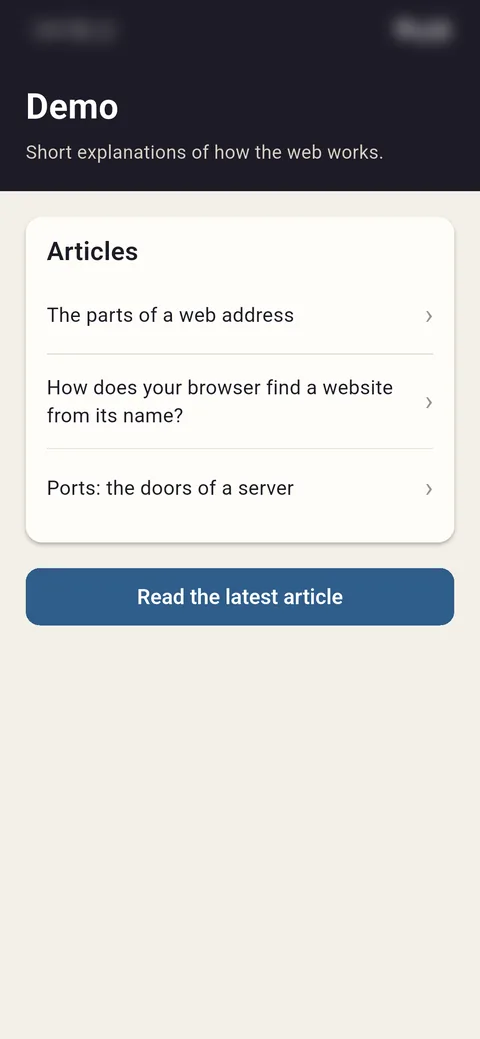
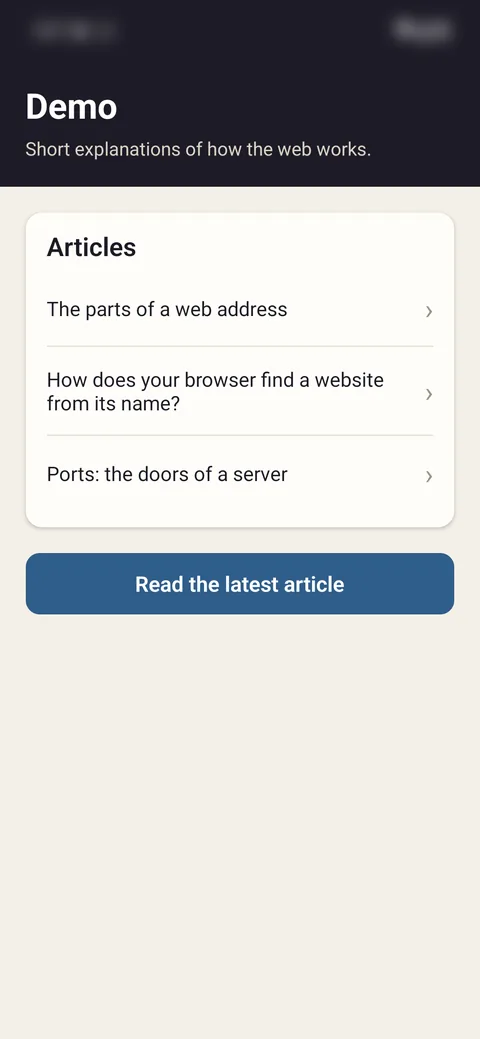
The Flutter demo app. With Show layout bounds on: one box around the whole screen, nothing outlined inside.
Flutterone box
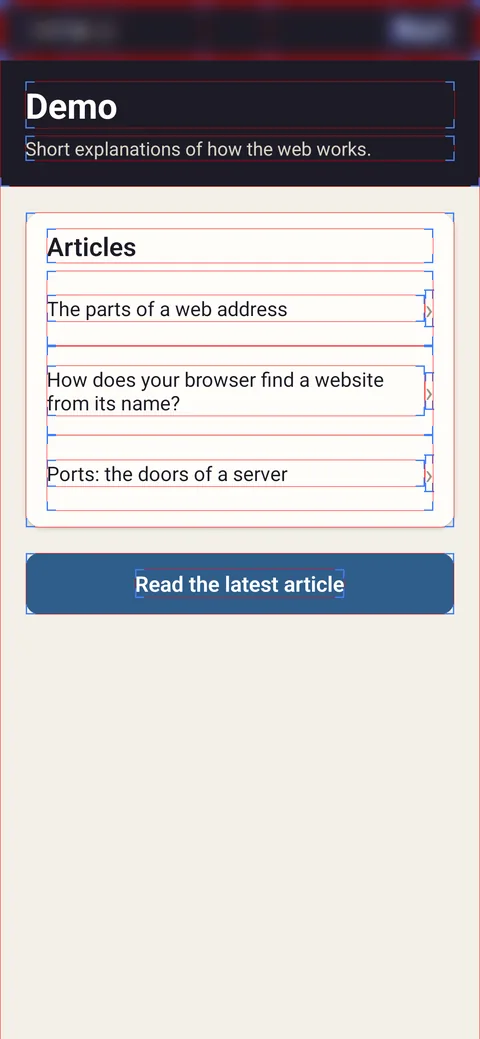
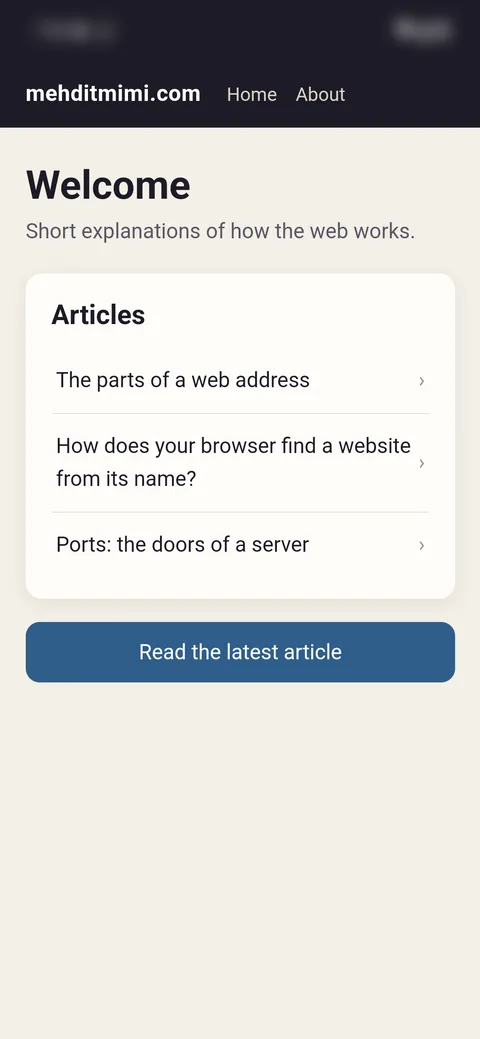
The Expo demo app, in JavaScript. With Show layout bounds on: a box around the header, each row, each text, the chevrons and the button.
React Nativea box per part
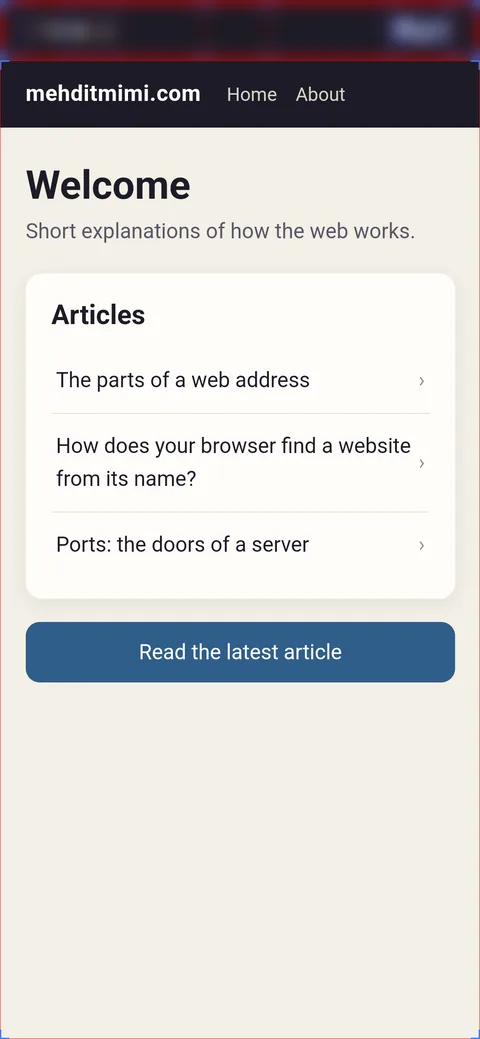
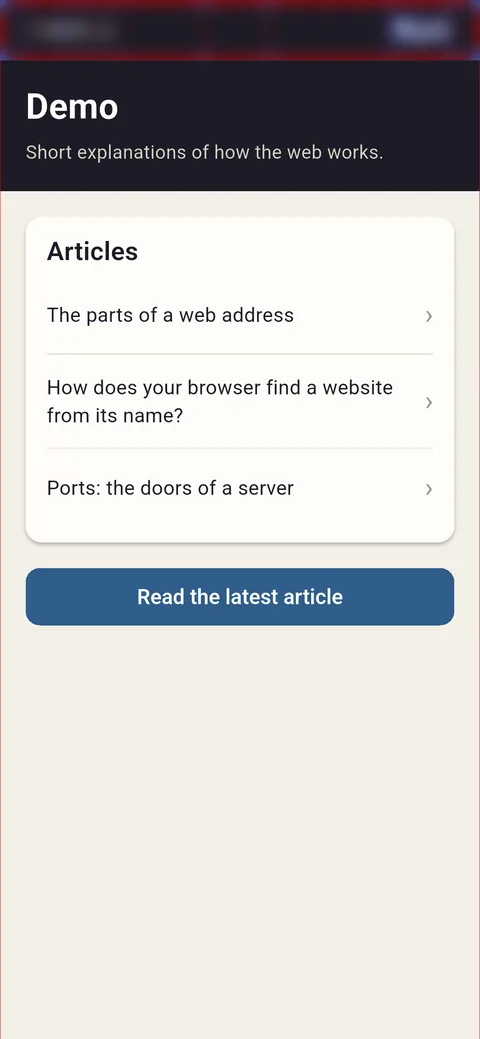
The hybrid demo app, a web page in a WebView. With Show layout bounds on: one box around the page, nothing outlined inside.
Hybridone box
Same screen, three demo apps, bounds on. React Native: a box per part. Flutter and the WebView: one box each, which we marked in red. Boxes cannot tell those two apart; the view tree can. Real captures, Android 16 emulator, October 2026. Status bars blurred.

React Native is not a web view: the OS draws its parts. Nor is Flutter: its own engine paints.

Go deeper Why a hybrid app can change without an update 1 min

On Android, the WebView is not part of your app. It is a system component: Android System WebView on Android 10 and later, Chrome itself on Android 7 to 9. Google updates it through the Play Store, on phones with Google services. On iOS, WKWebView ships with the OS.

So a hybrid app's rendering can change on a phone where nothing of the app was updated. A Flutter or Jetpack Compose app's widgets cannot: their code ships inside the app. A Views, UIKit, SwiftUI or React Native app's widgets change only when the OS does.

Checkpoint

Show layout bounds is on. An app shows one box the size of the screen, and nothing inside it. What can you conclude?

See the answer

One box says that one view holds the whole screen, and something paints inside it: a browser engine or Flutter's. Boxes are evidence; the view tree is the proof, step 4 of Try it.

Two answers decide the rest

The arguments you will hear are not opinions. Each follows from who draws and who talks to the OS. Pick a row.

 NativeCross-platformHybridPWA
LookThe platform's own.React Native: the platform's widgets. Flutter: its own.A web page, unless styled to the platform.A web page, without browser bars.
Performance ceilingThe highest: nothing in between.Close to native for most apps.A browser engine's: long lists show it.The same browser engine's limits.
Device accessEverything, the day the OS ships it.Through modules, or your own native code.Through plugins, or your own native code.Only what the browser exposes; less on an iPhone.
UpdatesA new build, through the stores.The stores; JavaScript can also update over the air.The stores; the web layer can update live.The next visit. No store.

Four consequences, two causes. When someone says one family is better, ask which row they mean.

Go deeper Updates that skip the store 1 min

Over the air. A React Native app can replace its JavaScript and images without a new store build: EAS Update does it for Expo. A hybrid app can do the same with its web layer. Both must stay within the stores' rules.

A PWA fetches its new version on the next visit. The new service worker waits, and takes over once the app's windows are closed.

With knowledge · in class

Name the family before the AI does

Ask an assistant for "a mobile app" and it chooses a family for you, often Expo. It will not ask you. The family is your first decision: name it, then check it.

Paste first, whatever the family

Before writing any file, state the family you chose and who will draw the pixels.

All families

Say it in the prompt

Put your family's phrase in your first prompt, after what the app does.

  • Native Android: a native Android app in Kotlin with Jetpack Compose, as an Android Studio project
  • Cross-platform: an Expo (React Native) app in TypeScript
  • Hybrid: an Ionic app with Capacitor, React, for Android and iOS
  • PWA: an installable progressive web app with React and Vite: a web manifest and a service worker that works offline

Which family is this project?

  1. Is there a package.json at the root? No: native, with Kotlin or Swift files, or Flutter if there is a pubspec.yaml. Kotlin Multiplatform and .NET MAUI have none either; this course does not use them.
  2. Is there a capacitor.config.ts or .json, or a Cordova config.xml? Yes: hybrid.
  3. Does package.json list react-native? Yes: cross-platform. No, with a web manifest and a service worker: PWA. Look for them as files, or as a plugin such as vite-plugin-pwa in vite.config, which generates both at build time.

Native

Say it in the prompt

a native Android app in Kotlin with Jetpack Compose, as an Android Studio project

Put this phrase in your first prompt, after what the app does.

Then check the project

Expo

Say it in the prompt

an Expo (React Native) app in TypeScript

Put this phrase in your first prompt, after what the app does.

Then check the project

Ionic

Say it in the prompt

an Ionic app with Capacitor, React, for Android and iOS

Put this phrase in your first prompt, after what the app does.

Then check the project

PWA

Say it in the prompt

an installable progressive web app with React and Vite: a web manifest and a service worker that works offline

Put this phrase in your first prompt, after what the app does.

Then check the project

If the project contradicts your prompt, the assistant changed your decision: say so, and ask again.

Try it on your phone · 10 minutes

See who draws, on your own phone

Before class Turn on Developer options 1 min

Settings → About phone → tap Build number seven times. On a Samsung, it sits under Software information; on a Xiaomi, tap the HyperOS or MIUI version instead. Developer options then appear in Settings, often under System or Additional settings.

For step 4, also turn on USB debugging and install adb, as in capsule 02, Before class.

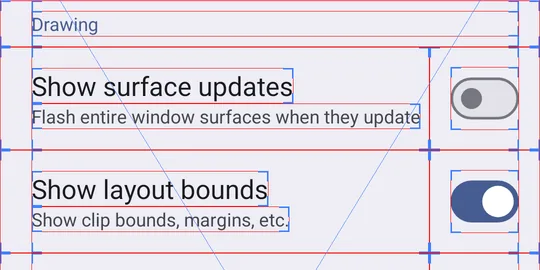
  1. Turn it on. Developer options → Drawing → Show layout bounds.

    Developer options, the Drawing section: Show layout bounds is switched on, and every row, label and switch now has a box.

    This shows Outlines appear in every app, Settings included.

  2. Open Settings, its home screen.

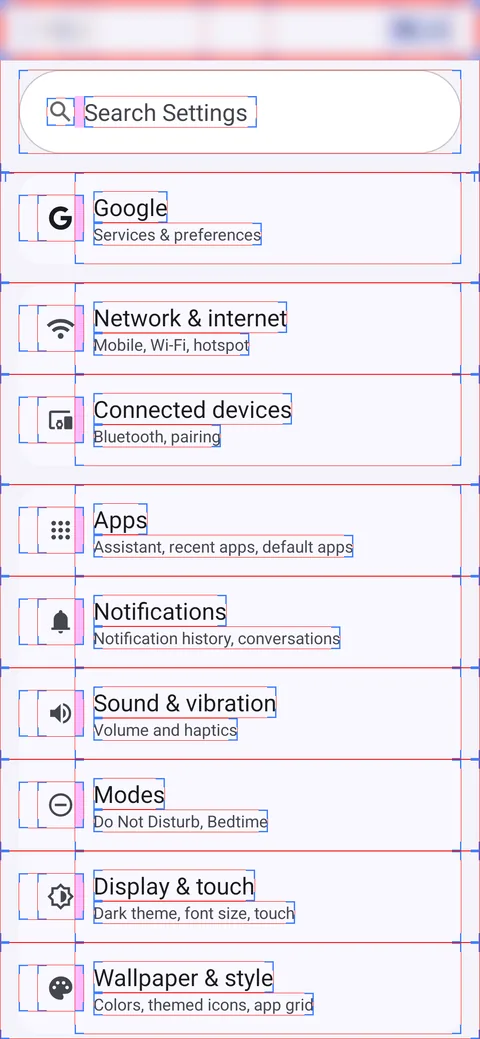
    The Android Settings app with Show layout bounds on: a box around every row, icon and label.

    This shows A box around every row, icon and label. The platform's own toolkit draws this screen, part by part.

  3. Open five apps you use, and sort them.

    • A forest of boxes: Android views, Jetpack Compose or React Native.
    • One box the size of the screen: another painter, Flutter or a WebView.
    • A PWA you installed: Chrome draws it, so any boxes are Chrome's.

    This shows A first sort. Boxes are evidence, not yet a proof.

  4. With a cable, read the view tree. The command prints the top activity of every task: read the part under your app's ACTIVITY line. Search it for WebView, FlutterView, AndroidComposeView or ReactSurfaceView.

    adb shell dumpsys activity top
    You should see, for the hybrid demoACTIVITY com.tmimiexplains.webviewdemo/.MainActivity …
      View Hierarchy:
        com.android.internal.policy.DecorView{… 0,0-1080,2400}[MainActivity]
          android.widget.LinearLayout{… 0,0-1080,2337}
            android.widget.FrameLayout{… 0,136-1080,2337 android:id/content}
              android.webkit.WebView{… 0,0-1080,2201}

    This proves One view, a WebView. The browser engine draws everything inside it.

    A store app may show short renamed classes instead, as the Flutter demo does in the fold below.

Go deeper Other trees, and Android Studio 3 min

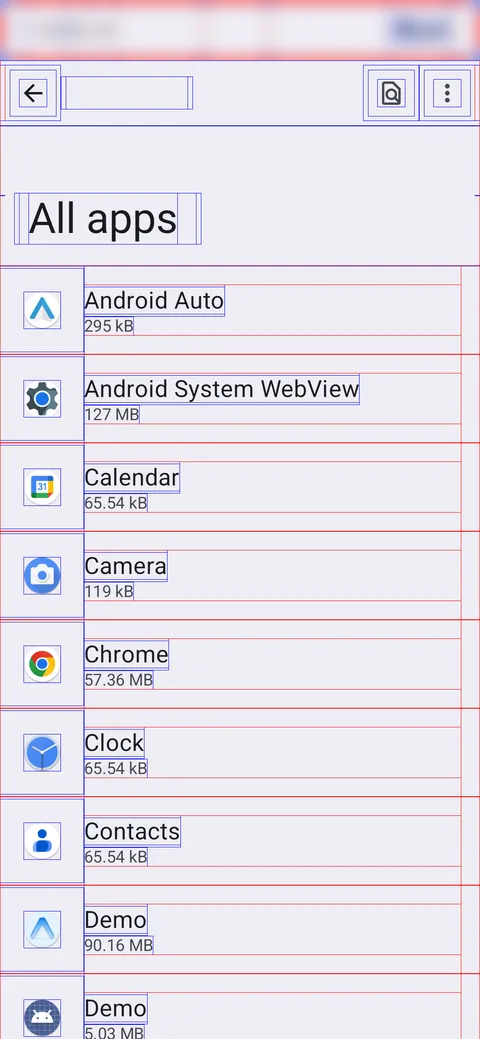
Jetpack Compose draws its own outlines too: Settings → All apps shows boxes everywhere, and its tree ends in one AndroidComposeView. Boxes are evidence; the tree is the proof.

Settings, All apps, with Show layout bounds on: a box around every row, icon and label.
Settings → All apps, bounds on: boxes everywhere.
Its view tree, real output, trimmedACTIVITY com.android.settings/.spa.SpaActivity …
  View Hierarchy:
    com.android.internal.policy.DecorView{… 0,0-1080,2400}[SpaActivity]
      android.widget.LinearLayout{… 0,0-1080,2400}
        android.widget.FrameLayout{… 0,0-1080,2400 android:id/content}
          androidx.compose.ui.platform.ComposeView{… 0,0-1080,2400}
            androidx.compose.ui.platform.AndroidComposeView{… 0,0-1080,2400 …}

The Expo demo shows a ReactSurfaceView, then 7 ReactViewGroup and 10 ReactTextView: real Android views. Apps still on React Native's old architecture show ReactRootView.

The Expo demo, real output, trimmedcom.facebook.react.runtime.ReactSurfaceView{… 0,0-1080,2400 #1}
  com.facebook.react.views.view.ReactViewGroup{… 0,0-1080,2400 #36}
  com.facebook.react.views.view.ReactViewGroup{… 0,0-1080,420 #a}
  com.facebook.react.views.text.ReactTextView{… 57,183-1023,289 #4}
  com.facebook.react.views.text.ReactTextView{… 57,305-1023,362 #8}
  …

The Flutter demo, a release build, shows one view the size of the screen with one child. R8 renamed both classes to y7 and p7. The build's mapping.txt translates them: FlutterView and FlutterSurfaceView.

The Flutter demo, real output, trimmedandroid.widget.FrameLayout{… 0,0-1080,2400 android:id/content}
  y7{… 0,0-1080,2400 #1}
    p7{… 0,0-1080,2400}

If the command hangs, a frozen app in the background can be the cause. Name your app's activity instead: adb shell dumpsys activity com.example.app/.MainActivity.

Android Studio's Layout Inspector shows the same tree as a picture, but only for a debuggable app: the debug builds you run from Android Studio, such as your native and Capacitor labs. Not Expo Go, which is a store app, and not a PWA, which runs inside Chrome.

Quick check

By the rule of this course, an assistant types most of your lab app's code. What stays yours?

See the answer

Every decision is yours, starting with the family you name in your first prompt, and every behaviour is tested by you. You test behaviours, not lines, and the language never decides the family: the drawing layer does.

An app is written in JavaScript, and its buttons are the platform's own buttons, drawn by the OS. Which family?

See the answer

The drawing layer decides the family, not the language: JavaScript that ends in real native widgets is React Native, cross-platform. A hybrid app would show one WebView, and JavaScript does not mean a web page.

Hybrid and cross-platform apps both promise one codebase for two platforms. What tells them apart?

See the answer

In a hybrid app a browser engine draws, so the app is a web page; a cross-platform app has no browser. React Native is JavaScript too, and hybrid apps ship through the stores as well.
Show layout bounds is on. Two cross-platform apps show the same screen. App A shows one box; app B, a box around every button. Which is which?

See the answer

Flutter paints its whole interface on one surface, so Android outlines one box; React Native asks the OS for real widgets, so each button gets its own. Same family, two hands on the pixels.

Show layout bounds is on. An app shows a box around every row, icon and label. What can you conclude?

See the answer

Classic views, Jetpack Compose and React Native all outline each part, so the boxes narrow it down and the view tree, from dumpsys, decides. Compose draws its own outlines, which is why boxes alone cannot prove classic views.

Your Ionic app must take a photo with the phone's camera. What carries the request from the page to the OS?

See the answer

In a hybrid app, plugins talk to the OS: Capacitor's Camera plugin is native code that the page calls from JavaScript. The WebView alone cannot open every door, and it runs with your app's permissions, not Chrome's.

Your app needs a phone feature that the browser does not expose. Which family cannot reach it, even with native code of your own?

See the answer

A PWA has no native code of its own: the browser decides what it gets, and gives less on an iPhone. A hybrid app adds plugins and React Native adds native modules: both can carry your own native code.

Overnight, the Play Store updated a phone's system components. Your app was not updated, yet one of its screens now looks different. Which app is it?

See the answer

On Android, the WebView is a system component, updated through the Play Store, so a hybrid app's rendering can change on its own. Flutter and Compose ship inside your app: their widgets change only with a new build.

You fix a bug in your PWA's JavaScript and deploy it to your server. How does the fix reach a user who installed the app?

See the answer

A PWA is a website: no store, and no build to review. The browser fetches the new service worker at the next visit, and it takes over once the app's old windows are closed.

You asked an assistant for an Ionic app with Capacitor. Its package.json lists expo and react-native, and there is no capacitor.config. What do you do?

See the answer

react-native in package.json means a cross-platform app, and a Capacitor project gets its capacitor.config at init, before any npx cap add. The assistant changed your decision: say so, and ask again.

Recap

  1. Two jobs. Every app draws pixels and asks the OS. Who does each defines the family.
  2. Native. The platform's toolkit draws. Your code calls the OS directly.
  3. Cross-platform. One codebase. React Native lets the OS draw; Flutter draws itself.
  4. Hybrid and PWA. A browser engine draws. Hybrid is not cross-platform.
  5. See it. Layout bounds give a first sort; dumpsys gives the proof.
  6. With an AI. Name the family first. Then check the project.

Sources

← All capsules